










Timesheet management in Business Central: from administrative data entry to a project management discipline
Index 
The timesheet suffers from a persistent reputation. Often perceived as a weekend chore, a box to tick before payroll or invoicing, it's rarely considered for what it truly is: the entry point for the data that feeds into margin calculations, hourly billing, and the transparency of resource consumption. In a project context, the quality of this data entry determines the entire downstream analytical chain. An incorrectly recorded hour means a distorted margin, incomplete billing, and a misleading workload indicator.
Business Central treats the timesheet not as an isolated tool, but as an integral part of the Projects module (formerly Jobs). This integration changes the nature of the process: data entry no longer fills a spreadsheet, but directly feeds into project usage, logs, and ultimately, the invoice. However, mastering its mechanics is essential, both for the project manager who oversees the process and for the consultant or administrator who configures it.
What the timesheet actually records
In Business Central, the timesheet operates on a weekly seven-day cycle. Each row represents an allocation: a project, a work order, or a resource task. Each column corresponds to a day of the week. Simply reading an open timesheet is enough to grasp this tabular logic, structured around a central concept: that of a resource.
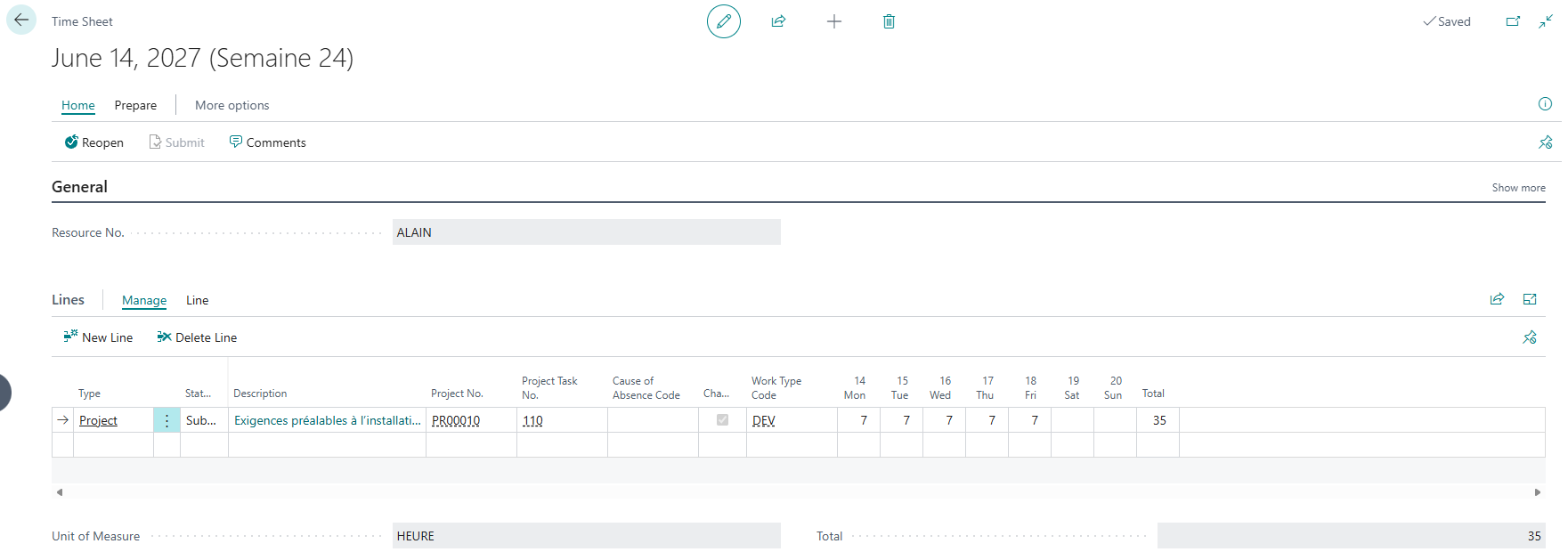
Each row shows an allocation, each column a day, and the last column totals the hours of the week.
It's not users who record time, but resources. This distinction isn't merely cosmetic. A resource can be an employee, but also a machine, or even an external, non-salaried contractor. This is precisely what gives timesheets their power: they allow you to track the work of people who aren't included in the payroll. To track an employee's hours or absences, you must first link the employee to a resource. This employee/resource link is the foundation upon which everything else rests: without it, the timesheet has no one to which it can be connected.
The three-part roles: owner, approver, administrator
Before any seizure, three roles must be distributed, and their separation constitutes in itself a governance mechanism.
The Time Sheet Owner is the person who enters the hours and submits the sheet for approval. When the resource is a person, they are most often their own owner.
The approver validates, rejects, or reopens the sheet. Its positioning varies depending on the approval method chosen, at the resource level or at the project level, which is one of the most crucial configuration choices.
The administrator (Time Sheet Admin.), finally, has a cross-functional right: they can modify and delete all timesheets. Microsoft recommends designating only one administrator per company. This centralization is not a mere convenience: it limits corrective actions to a single point of contact, thus protecting the integrity of already validated data.
The quality of a deployment is often judged by the clarity of this distribution. A poorly positioned approver, and the entire validation process loses its meaning.
Timesheets and the Projects module: the pivot point
This is where the real value of the tool lies. A timesheet disconnected from the project is just a record of hours; when linked to project planning lines, it becomes a tool for managing margin.
The initial setup takes place in three stages, from the most general to the most specific. The first entry point is the resource settings page, where the approval method that will govern everything else is decided.
Resource settings
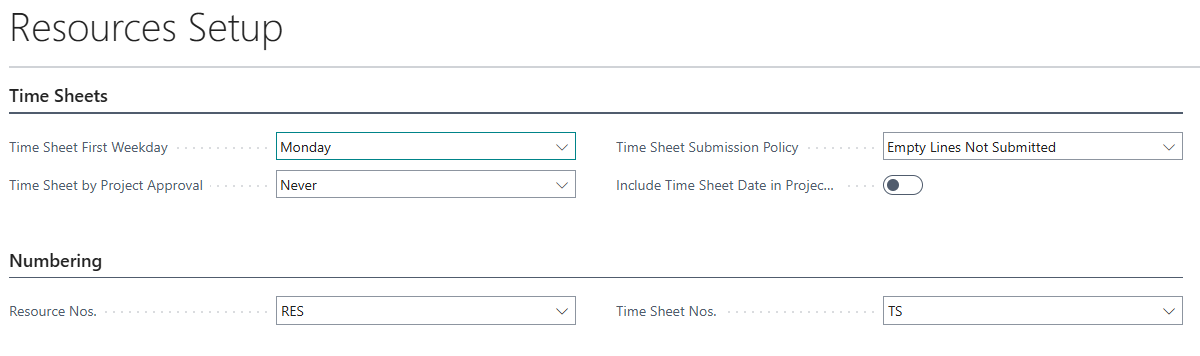
Open the Resource Settings page via Alt+Q. The Timesheets group contains the essentials.
The First day of the week of the timesheet field sets the starting point for weekly blocks, most often Monday.
The Timesheet Submission Policy governs the handling of blank lines upon submission.
The decisive parameter remains Timesheet per project approval, which determines who approves:
- The value “Never” assigns approval to the approver defined on the resource sheet.
- The value “Always” assigns it to the designated responsible person on the project sheet.
- The “Machine only” option applies a mixed rule depending on whether the machine sheet is linked to a project or a resource.
Finally, the Numbering grouping must point to valid stubs for resources and for timesheets, otherwise no sheet can be created.
User settings
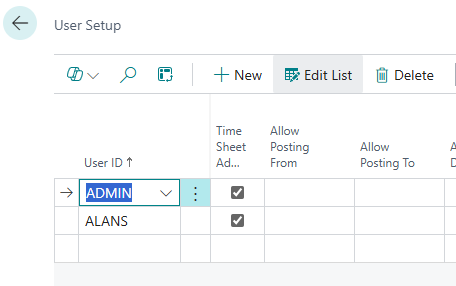
Locate the User Setup page, select the relevant user and check Time Sheet Admin to assign them the administrator role.
Resource sheet
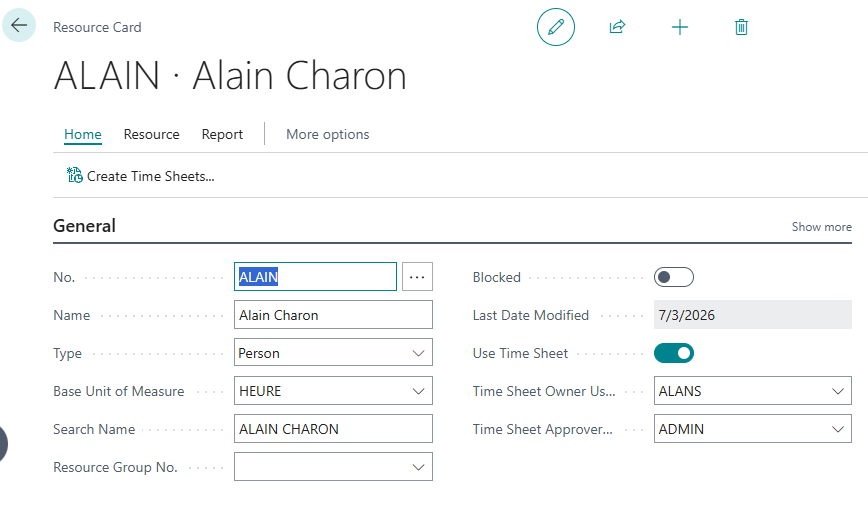
This is where the owner and approver are materialized, via “Use Time Sheet”, “Time Sheet Owner User ID” and “Time Sheet Approver User ID”.
Search for the Resources page, select the resource, check “Use timesheet”, then enter “Ownership user code” and “Approver user code”.
💡The approver ID can no longer be modified once sheets with the status Submitted or Open are in progress.
An assisted setup guide (Set Up Time Sheets) allows you to link these steps in a guided way, and even offers to automatically create the first sheets after the setup, a valuable option for a first deployment.

A terminological point deserves the consultant's attention here. The renaming of Jobs to Projects, which occurred with the 2024 update, only changed the interface labels and documentation: the underlying tables and fields retain the term "Job." The "Time Sheet by Job Approval" field is a direct example; it still displays "Job" even though the interface refers to projects. For anyone working with customizations, integrations, or application learning (AL), this dissociation between the display and the actual object is not insignificant: it ensures that existing systems continue to function, but requires focusing on object names, not captions.
Once the settings are in place, populating the timesheet from the project becomes straightforward: the "Create lines from project planning" action copies the project planning lines covering the period onto the relevant resource's timesheet. After validation, these hours are added to the project usage and can then be recorded in the project log or resource log. The loop is thus closed: from planning to actual usage, all the way to the margin.
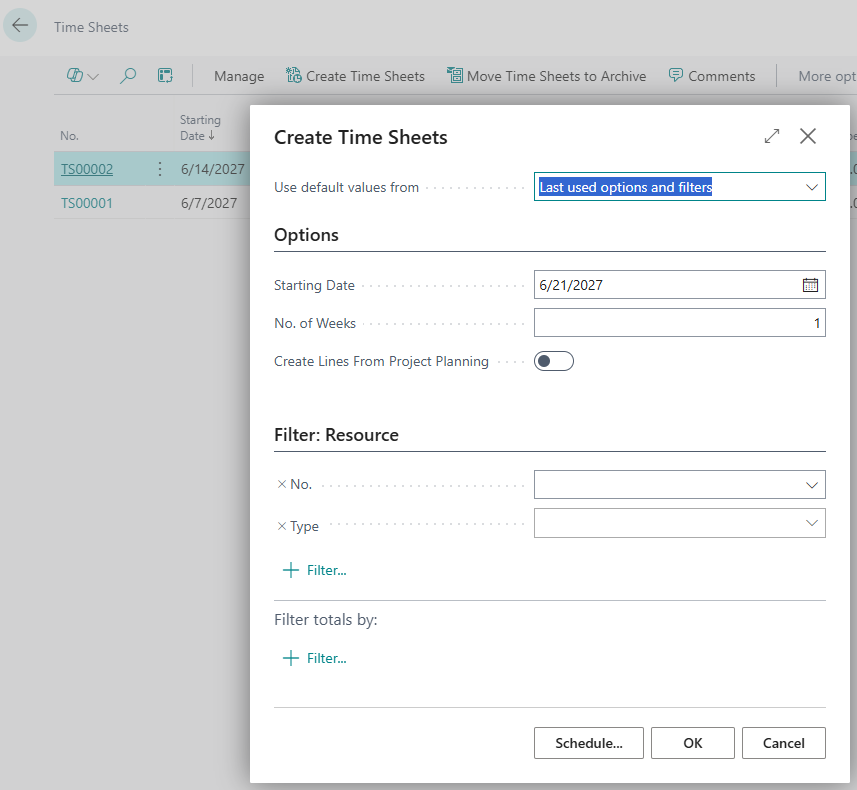
The validation process
Validation isn't a weekend formality; it's the quality control of data before it feeds into invoicing and margins. Business Central organizes it around a series of statuses and dedicated pages.
On the data entry side, the owner can submit a single line or the entire sheet. Submitting the line changes its status to "Submitted" and makes it visible to the approver.
On the validation side, two entry points coexist depending on the logic adopted. The first concerns approval by resource.
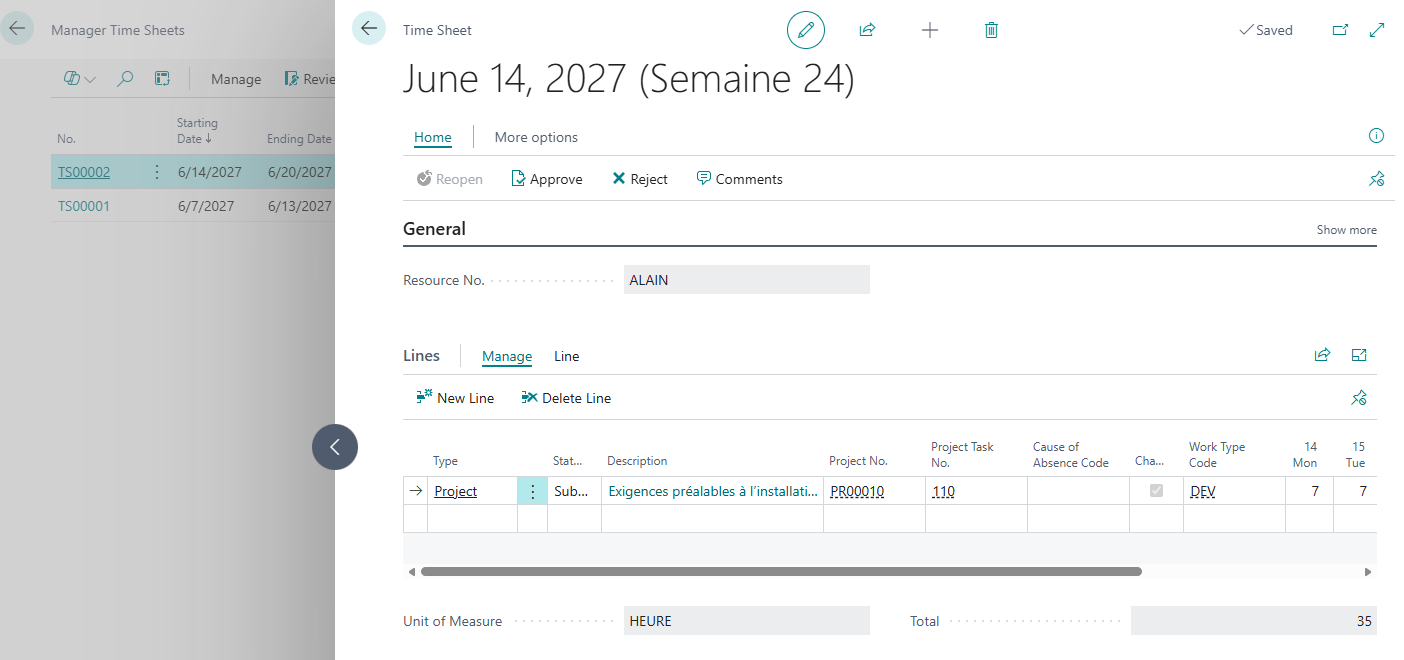
For approval by resource, the approver opens the “Manager Time Sheets” page, locates the sheets with a submitted status, checks the values, and then chooses “Approve” (or “Reject”, or “Reopen” to return the sheet to its owner).
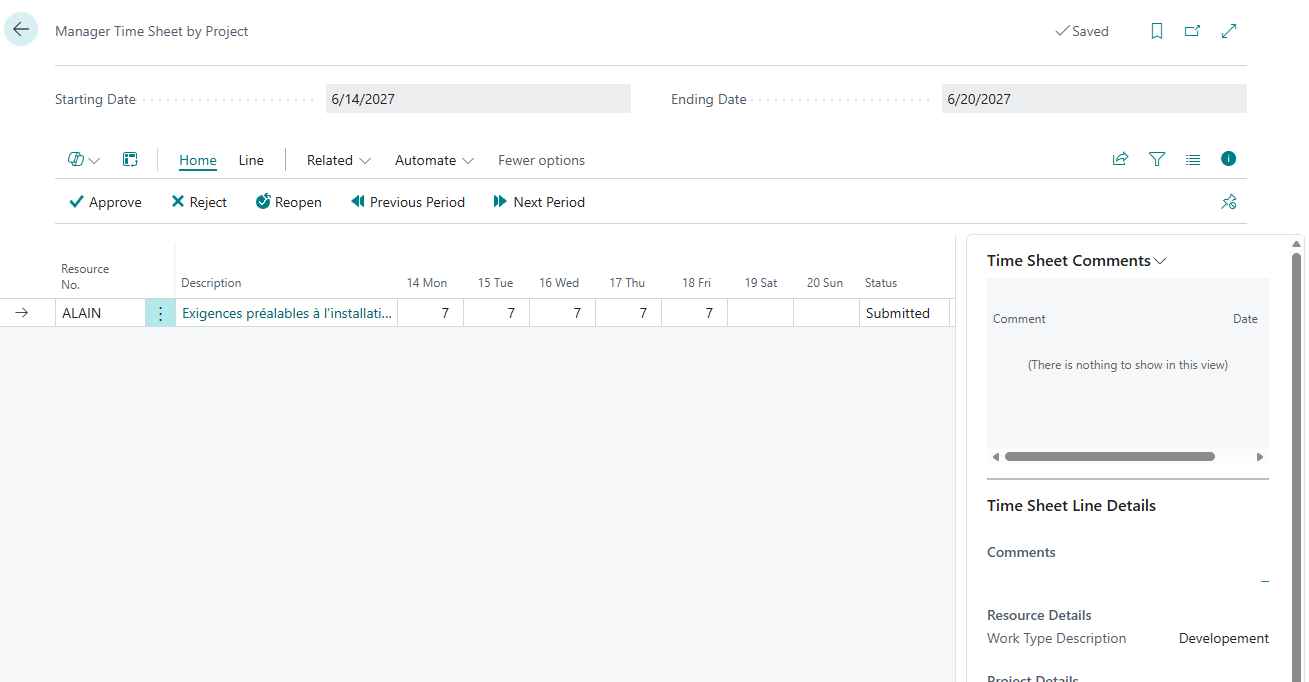
For project-based approval, the “Manager Time Sheet by Project” page displays the entries associated with the projects for which the user is responsible. This functionality assumes that the project-based approval option has been selected in the resource settings and that the responsible party has been designated on the project record.
This second process deserves closer examination. By linking approval to the project manager rather than a generic approver, it brings control closer to the person who truly understands the expected workload. The project manager doesn't sign off on a timesheet; they compare the declared hours with the planned ones. It's at this level that deviations are detected: a task that consumes twice its budget, an allocation to the wrong project, a forgotten hour that will never be billed.
What happens downstream
Upstream rigor only makes sense in light of what it makes possible. Once hours are validated and recorded, they feed into project usage, contribute to the calculation of work in progress (WIP), and are ultimately used for billing, whether on a time and materials basis or a fixed-price contract. Dashboards, including dedicated project Power BI applications, merely reflect this data; they don't correct it. Reliable margin management isn't built on reporting; it's built on data entry.
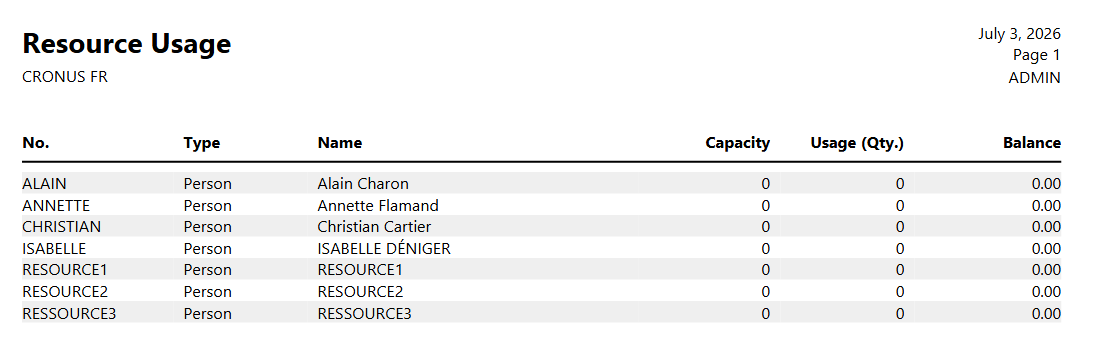
But you still need to know where to look for these hours once they've been recorded. Business Central offers several standard reports for this purpose, without requiring any further development. The "Resource Utilization" report compares the capacity and usage of each resource over a period, expressed in their basic unit, the hour, and shows the balance, indicating under- or over-utilization.
The Resource Statistics report switches to the value side, with usage amounts, sales and the percentage billed per resource.
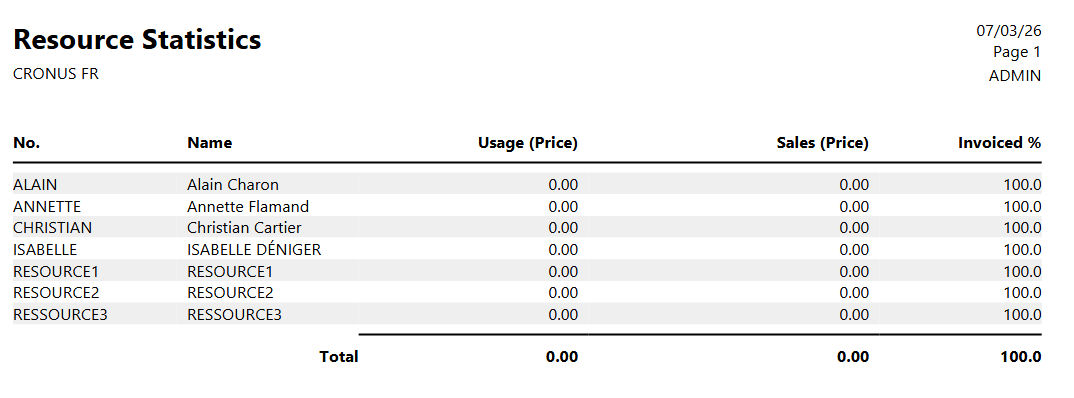
For easier reading, Data Analysis mode opens resource or project entries directly in a list page, where hours can be grouped and rotated on the fly, while the Open in Excel action exports the same dataset to a pivot table. All these analyses share a dependency, however: they only see hours that have been validated and then posted to the logs, which, once again, comes down to the quality of data entry.
This tool brings about a complete shift in perspective. The timesheet is not the weak link that becomes a problem at the end of the week; it is the foundation upon which the entire analytical framework depends. Its quality cannot be decreed; it must be properly configured beforehand and maintained through a validation process that is meaningful to those who use it.
Towards an ever more central data point
As automation permeates the Business Central ecosystem, with batch generation of timesheets, a streamlined mobile experience, and now the arrival of AI agents and MCP servers, value is shifting. It no longer resides in the act of data entry, which is becoming less frequent, but in the reliability of the source data. The more data entry becomes technically less of a task, the more crucial the disciplined governance that governs it becomes. Tomorrow's project manager will not spend less time on timesheets because they are less interested in them, but because they will have invested upstream in settings and governance that ensure data accuracy from the outset.
Analyzing these hours at the project level itself, through its tasks and planning lines, opens up a whole new area of inquiry. This will be the subject of a future article, dedicated to a detailed reading of project data and what it reveals about the gap between planned and actual results.






No comments yet.