










Mastering Sales Pricing in Business Central: A Guide to Setup and Daily Management
Index 
The redesign of the pricing engine in Business Central marks a major turning point for Microsoft's ERP solution. The old system, rigid and fragmented across several separate screens, gives way to a unified, efficient, and much more flexible mechanism, modeled on the standards of solutions within the Dynamics 365 ecosystem. This evolution brings essential rigor to the traceability of pricing policies, while simplifying the daily tasks of sales data managers.
1. Activation and irreversibility of the new engine
This feature is integrated at the page level. Functionality management (Feature Management). The line titled New experience in calculating sales prices and to activate it for all users.
Technical point of no return: It is crucial to note that activating this new pricing engine is strictly irreversible. Once the switchover is complete, there is no way to revert to the old pricing method. Therefore, a preliminary validation and thorough testing phase within a sandbox environment is essential before any production deployment.

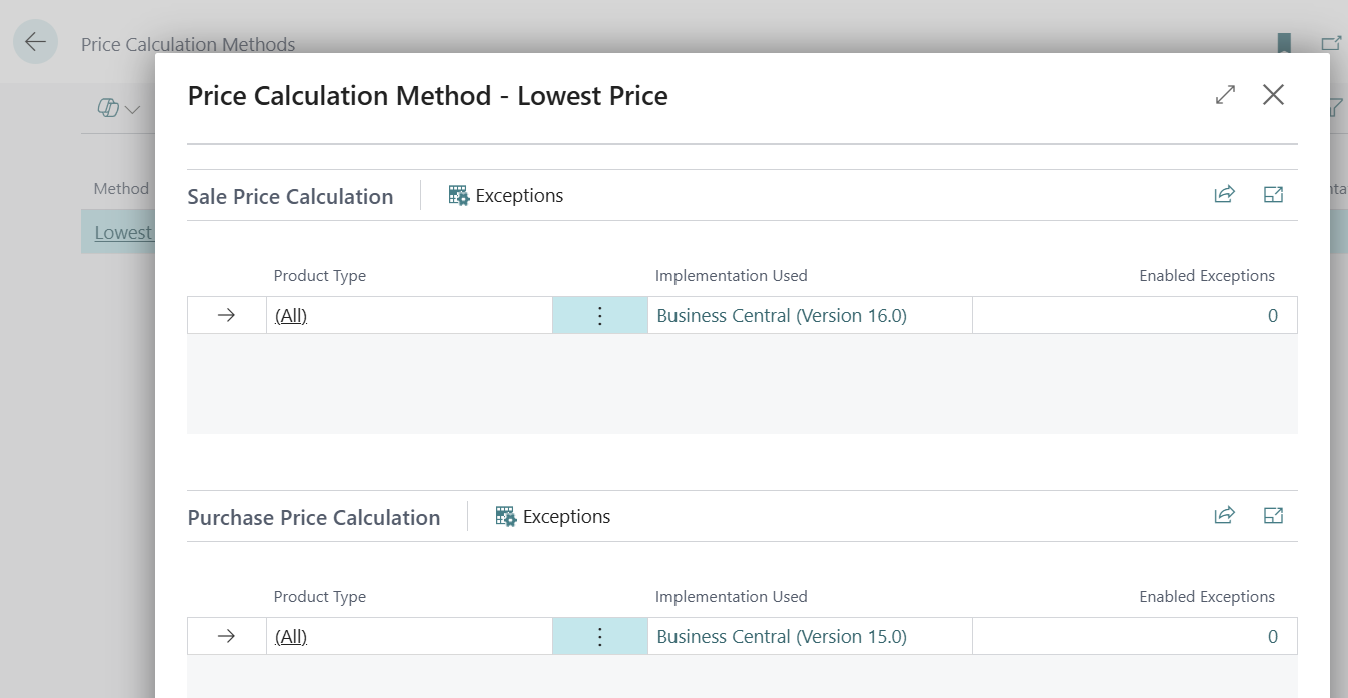
Once activation is confirmed, the initial settings are finalized on the page Price calculation methods This is where the association with the functional version of Business Central is established. The user defines the default calculation method applicable to the organization, the standard choice generally being oriented towards the rule of Lowest Business Central rate The system also offers the flexibility to create specific exception lines to isolate certain products or customer segments from the general rule.
2. Activating invoice discounts and configuring sales
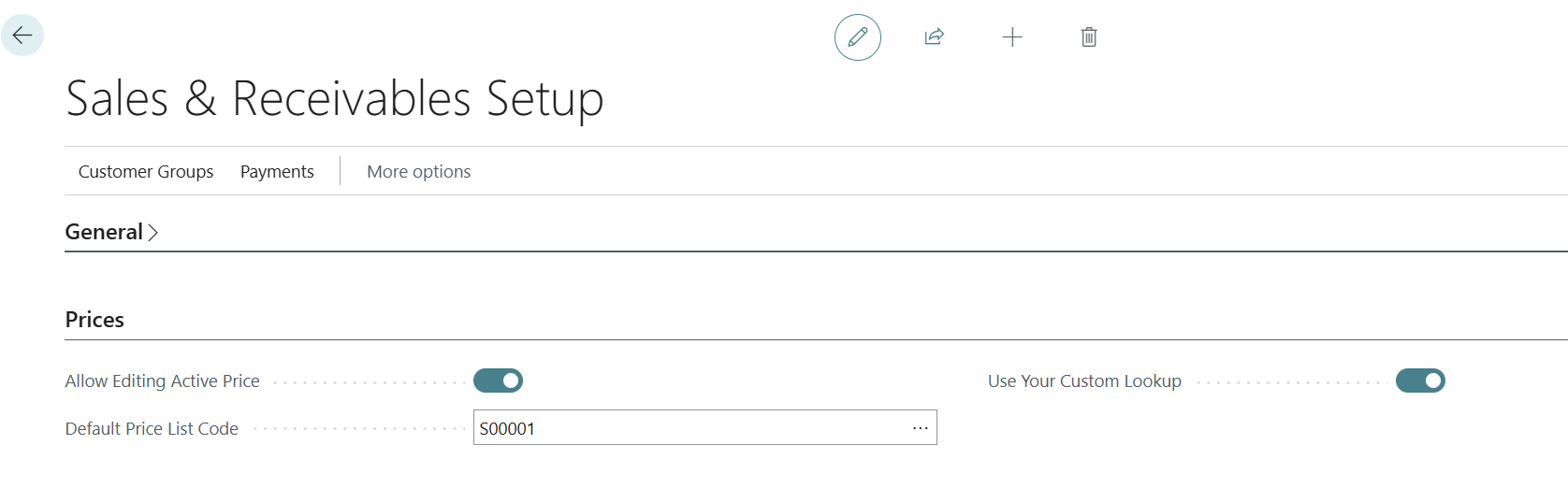
For the automated workflow to be fully operational, a thorough check of the sales administration settings is mandatory. On the page Sales Setup the option Invoice discount calculation must be explicitly enabled. If this box remains unchecked, Business Central will not trigger the automatic processing of invoice end discounts when entering business documents, forcing operators to perform a tedious manual calculation.
It's also on this page Sales parameters which configure the main options of the new pricing experience:
- Default pricing code: This option is crucial; it determines the standard price list (often the universal "All customers" list) to which the system will publish new lines by default if no other target document is explicitly specified during processing.
3. Structure and definition of sales price lists
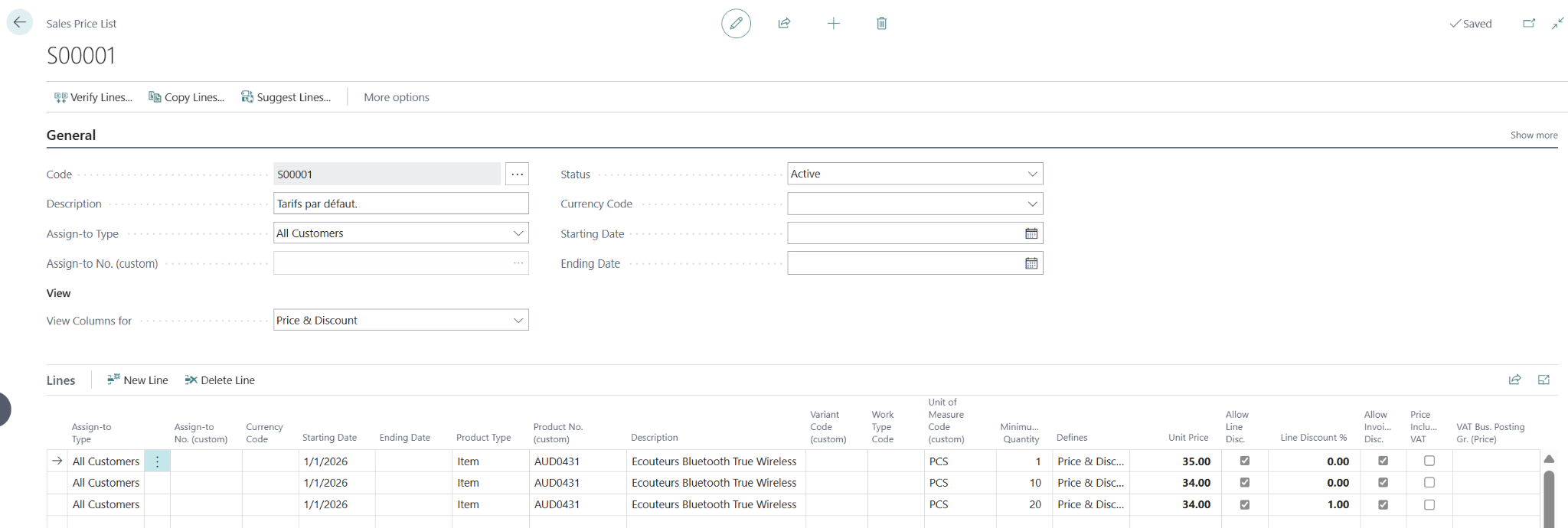
The core of the new system is based on the concept of Sales price list Unlike the old module where prices and line discounts coexisted in a completely separate manner, the new list offers the possibility of grouping, within the same document, net prices and associated discount percentages.

Definition of targets and application criteria
Each price list is linked to a specific target type in the header, defining its scope of action:
- All customers: Universal application of pricing across the entire company portfolio.
- Client: Specific and nominative pricing, reserved for a single customer account.
- Customer price group: Associating a pricing policy with a group of customers sharing the same business characteristics.
- Campaign: Direct link with the marketing module, allowing prices to be activated only for the duration of a defined commercial operation.
At the line level of the list, the settings are refined by combining the item type, any variants, the commercial unit of measure, and minimum quantity ranges. The start and end dates of validity, also positioned in the line or header, precisely define the time limit of the offer's validity.
The lifecycle of the list: the importance of statuses
The security and reliability of the displayed prices rely on rigorous management of the list status, which can take three distinct states:
- Draft: The list is currently being entered or modified. The prices it contains are completely ignored by the calculation engine and cannot be applied to any sales document.
- Valid: The list is active. As soon as the date of the commercial document meets the criteria, the prices are applicable to the billing flow.
- Blocked: This state allows the application of a price list to be suspended immediately and temporarily, without needing to modify its validity dates or revert it to draft status.
Any subsequent modification of a line within a list with the status Valid requires re-entering the entire document in mode Draft, thus guaranteeing the integrity of the data used in real time by the billing services.
4. Access points from product and customer records
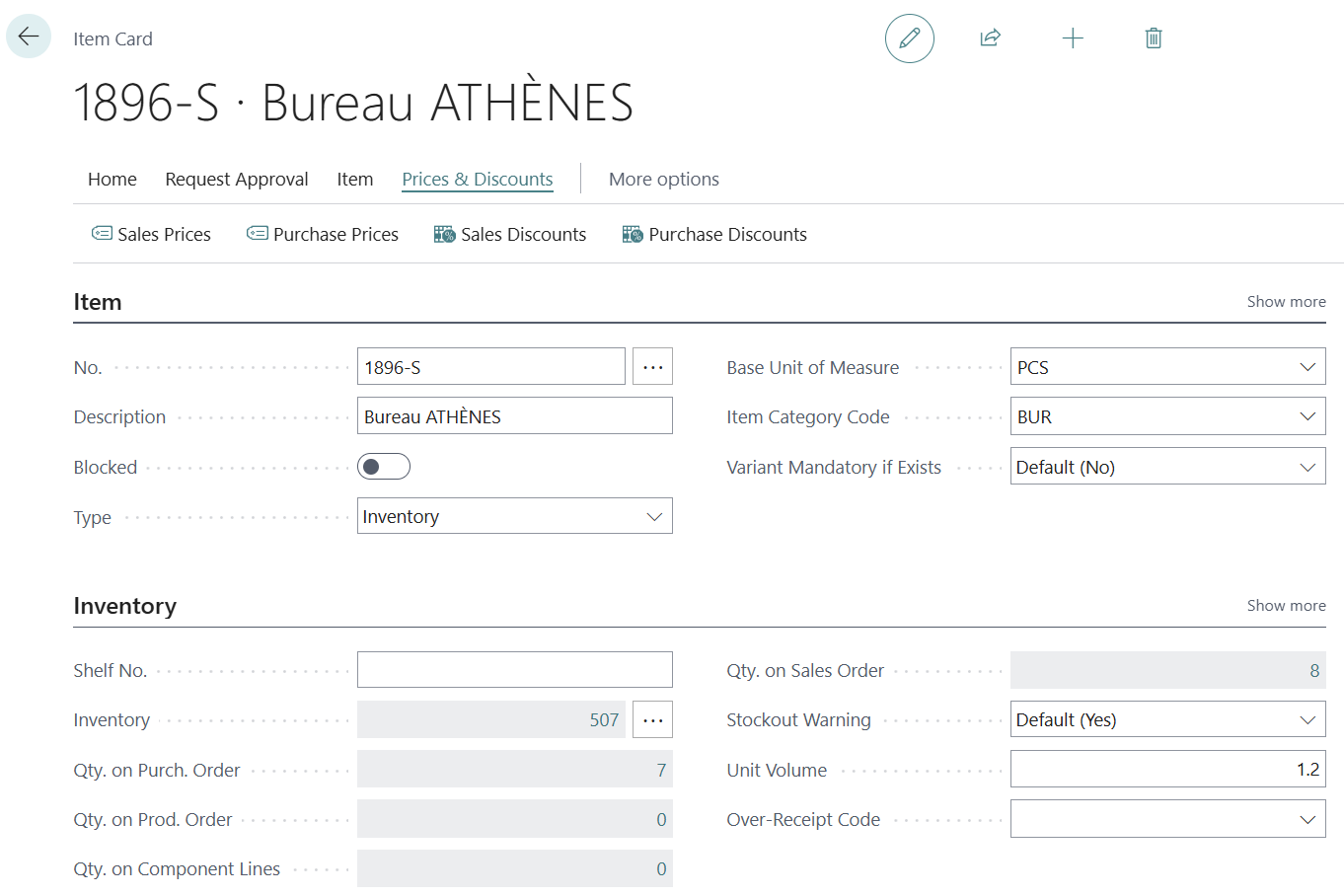
Access to pricing information is greatly facilitated by seamless user-friendly integration. Managing conditions is no longer necessary, requiring users to navigate exclusively through general menus.
From a Client card the button Prices and discounts opens a filtered view displaying all applicable rates for that third party, whether they come from a specific agreement, its pricing group, or a current campaign. Conversely, from a third party's record Article The same access allows you to instantly view all the commercial conditions and quantitative grids configured for this product across all existing lists.
5. Mass revision process: creating, copying, and increasing rates
With the new pricing experience, the proliferation of price lists necessitates a rigorous methodology for successfully conducting annual price review campaigns or mass price increases. Rather than relying on an external intermediary spreadsheet, the system now prioritizes a direct document-to-document copy and filter workflow.
The standardized process for applying a global or targeted increase takes place in three major steps:
Step 1: Creating the welcome list
The first action is to create a new Sales price list blank. In the header, the manager defines the target scope of this new commercial policy (for example, for All customers or a Customer pricing group specific), enters the new validity dates (e.g., from 01/01/2027 to 31/12/2027) and ensures that the document remains in the status Draft As long as this status is maintained, no injected line will be able to disrupt the current billing.
Step 2: Using the copy function and filtering the rows
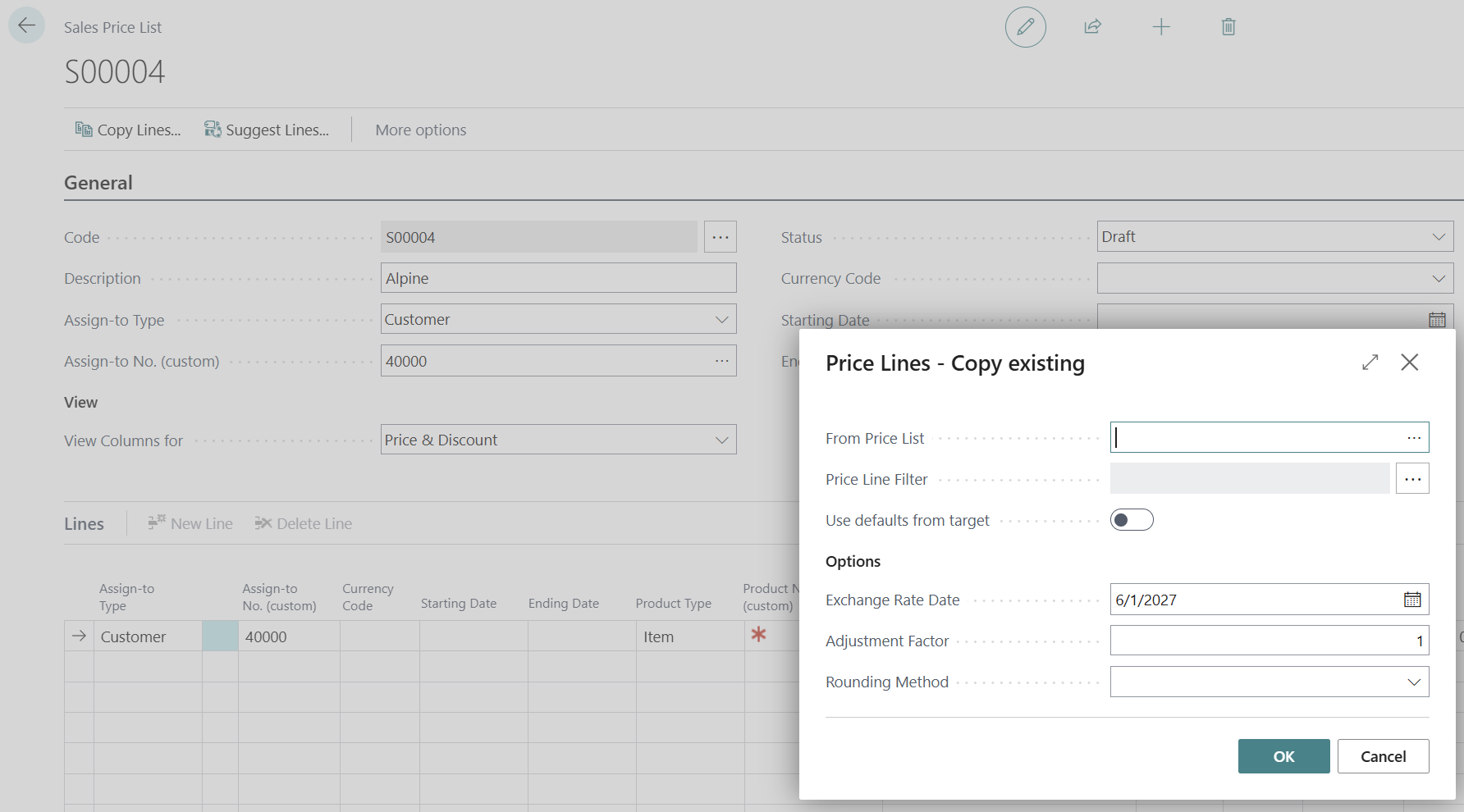
From this new blank list, the operator accesses the function Copy lines. This command opens a processing page that acts as a true selection filter. The user designates the starting price list(the source list containing the old prices to be carried over or modified).
To avoid duplicating the entire catalogue if the price increase only affects a portion of the products, the interface allows for the specification of extremely precise filters online:
- Filter on a range of item codes or a specific product category.
- Filter by variant code or specific unit of measurement.
- Select only the lines associated with a defined minimum quantity level.
Step 3: Applying the markup coefficient and rounding
Beyond simple data transfer, the copy function integrates the calculation engines necessary for large-scale financial adjustments. In the processing parameters area, the user can configure two essential criteria:
- The correction factor (increase): By entering a multiplier (for example 1,05 To apply a uniform increase of 5%), Business Central will automatically calculate the new selling price for each copied line relative to its value in the original list.
- The rounding method: It is possible to associate a specific rounding code to avoid obtaining complex rates after applying the percentage (for example, forcing rounding to the nearest 5 cents or unit).
Once the processing is validated, the new price list is instantly populated with the filtered and marked-up items. The manager can then perform a complete visual review, manually adjust any exceptions if necessary, and then switch the list status toValidto plan its dynamic entry into force.
Price sheet and default list, an exclusive behavior to be aware of
It is important to note an ergonomic feature concerning the page Sales price list (Price Worksheet) in this new version of Business Central. Although this historical screen is still accessible, its use in global search is now restricted.
Indeed, when you extract prices from this sheet and validate the changes via the action Implement new price The system is no longer designed to generate a new, separate document. It targets only and exclusively the price list configured by default in your general settings (usually the system's universal list). New entries are then injected directly into this list. To maintain clear segmentation and work with dedicated lists, the creation and direct copy method detailed in the previous section must be used.

6. Dynamic behavior in sales orders
When creating a sales order, the consistency of the calculation depends on the document header, where the Order date serves as a unique temporal pivot to query the pricing engine and identify the valid target period.
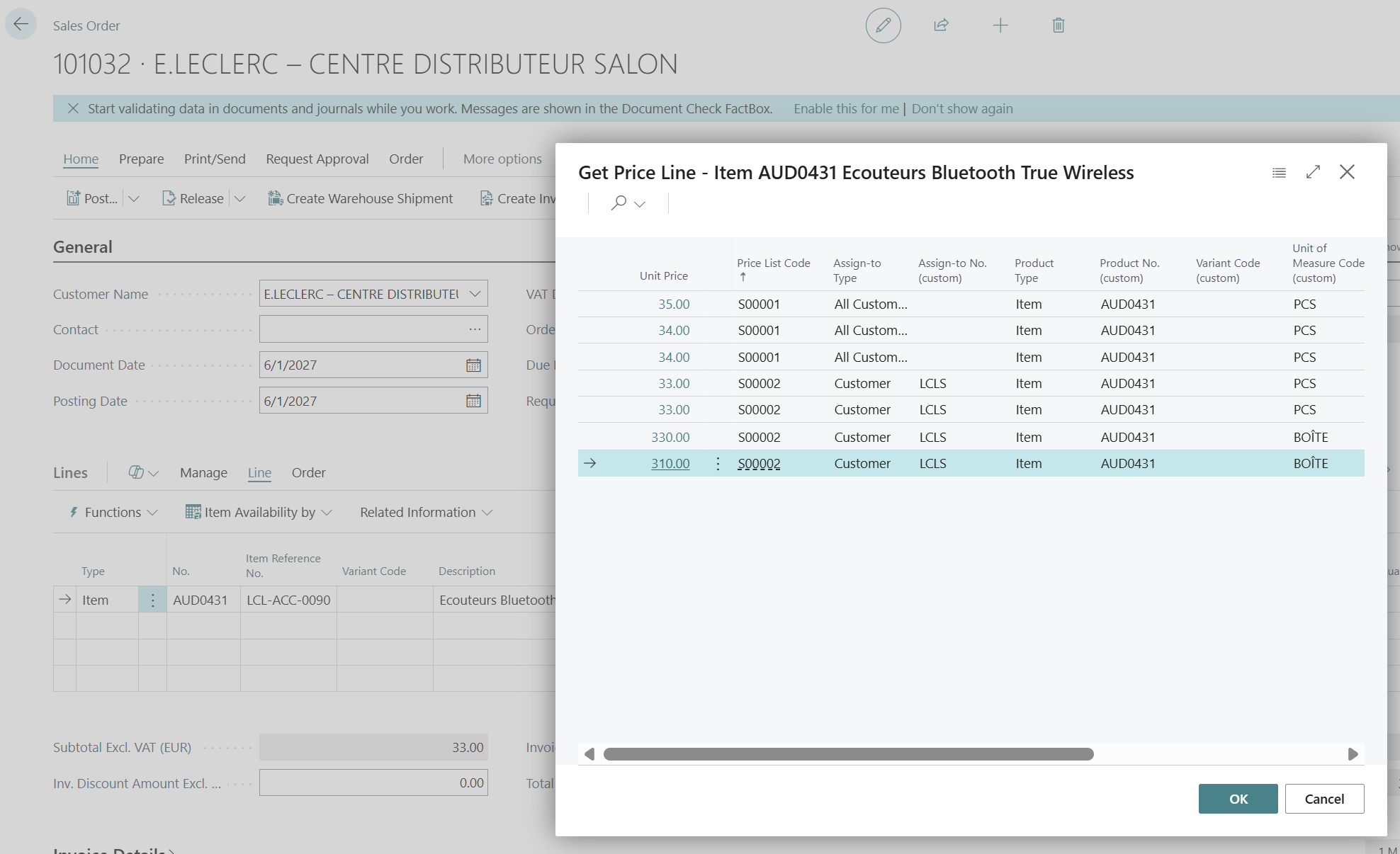
At the sales line level, when entering the item, the system applies the standard hierarchy. If several lists are eligible, the system defaults to the lowest net price, unless a rule of Priority A higher numerical value has been configured on one of the lists to override the standard choice. The user retains the ability to manually extract and view the history of alternatives via the price extraction function accessible in the line menu.
On the right side of the screen, the FactBox The dedicated sales line audit offers real-time tracking. It immediately displays the applicable price and includes clickable links that clearly identify the original price list used for the calculation. Finally, the invoice discount mechanism runs in the background, and all financial impacts, including margins and discount accumulations, remain accessible to the operator at any time via the Statistics of the order.
Conclusion
Adopting the new pricing experience in Business Central requires a period of adjustment, particularly in letting go of old habits associated with the legacy price list. Nevertheless, the functional gains are undeniable. By unifying pricing and discount management within traceable documents with strict lifecycles, Microsoft secures invoicing processes and provides businesses with valuable agility to manage their sales policies at scale. This technical transition is essential and must be carried out methodically to unlock the full potential of the sales engine.






No comments yet.