










Calculating delivery dates in Business Central, mastering sales scheduling
Index 
Accurate management of delivery promises is a key factor in customer satisfaction and logistical efficiency. In Microsoft Dynamics 365 Business Central, two distinct methodologies enable the automated determination of these dates. Analyzing these mechanisms provides insight into how the system integrates inventory flows and transportation constraints.
Key fields on the sales order line
Business Central's planning engine relies on several specific dates located at the sales line level. Understanding how these fields interact is essential for analyzing the calculation process.
- Shipment Date:This field indicates when the merchandise is available in the warehouse, ready to be packed or brought to the loading dock.
- Planned Shipment Date:This date corresponds to the precise moment when the goods physically leave the warehouse. The standard calculation applied by the system is as follows:
- Planned shipping date = Shipping date + Outbound Handling Time.The accuracy of this calculation depends heavily on the schedules associated with the store and the carrier.
- Confirmed delivery date (Promised Delivery Date):This field represents the final date on which the goods arrive at the customer's location. The calculation formula is defined as follows:Confirmed delivery date = Planned shipping date + Shipping time.Here again, the store and carrier calendars are consulted to validate the feasibility of the dates.

The delivery promise functionality, a simulation and decision-making tool
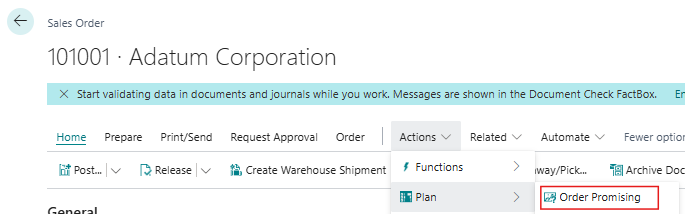
From the sales order, accessing the Delivery Promise page opens an advanced simulation interface. This screen centralizes date and volume indicators to help the manager prioritize logistical commitments.
The temporal indicators of the simulation
- Requested delivery date:It represents the initial requirement formulated by the client. This field constitutes the starting point for all scheduling.
- Requested shipping date:This is the deadline by which the warehouse must proceed with the shipment in order to meet the delivery date requested by the customer.
- Earliest shipping date:This field displays the direct result of the ATP simulation. The system calculates forward from the requested shipping date to identify the earliest feasible time slot. For example, if the requested date is set to 05/06/2027, no unloading delay is configured (0 days), and the carrier's lead time is 1 day, the backward calculation positions the required shipment on 04/06/2027.
- Scheduled delivery date:This date confirms whether or not the system can fulfill the customer's request. It is calculated by adding the earliest available shipping date and the carrier's delivery time.
Quantity and planning alert indicators
- Quantity :This field displays the total volume ordered on the relevant sales line.
- Quantity required:It isolates the quantity physically missing from stock at the time of the order, which the system will then plan for replenishment.
- Availability :The change of this value to 0 indicates that the shortage is theoretically resolved following the CTP simulation. This does not mean that the current physical stock is zero, but rather that the irresolvable shortage has been eliminated. The existing stock remains insufficient, but the simulation has proven that the missing units will arrive in time thanks to future flows.
- Quantity not available:This field maintains the display of the specific quantity to be supplied. Even if the overall date can be validated, this value remains visible because it serves as a signal to trigger the creation of the purchase order.
- Date of unavailability:This is a planning alert, not a delivery date. The system projects the precise moment when the stock level will become negative by cross-referencing all existing orders. The message indicates that if the stock is not replenished, it will be completely depleted by that date.

Validation and its impact on the order, the Accept button
Once the simulation results have been analyzed on the Delivery Promise page, the selected dates can be confirmed by clicking the Accept button. This action automatically transfers the calculated dates (the planned shipping date and the planned delivery date) to the sales order line. The order fields are then updated and locked, ensuring that reliable and final information is provided to the warehouse teams for order preparation.
The top-down method (Forward Calculation), the logic of availability for sale
When the delivery date is not dictated by the customer, planning is forward-looking. This approach is based on the concept of Available To Promise (ATP). The calculation takes as its starting point the earliest date on which existing stock or a planned delivery can cover the quantity requested.
The logistical steps are then added sequentially to determine the final deadline. The following formula is applied by the system:
Stock availability date + Warehouse dispatch time + Carrier delay = Scheduled delivery date
This method guarantees the reliability of the announced date, as it is based on already confirmed stock or supply flow realities.
The bottom-up method (Backward Calculation), the logic of the capable of delivering
In many business situations, the customer requires a specific delivery date, known as the requested delivery date. The system then switches to a reverse calculation, linked to the concept of Capable To Promise (CTP).
The objective is to determine the precise moment when the item must be processed in the warehouse to fulfill the commitment. The calculation is performed as follows:
Requested delivery date - Delivery time (Carrier) - Warehouse exit time = Planned shipping date
If the calculated planned shipping date is earlier than the actual availability date of the item, Business Central will flag this. A downward calculation will then be automatically run to suggest a realistic alternative.
The distinction between urgent and standard orders, and the use of the carrier service code
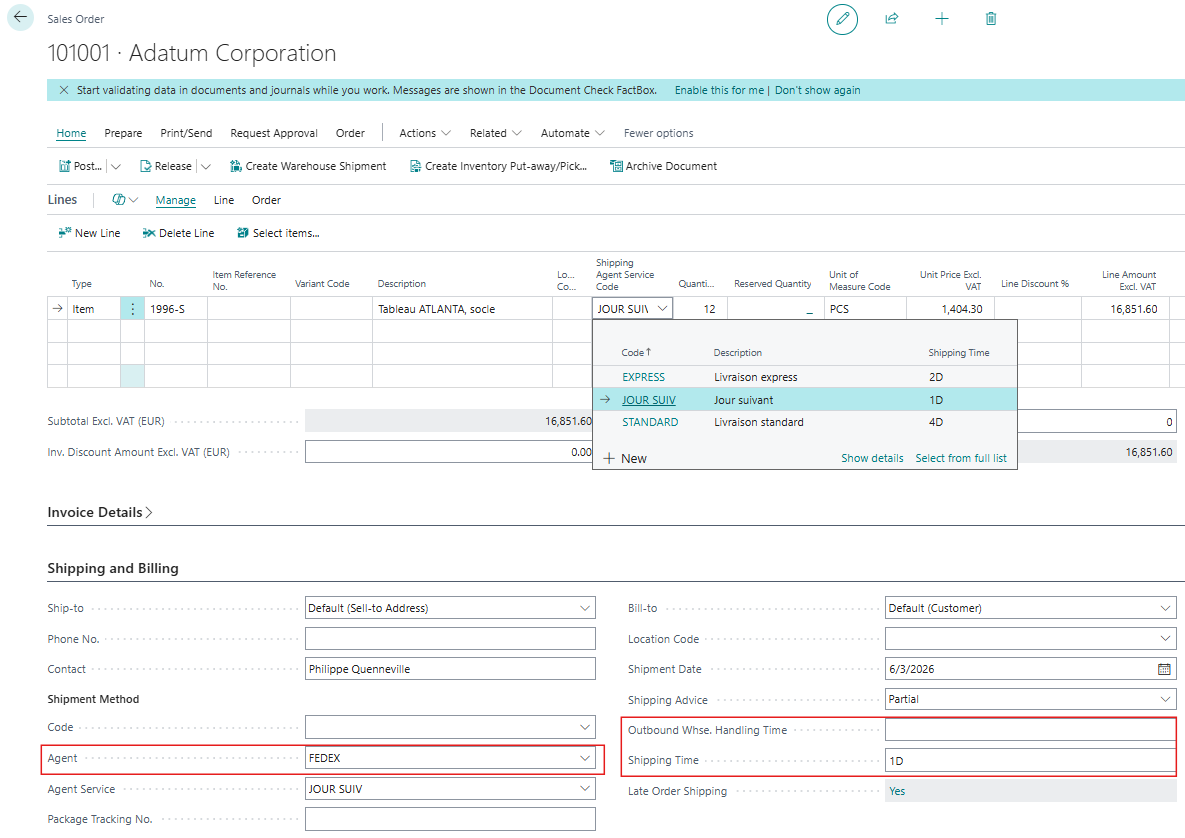
Commercial flexibility often relies on the ability to offer shipping options tailored to customer requirements. In Business Central, delivery times are adjusted dynamically on the sales line using the Shipping Agent Service Code field.
By modifying this code during data entry, the sales representative can switch from standard shipping with a significant lead time (e.g., 3 days) to express service (e.g., 1 day). The delivery promise calculation engine instantly incorporates this change. Scheduled shipping and confirmed delivery dates are recalculated in real time, allowing for alternative delivery times and prices to be proposed directly over the phone with the customer.
Safety concepts related to product datasheets
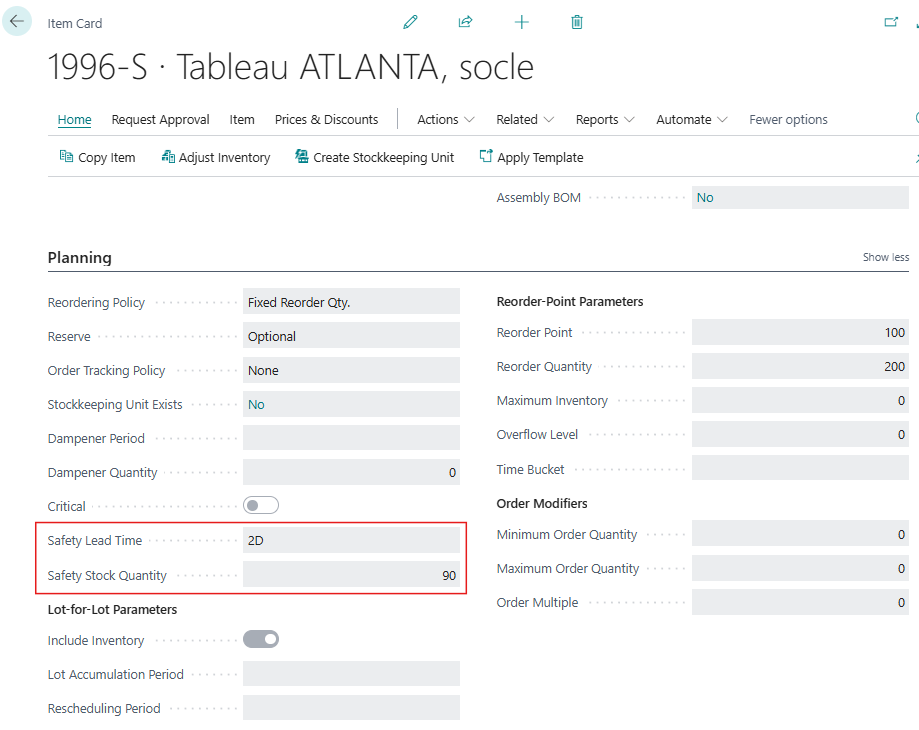
Beyond transport flows, the calculation of delivery promises remains subject to inventory management rules defined by the procurement departments. Two key parameters located on the product sheet directly influence the availability displayed to the salesperson.
- Safety Stock Quantity:This volume constitutes an alert threshold below which the system is prohibited from falling. For the ATP calculation, these stock units are considered invisible and unavailable for sale in order to protect the company against breaches of strategic contracts. The salesperson may therefore notice an unavailability for sale even though the physical warehouse still has some units available.
- The safety lead time:This time buffer is added as a precaution to the standard supplier lead times. It allows for the absorption of potential upstream delivery delays, but it mechanically shifts the availability date calculated by the system during a CTP simulation.
These parameters guarantee the robustness of the company's commitments, although they impose strict rigor during commercial exchanges.
Conclusion
Mastering delivery date calculations in Business Central is a strategic advantage for aligning commercial commitments with logistical realities. Automating top-down and bottom-up calculation methods, combined with precise visibility via the Delivery Promise page, ensures that promises made to customers are kept. However, the reliability of these simulations depends on the accuracy of the underlying data, whether it be transport schedules or the security parameters of the item master records. Rigorous configuration of these tools guarantees optimal flow throughout the supply chain, from order entry to final delivery of goods.






No comments yet.