










The architecture of AI agents in Business Central, understanding the pivotal role of the MCP server
Index 
The integration of artificial intelligence into enterprise management systems is taking a decisive step forward with the advent of agentic AI. Unlike traditional chatbots that simply answer questions based on a large dataset, Microsoft Dynamics 365 Business Central agents act as autonomous workers. They are designed to execute complex end-to-end business processes, such as converting an email into a sales order or processing supplier invoices, by interacting directly with the information system. This autonomous action capability relies on a specific three-part architecture: artificial intelligence, the ERP system, and a key component called the Model Context Protocol (MCP) server.
Defining the components, from intention to action
To understand how a natural language instruction is transformed into an accounting transaction, a clear distinction must be made between the execution engine and the communication gateway.
The agent ia, the decision center
The artificial intelligence agent is the brain that uses language models (LLMs) to orchestrate the steps necessary to complete a task. It is not a computer program with fixed (hard-coded) code, but a software entity guided by textual instructions and business objectives. The agent uses the context and metadata of the interface (such as tooltips or field names) to navigate the ERP and formulate action intentions, thus replicating the behavior of a human user.
The MCP server, the standardized gateway
The Model Context Protocol (MCP) is an open protocol that standardizes communication between AI applications and data sources. The MCP server acts as a universal translator and a secure bridge. It exposes Business Central data and logic to external clients (Copilot Studio, VS Code) in three AI-readable formats:
- Resources: raw ERP data accessible for reading, such as customer records or accounting entries.
- The tools: executable functions, such as creating a command or modifying a validation status.
- The context: the rules of engagement and prompt structures that frame the interaction.
The interaction mechanism: transforming APIs into tools
The execution of an automated task is not done by direct access of the AI to the database, but by a series of secure interactions where the MCP server transforms the Business Central API pages into tools that can be acted upon by the AI.
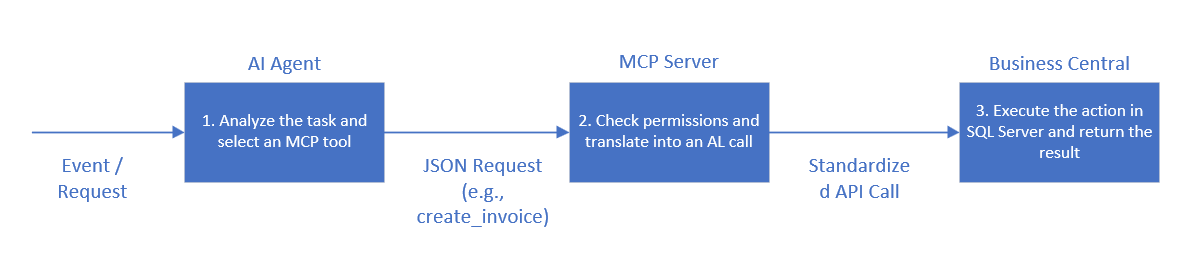
The operational process unfolds according to the following chronology:
discovery phase:During initialization, the AI agent queries the MCP server to obtain the catalog of available tools. The MCP server lists the API pages and Business Central requests to which the administrator has granted read, create, or modify access.
-Decision-making:When faced with an event, the AI agent determines the action to be taken and selects the appropriate function. It formulates a standardized request in JSON format containing the parameters required by the tool.
-Translation and security check:The MCP server receives the AI request. Before any transmission to the ERP, access rights are checked against Business Central's AL permission sets. Each action is performed with the identity and permissions of the user or agent, ensuring a complete audit trail. If the permissions are validated, the MCP server translates the AI request into a native API call.
-Execution and feedback:Business Central processes the operation in the SQL Server database. The result of the execution (success, write confirmation or accounting error message) is returned to the MCP server, which forwards it to the AI agent in a structured text format so that the latter can continue its reasoning, log its progress or finalize the task.
Implementation in Business Central, the official infrastructure
With Business Central, the installation of on-premises MCP servers is not required. Microsoft manages this infrastructure completely transparently through managed cloud services according to a well-defined layered strategy.
The foundational layer
This layer integrates native agents pre-built by Microsoft (such as theSales Order Agentor thePayables AgentThese processes run directly within the Business Central environment via the Agent Runtime to handle standard ERP tasks. The cloud server dynamically maps all installed AL objects and custom extensions, instantly transforming partner-specific tables into new tools available for artificial intelligence.
The role of the native Agent Designer
The Agent Designer is the visual interface integrated directly into Business Central that allows consultants and developers to prototype custom agents using natural language to define their instructions. When creating agents using this tool, three essential parameters are defined: the role (which applies a streamlined user interface profile), the permissions (which restrict accounting entries according to AL rights sets), and the business instructions (the system prompts dictating the business rules to be applied).
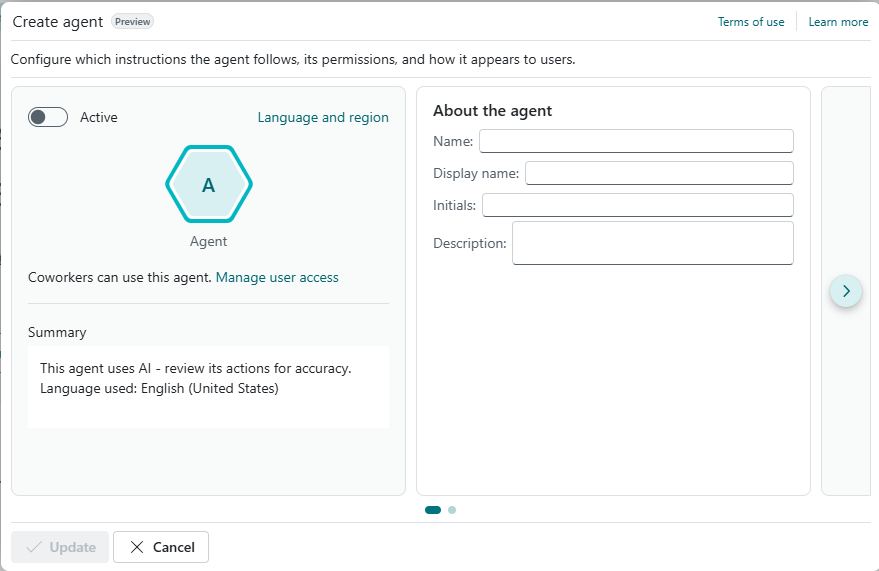
Technical prerequisites for configuring agentic AI
To initiate the first practical tests within the Agent Designer (currently in preview), rigorous environment preparation is essential. All operations must be performed exclusively in a test environment to guarantee data isolation.
- The type of environment:the use of an environmentSandboxis required, updated to at least version 27.2 of Business Central.
- Activating the features:the capacityCustom Agentmust be formally activated on the Copilot and Agents capabilities page in order to make the configuration assistant visible.
- Access configuration:The technical profiles responsible for the design must be granted all permissions.AGENT - ADMINFor monitoring executions, analyzing logs, and controlling interface token costs, the entireAGENT - DIAGNOSTICSis also necessary.
Extending capabilities to Microsoft Copilot Studio
While Agent Designer is ideal for tasks within the ERP system, using Microsoft Copilot Studio is the logical next step for multi-system orchestration. This low-code development platform allows you to design cross-functional agents capable of linking Business Central to the entire Microsoft 365 ecosystem (Outlook, Teams), as well as to external databases or software (SharePoint, Salesforce, SAP).
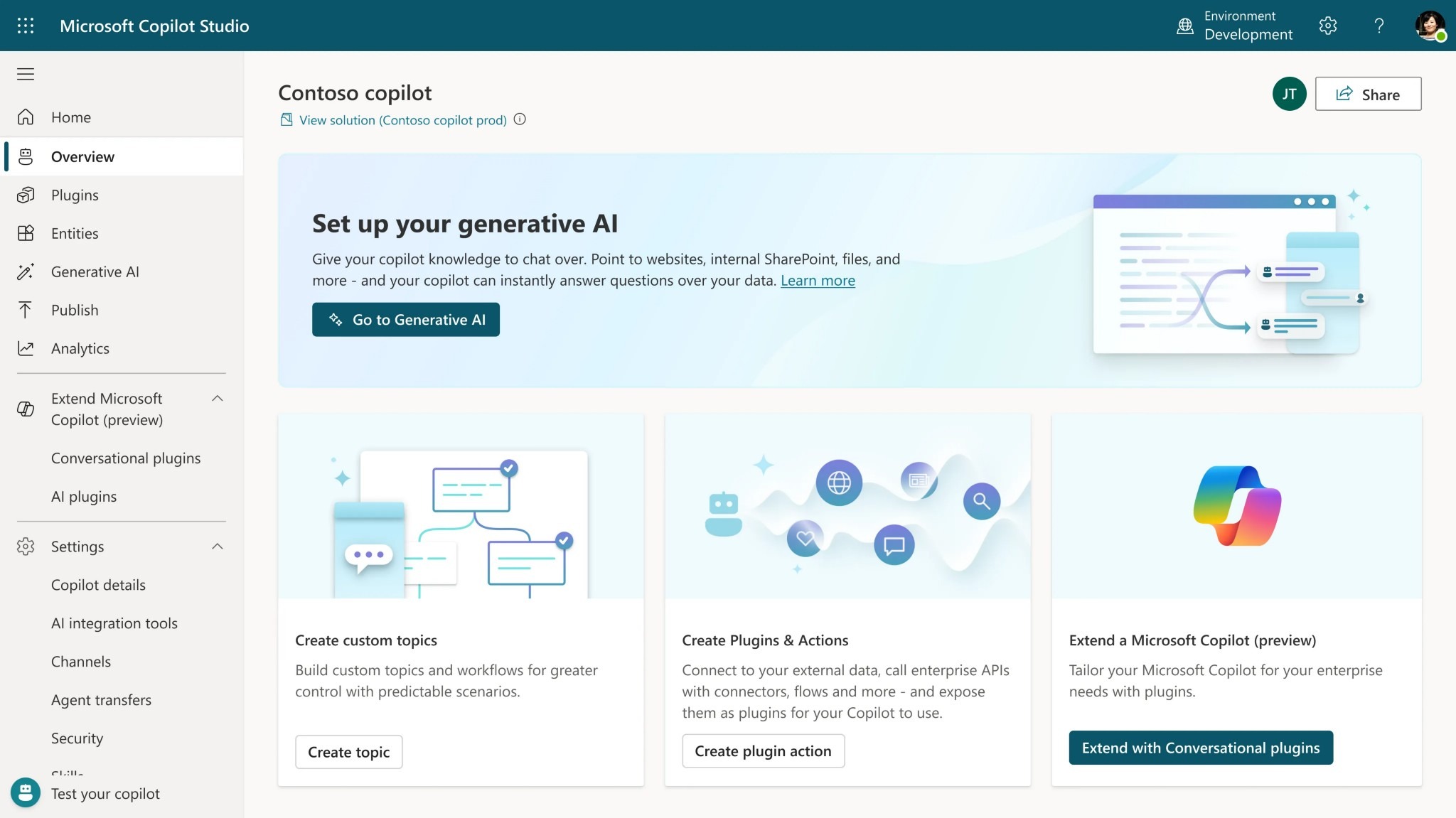
Orchestration and configuration in Copilot Studio
Within the Copilot Studio interface, the Business Central MCP server appears as a catalog of connected actions. During flow design, event triggers are configured, for example, to intercept the arrival of an attachment in a shared Outlook mailbox. The visual editor then allows for the management of complex conversation flows and the configuration of logic loops where the AI queries the ERP's MCP tools, analyzes the responses, and then switches to another application or exposes the agent on various channels (Teams, websites, mobile applications) without ever breaking the ERP's security chain.
The economic model and cost management of tokens
Agentic AI introduces a billing model based on the actual consumption of cloud resources, materialized by tokens.
Copilot credits and billing options
Unlike simple assistance functions, AI agents consume resources.Copilot creditsdepending on the volume of specific orchestration actions performed. For example, the complete processing of a receipt by an expense agent can cost approximately 50 credits. To cover these costs, companies can opt for prepaid capacity credit packages or a pay-as-you-go billing model via the administration center.
Cost management between test environments and clients
For configurations conducted within the Agent Designer on official partner demo tenants (CDX), direct token billing is not applied, thus enabling a free and isolated R&D phase. However, when using a Sandbox created directly on a customer's tenant, token consumption is active. Test requests draw directly from the global Copilot credit pool allocated to the customer's tenant or their associated Azure subscription. The assignment of the permission setAGENT - DIAGNOSTICSIt then becomes essential to analyze the theoretical execution cost recorded in the activity logs and to monitor the volumes consumed before production begins.
In conclusion, trust through transparency
The agent architecture in Business Central does not function as a black box. It is based primarily on the principle of human governance within the loop (Human-in-the-loopThis provides essential security for financial and accounting processes. Every step of the AI's reasoning, from tool discovery to decision-making, is meticulously recorded in a detailed timeline. This complete traceability allows users to verify the logic applied by the agent and mandates human validation for critical steps before entries or documents are finalized in the database.
This initial overview lays the groundwork for a series of articles dedicated to the practical implementation of agent-based AI in ERP systems. The learning path will continue with a guided immersion in the Agent Designer to configure an initial operational sales validation scenario. Technical aspects will then be addressed to understand how to adapt the AI code and enhance the APIs specifically for the MCP server, before concluding with global integration and multi-system orchestration via Microsoft Copilot Studio.






No comments yet.