









Business Central: Mastering Cost Dynamics and Inventory Posting Setup
Index 
In the previous article, I concluded that inventory management is primarily a disguised cash flow.
For a consultant or a project manager, the challenge is to transform this theory into a system of automated rules.
Microsoft Business Central (BC) is a machine of formidable precision, but it does not forgive setup errors.
Here is how to lock down the system to guarantee the integrity of your financial data.
Choosing the Costing Method: The Irreversible Decision
On each item card, the "Costing Method" field is undoubtedly the most important. Once transactions have been posted, changing it is a complex process that requires physically emptying the stock.
Costing method on Microsoft Learn
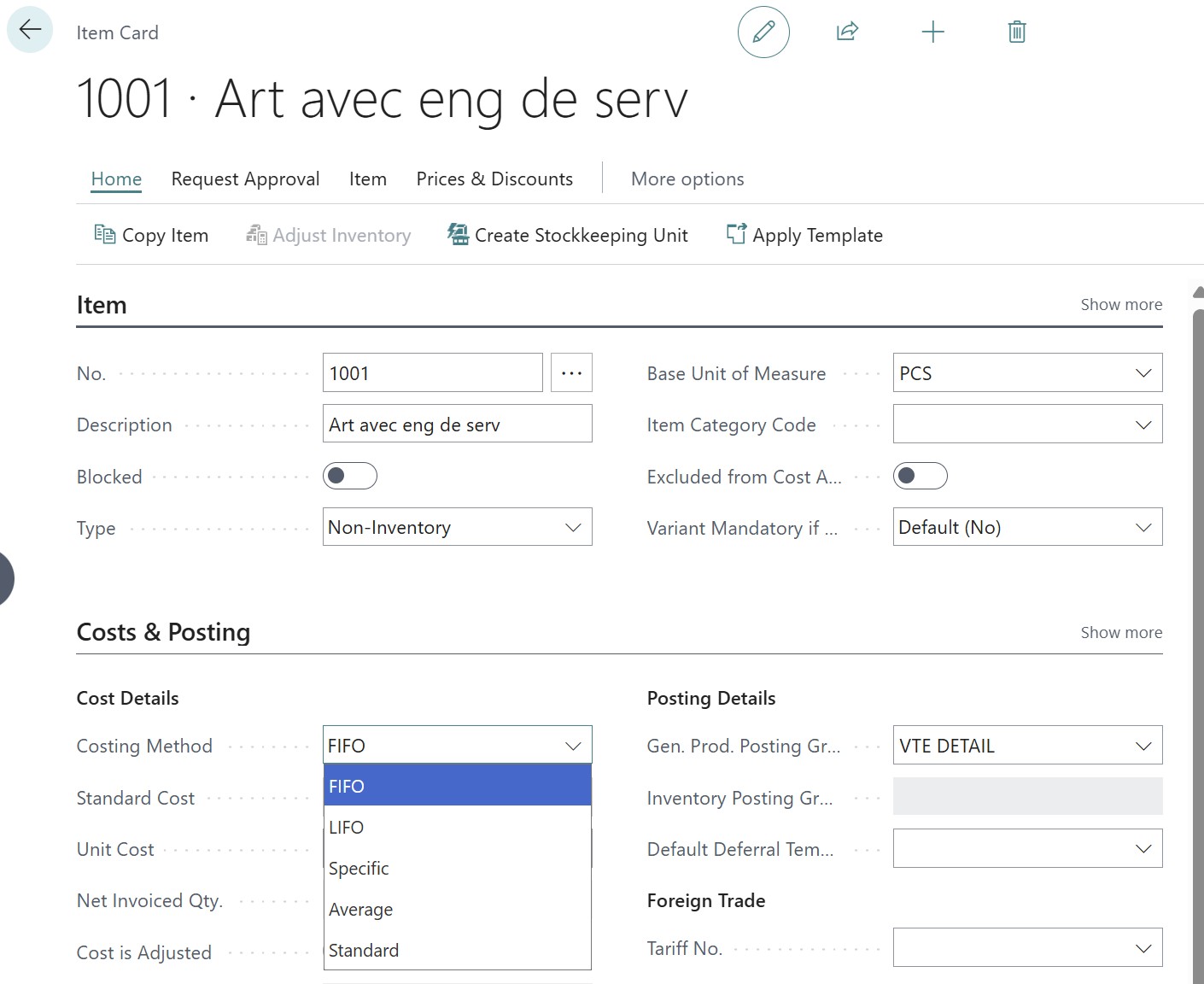
FIFO (First-In-First-Out)
The standard for trading.
Business Central creates a queue: each sale is linked to the oldest purchase still open. This is the simplest method for tracking inflation.
FIFO on wikipedia
Average
Ideal for bulk products or items with high price volatility.
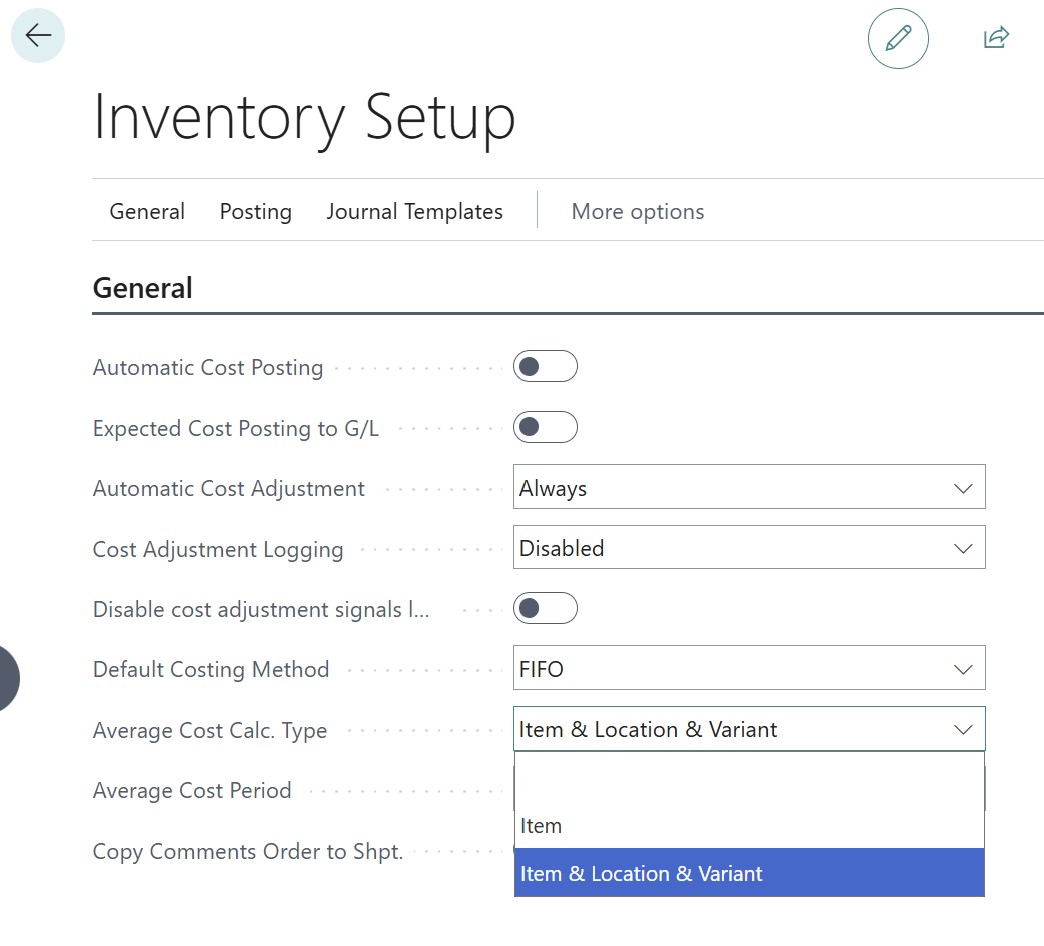
BC calculates the weighted average over a period (often daily).
Consultant's tip: Check the "Average Cost Calc. Type" setting in the inventory setup. If you set it to "Item & Location & Variant", you will have a different value for your Lille warehouse and your Marseille one.
Weighted average cost on wikipedia
Standard
The industry choice.
You set the cost. Any variance with the actual purchase price goes to "Variance" (account 603700). This is the method that offers the greatest margin stability.
Standard cost on wikipedia
Specific
Reserved for items with mandatory serial numbers.
This is the only method that physically and financially links a specific unit to its original cost.
Important fields on the item card
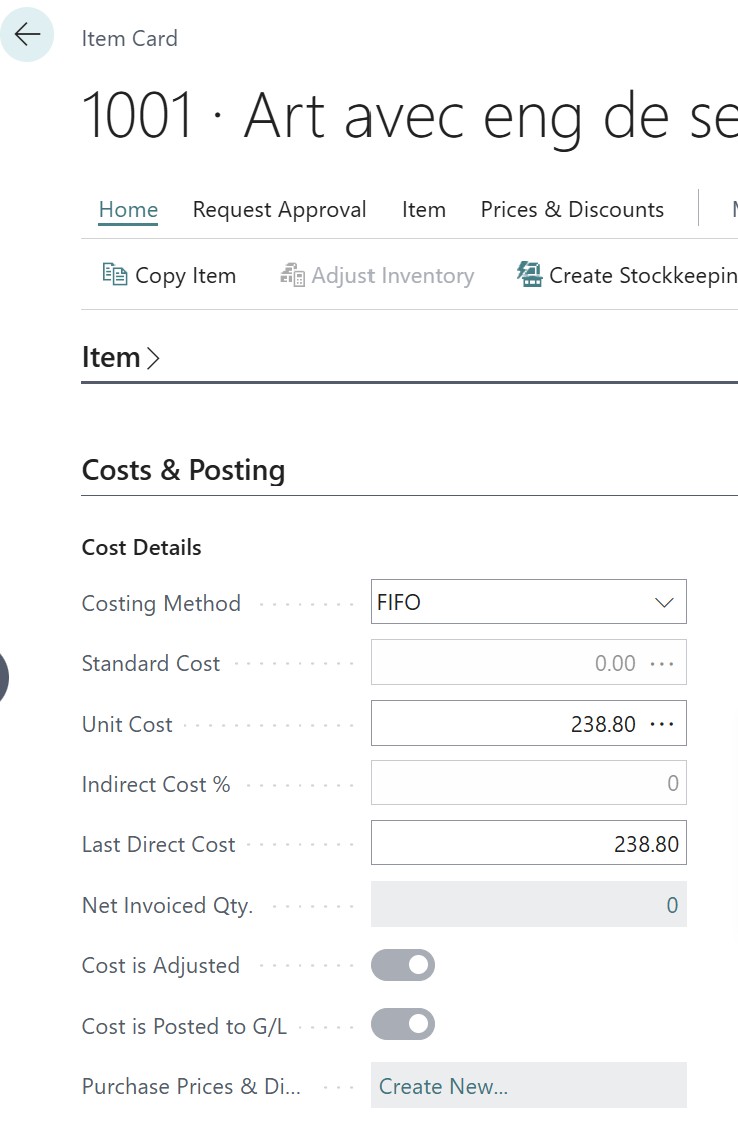
The “Standard Cost” field
In the Standard method, the Standard Cost sets the value of the item in stock. Any discrepancy with the actual purchase price is immediately isolated in a financial variance account, without impacting the inventory value. This field is static: it only updates using the Standard Cost Worksheet or through manual entry.
The “Unit Cost” field
For all methods except "Standard", Business Central calculates the unit cost on the item card as a weighted average of all units currently in stock.
When creating the item, you can enter an "estimated cost". This amount will serve as the default value for future purchase lines or theoretical margin calculations until an actual transaction replaces it. It can be important to enter a consistent value such as the last known purchase price or a realistic estimate. This allows the system to calculate a gross margin closer to reality on your first quotes or sales orders even before receiving the stock.
The inventory value is updated at two key moments:
- Recording of purchases (Receipt and Invoicing): Posting a purchase invoice triggers a recalculation of the global inventory average, and the corresponding field on the item card is updated.
- Cost adjustment: The "actual" (or final) cost is updated when running the Adjust Cost - Item Entries batch job. This process, whether automatic or manual, is essential for integrating price variations (additional charges, invoicing discrepancies) into the inventory cost.
Regarding inventory outflows (sales), although a sale theoretically does not impact the average unit cost (since it uses the existing average cost), the system keeps this field up to date to accurately reflect the value of the remaining items.
During the sale, Business Central will ignore the unit cost on the item card and perform the accounting calculation based on the specified costing method.
The “Indirect Cost %” field
It is used to integrate your overhead costs (logistics, storage, administration) into your inventory value to obtain a cost of goods sold that is closer to reality.
When you buy or produce an item, the system automatically calculates an additional amount based on this percentage and adds it to the initial purchase price to define the Unit Cost.
This impact is immediate on future sales entries, as the cost of goods sold (COGS) will be higher, displaying a more realistic but lower margin.
The “Last Direct Cost” field
The Last Direct Cost represents the unit purchase price of the item during the very last invoiced purchase transaction.
- This is the price before adding indirect costs or additional charges.
- Unlike the "Unit Cost", it is not an average: it is a "snapshot" of the price from the last invoice.
The "Last Direct Cost" field is updated automatically when two specific events occur. On one hand, posting a purchase invoice applies the unit price of the line as the new "Last Direct Cost". On the other hand, a positive inventory adjustment made via an item journal also triggers this update, provided that an amount is entered in the "Unit Amount" field of that journal.
💡In FIFO, it serves as a basis for future purchases. When you create a new purchase order for this item and you have not defined a "Special Purchase Price" for the vendor, Business Central will look for the amount in the Last Direct Cost field to fill the purchase line.
The Unit Cost is normally never used as a suggested price on a purchase order. Its role is to value your inventory and calculate your margin, not to negotiate with the vendor.
The “Cost is Adjusted” field
In Business Central, an item's cost can evolve after it enters inventory (for example, you receive a freight invoice 15 days after receiving the item). As long as the "Adjust Cost - Item Entries" batch job has not been run, the cost on the card may be incorrect.
It is automatically checked when the system has finished passing all costs (purchases, additional charges, invoicing discrepancies) to the output entries (sales).
As soon as you post a new transaction (purchase, charge, production) that could modify the inventory value, the box is unchecked. It signals to you: "Warning, the cost displayed here might not be the final cost, you must run the adjustment."
The “Cost is Posted to G/L” field
It indicates whether the financial value of the inventory displayed on the item card is synchronized with your general ledger.
It is checked when the "Post Inventory Cost to G/L" batch job has been run. This means that every inventory movement has generated its corresponding accounting entries (accounts 370000, 607000, etc.).
If this box is unchecked, it means your perpetual inventory in accounting is not up to date. Your balance sheet does not yet reflect the actual inventory value shown on the item card.
Inventory Setup
The "Inventory Setup" page is the control center of the calculation engine. Three options are critical there:
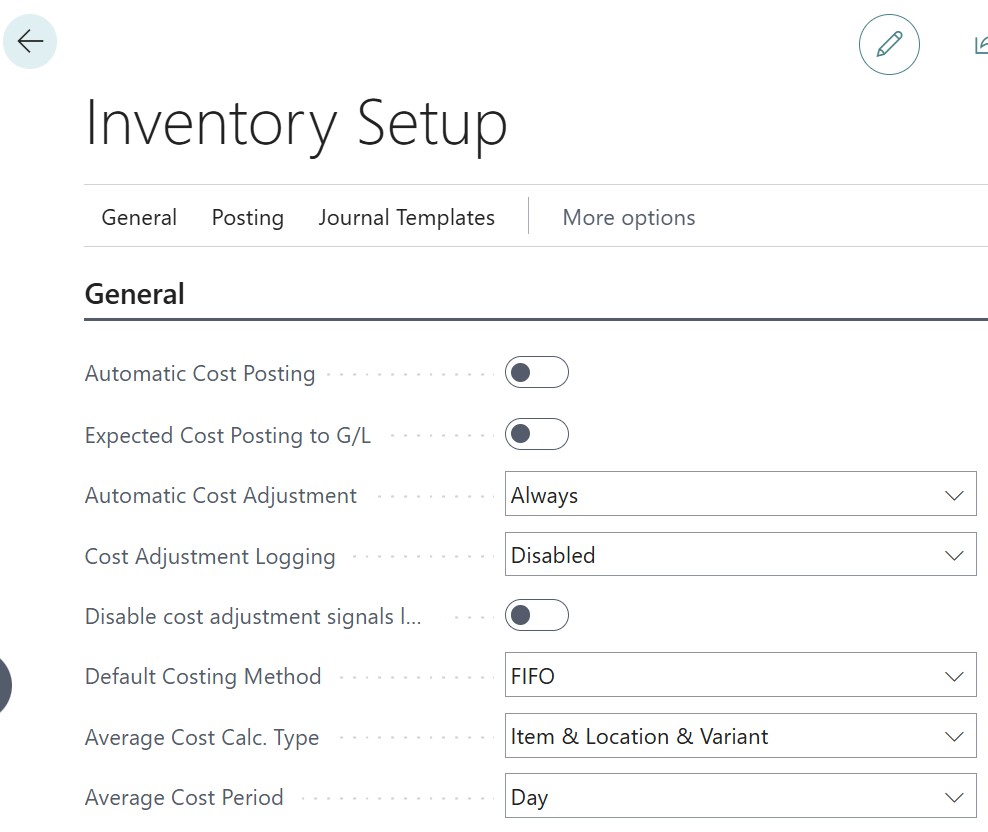
Automatic Cost Posting field
If you disable this option, your inventory movements will remain in the logistics module without impacting your trial balance.
Not activating it risks a discrepancy between your 370000 inventory account and the reality of the warehouse. Leave it enabled for immediate visibility.
Expected Cost Posting field
This is the option that allows valuing "Received but not invoiced" inventory. Without it, the 370000 inventory account only increases at the time of the invoice. With it, it increases upon receipt, using an interim account. This is essential for a reliable monthly closing.
Automatic Cost Adjustment field
This setting decides when the system should "clean up" the costs (the famous zeroing out seen in the preamble).
Recommended setting: "Always". This ensures your margin is accurate in real time.
⚠️Warning: On very large volumes (thousands of lines per day), this can slow down data entry. A scheduled nightly batch job is then preferred.
Cost Adjustment Logging field
This field is an essential audit tool that defines the degree of traceability for the cost calculation engine (Report 795 “Adjust Cost - Item Entries”). It feeds the technical table 5806 (Cost Adjustment Log) to precisely identify why certain costs might not be up to date.
Three options are available:
- "None": to optimize performance by not keeping any trace
- "Errors Only" (recommended): to isolate only blockages such as closed accounting periods
- "All": to obtain an exhaustive history of every calculation performed. This setting is the first one to consult when an item's "Cost is Adjusted" box remains unchecked despite your processing.
Skip Cost Adjustment Logging field:
This field is an option to improve system performance. It serves to lighten processes by ceasing the detailed recording of alerts that mark an item as "to be adjusted" during each transaction. Its activation is mainly recommended during massive data imports or to resolve slowdowns (table locking) during order validation.
In summary, you gain entry speed at the expense of fine traceability regarding the origin of adjustment needs.
Default Costing Method field:
This field serves as a default value (template) when creating new items.
Average Cost Period field:
It is one of the most critical parameters in the Inventory Setup if you use the Average costing method.
It defines the time interval during which the system accumulates inflows and outflows to recalculate the average unit cost.
Setting up Posting Groups
This is where we connect logistics to the 370000 and 607000 general ledger accounts seen in the previous article.
Inventory Posting Groups and Inventory Posting Setup
Inventory posting groups are defined based on Balance Sheet accounts (370000).
You can have one account for raw materials and another for finished products; in this case, a Raw Materials inventory posting group and a finished products group will be created.
These posting groups are then associated with locations in the “Inventory Posting Setup” page to specify different accounts.
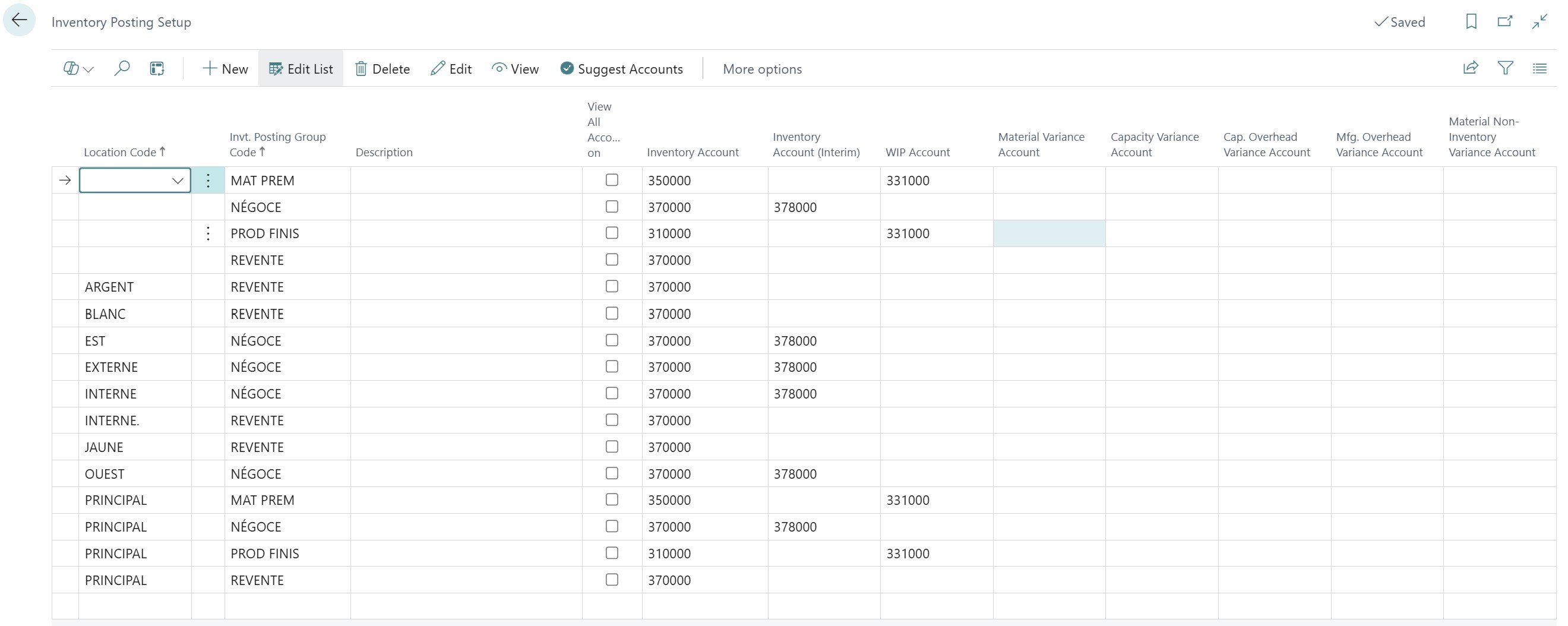
- Inventory Account: The final inventory account (370000).
- Inventory Account (Interim): This account is vital. It carries the value of "received but not invoiced" stock. It is a clearing account that balances the balance sheet before the invoice arrives. Account 378000 is used here.
- WIP Account: used to store the value of components and labor that have been consumed to manufacture a product, but whose manufacturing is not yet finished. We use accounts reflecting that material has left inventory but is not yet a finished product: 331000, Work in Progress (if it is a physical good) or 335000, Work in Progress (if it is a complex service or assembly).
Accounts linked to the Standard costing method:
- Material Variance Account: records the financial difference between theoretical component consumption (defined by the BOM) and the actual consumption observed during production. Used exclusively with the Standard costing method, it isolates material losses or gains without impacting the fixed value of the finished product in stock. A debit balance on this account generally reveals waste or abnormal scrap, thus acting as a performance indicator for your workshop.In French accounting, standard cost variances are not intended to stay on the balance sheet (class 3) but must impact the result. A sub-account of the Inventory Variation account is often used to isolate these variances: 603709: Variances on standard costs (Merchandise) and 603109: Variances on standard costs (Raw materials).
- Capacity Variance Account: records the difference between theoretical labor or machine cost (defined in the routing) and the reality observed during production. Used with the Standard method, it isolates workshop inefficiencies without modifying the fixed value of the finished product stock. In the French PCG, account 603110 (Inventory variation - Capacity variances) or a sub-account of 627 is generally used to identify these productivity losses or gains in the income statement.
- Capacity Overhead Variance Account: isolates the discrepancy between estimated indirect production costs (rent, energy, management) in the standard cost and the costs actually absorbed by the workshop's activity. It allows measuring if your structural costs were correctly covered by the production volume. In the French PCG, account 603112 (Inventory variation - Overhead variances) is generally used to record these incorporation differences.
General Business/Product Posting Groups
General Business/Product Posting Groups (General Posting Setup) define the impact on the Income Statement. There are only 4 accounts to set up for inventory valuation.
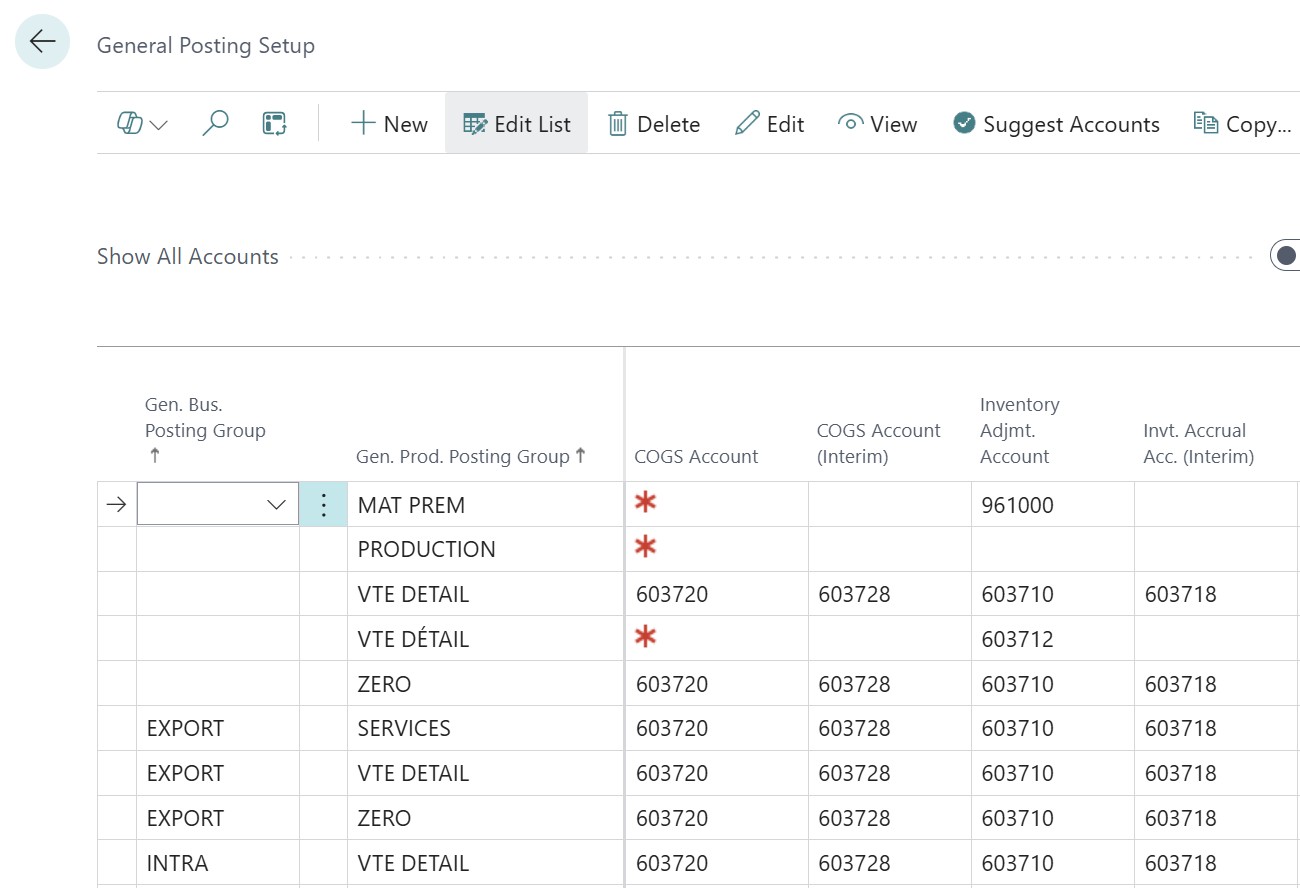
- Inventory Adjmt. Account (603000): it acts as a pivot between the balance sheet and the income statement: it neutralizes the purchase upon inventory entry (Credit 603000 / Debit 370000) to transform the charge into an asset, then it recognizes the cost of goods sold (COGS) upon exit (Debit 603000 / Credit 370000). In summary, it allows only the actual value of products consumed or sold to be displayed as a charge, thus ensuring the exact calculation of your gross margin.
- Inventory Adjmt. Account (Interim): it intervenes to neutralize the cost of goods received physically but not yet invoiced. Upon receipt of the delivery note, the system credits this account (often a 603000 or an accrued expense account) to offset the debit of account 378000 (Inventory in progress). This mechanism allows immediately integrating the inventory value into your assets while maintaining a zero impact on your result until the vendor invoice (account 601000) has been posted.
- Inventory Adjmt. Account: records the financial offset of manual inventory movements, such as inventory discrepancies, breakage, or disposals. Unlike the classic sales flow, it isolates physical losses or gains to correct the balance sheet value. In the French PCG, account 603701 (Inventory variation - Inventory discrepancies) or 658000 (Miscellaneous charges) is generally used so that these operational adjustments directly impact the result without distorting the cost of goods sold.
- Inventory Adjmt. Account (Interim) is a transit account used to immediately reflect the financial impact of a manual inventory movement (discrepancies, breakage) before its final cost is definitively calculated by the system. It serves as a temporary offset to the balance sheet inventory account to ensure a real-time updated balance. In the French PCG, account 603709 (Inventory variation - Waiting) is generally used, which will be automatically reversed and moved to the definitive adjustment account once the cost calculation process is executed.
Anatomy of a Transaction: The Data Journey
In Business Central, a transaction is not a fixed event; it is a dynamic process. The system uses two master tables: Item Ledger Entry (ILE) for physical quantity and Value Entry (VE) for financial valuation.
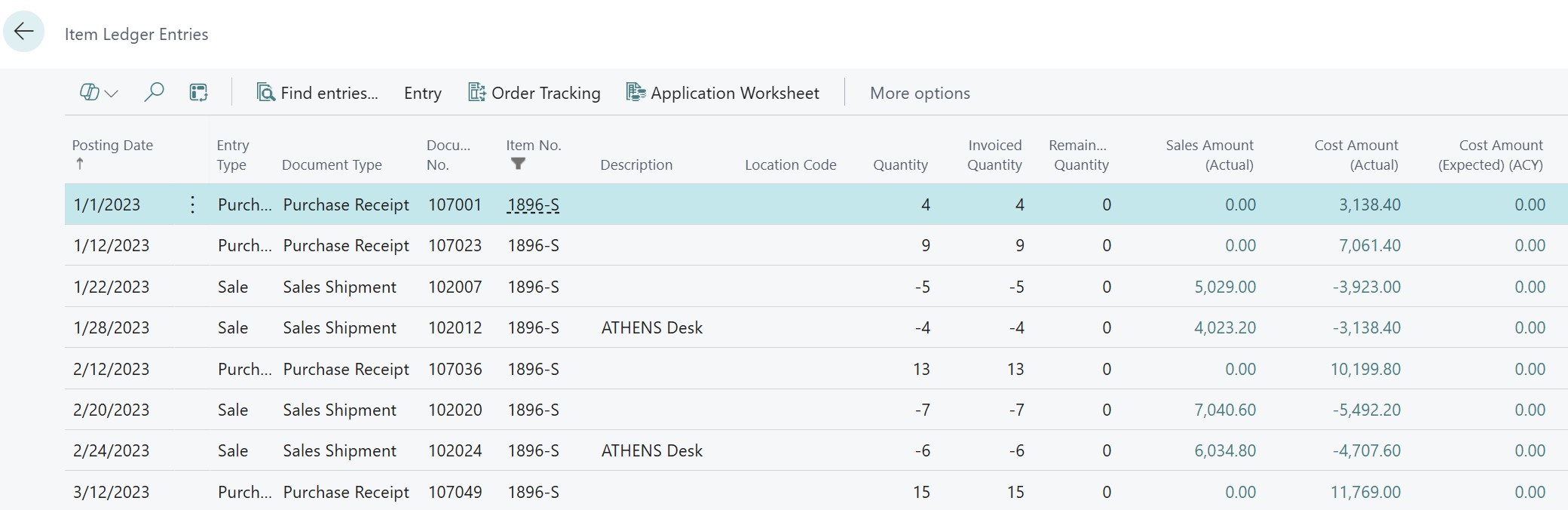

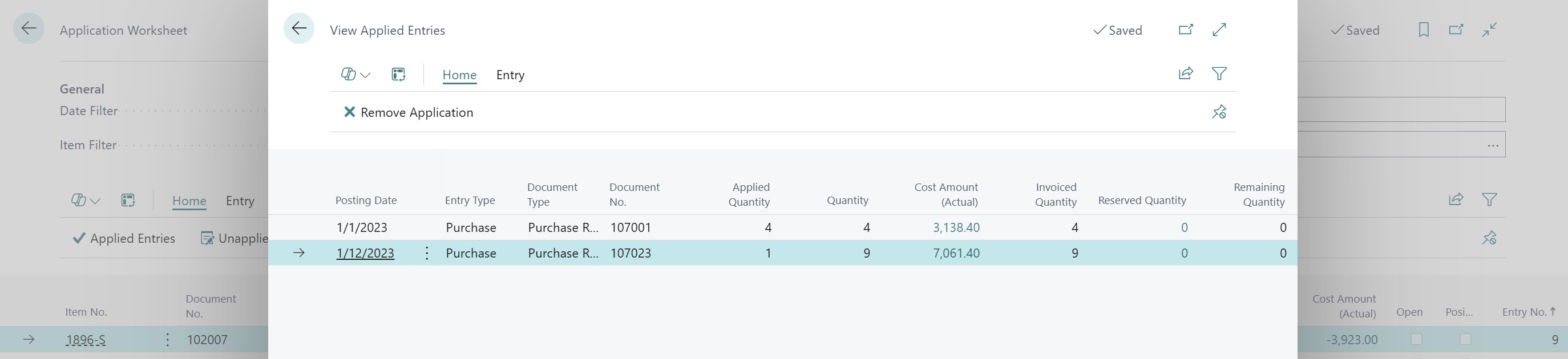
The basic principle of inventory valuation relies on Business Central's ability to create a link between each purchase entry and each sales entry.
It all starts in Table 32 - Item Ledger Entry, which physically records your inventory inflows and outflows. But the real secret of the chaining lies in Table 339 - Item Application Entry. It is this table that remembers the links between each unit sold and the corresponding unit purchased. It is thanks to this precise chaining that the cost engine knows exactly which value to "retrieve" from the purchase to inject into the sale (except for the average cost, where chaining is done in FIFO but the cost is the calculated average), thus ensuring that your margin is not a simple estimate but a faithful reflection of the logistical reality.
The fundamental distinction: Inflows vs Outflows in the Value Entry
It is crucial to understand that the Value Entry table does not treat inflows and outflows in the same way:
- Inflows (Source of value):It's not just about the purchase. The system treats as an "inflow" any transaction that feeds the stock: Purchase, but also Production output (Finished product) or Assembly output. In these cases, the cost is either dictated by the vendor invoice or by the sum of component and labor costs. These are the "reservoirs" of value.
- Outflows (Consumption of value):These are Sales or Component consumptions. Their value is never autonomous; it is always the slave of an inflow entry. An outflow only "draws" from the value accumulated by the inflows according to the chosen costing method.
The Purchase Receipt (or Production Output)
When you post a receipt (before the invoice), the system generates:
- A line for each item/location in the Item Ledger Entry (ILE) table, thus storing the quantities that increase the stock.
- A line in the Value Entry (VE) table for each ILE, thus valuing an "Expected Cost" to the inventory entry (ILE). Business Central uses the order price (purchase) or the estimated cost (production).
- In Accounting, the system uses the "interim" accounts (seen previously) to reflect this theoretical wealth.
The Sales Shipment (Delivery): Estimation of the cost of goods sold
At the moment you deliver to the customer:
The system must output an immediate Expected Cost of Goods Sold value.
- Case A: If the corresponding purchase has already been invoiced, the output cost is certain.
- Case B: If the corresponding purchase is only "received" and not invoiced, the output cost is estimated based on the expected cost of the purchase.
- Business Central creates an output Value Entry (VE) in "Expected Cost", linked to the shipment ILE. Your gross margin at this moment is an estimate.
The decisive influence of the Purchase Invoice (Retroactive recalculation)
Posting the Purchase Invoice is the true trigger for the calculation engine. When it arrives:
- Business Central updates the inflow Value Entry (switching from "Expected" to "Actual").
- The adjustment engine wakes up: It detects that this purchase is linked to a past sales shipment.
- Automatic Revaluation: The system retroactively revalues the inventory outflow entry. If the final purchase price is different from the expected price, BC creates an adjustment Value Entry on the sale to correct the margin, even if the shipment took place several weeks ago.
The Sales Invoice: The crystallization of the effective cost
Upon posting the sales invoice, the system "closes the loop":
- The sales cost becomes effective or actual.
- Business Central performs a final check. If between the delivery and the sales invoice, an additional charge (customs, freight) arrived on the inventory inflow, the sales cost is recalculated in the same way to reflect the exact reality.
- The "interim" accounting accounts are cleared and the value is transferred to the final expense account (607/COGS).
The "Live Memory" of the system: Why does the value move?
One of the most difficult concepts for an accountant to accept is that the value of an item outflow entry can be modified by a future event.
This is where the "Item Application Entry" table comes in. It serves as a mapping: it knows that sale No. 50 "consumed" purchase No. 12. As long as purchase No. 12 is not "Completely Invoiced", the value of sale No. 50 remains in motion. Even after the sales invoice, the addition of an item charge to the initial purchase will trigger a new adjustment Value Entry on the sale to impact the margin.
This recursivity ensures that the displayed profit is not a simple snapshot, but a mathematical truth that refines itself. The "Adjust Cost - Item Entries" process is the financial lung of the ERP: it is what propagates these value changes from inflows to outflows.
I already know what some will ask me: what if the accounting period is closed? Business Central does not rewrite history. It accepts the time lag: the profit for the period of the sale remains as is, and the margin adjustment "hits" the result of the following month (the first day of the next open period). The link in Table 339 remains intact, but the Value Entry carries a shifted posting date.
Conclusion
The cost architecture in Business Central is a masterpiece of logic, but it does not support improvisation. Understanding that an entry's value is "alive" and that it travels between the Item Ledger Entry and Value Entry tables is the first step toward total mastery.
To close this chapter and prepare for the rest, here is what awaits us in the next episodes:
We will meet again very soon to explore advanced flows, where we will see how to tame daily unexpected events regarding costs. We will then move on to the big piece: financial control and closing, the ultimate step to make the Business Central adjustment engine talk, reconcile your shelves with your general ledger, and finally sleep soundly at the time of the balance sheet. This is where all the theory we have seen together will take its full meaning to guarantee unassailable figures!






No comments yet.