










Business Central: Mastering financial inventory flows, from international transit to inventory scrap
Index 
In the previous episode, we built a fortress of configuration. However, the life of an inventory manager is not a long, quiet river. Between transport invoices that arrive three weeks after the goods, customers who change their minds, and transfers between depots, the "value" of the stock is a living data point.
This article explores how to manage these logistical "accidents" to obtain what every CFO looks for: the Landed Cost (the real cost, delivered to the warehouse), while ensuring perfect synchronization with the general ledger.
Mastering Item Charges
The purchase price on the purchase order is only a working basis. To know the real profitability, you must integrate "landed costs". Business Central uses Item Charges for this. Unlike an item line, an item charge has no physical weight, but it possesses a financial revaluation power that directly modifies the value of your asset.
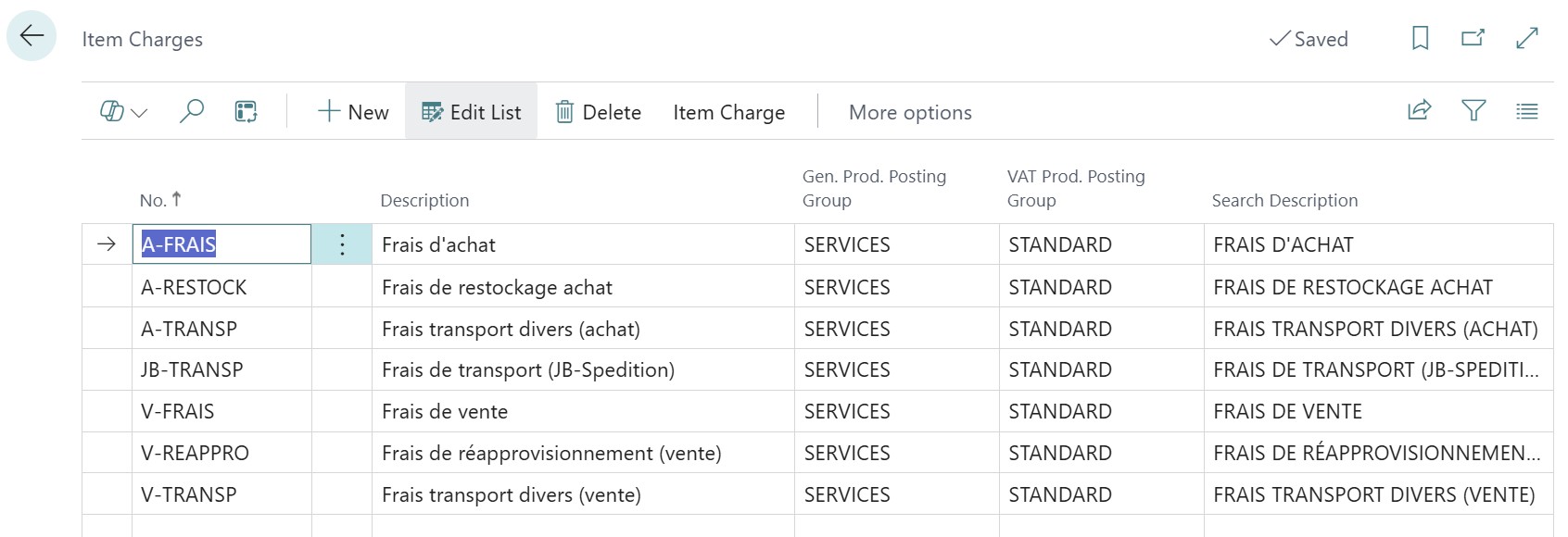
The item charges table in Business Central mainly consists of a unique code and a description, serving as a pivot to identify the nature of the charge, such as transport or customs. It also integrates product posting groups that automatically direct financial flows to the correct inventory variance or expense accounts of the Chart of Accounts.
Two assignment strategies depending on the origin of the charge
Depending on your supply chain flow, you will use one of the following two methods:
Assignment on the original Purchase Order
This is the most fluid scenario: your goods supplier handles the transport themselves and invoices you on the same document.
- The handling: On the order, after your item lines, you add a line of type Item Charge. Via the Item Charge Assignment function, you distribute this amount over the item lines present.
- The accounting automation: As soon as the Receipt is posted, Business Central increases the value of your stock. If the "Expected Cost Posting" parameter is activated, the system automatically generates a balance sheet entry (Debit of account 378 (🇫🇷378, 🇬🇧1250, 🇮🇹13.10.50)) offset by a theoretical debt (Credit of account 4081 NI (🇫🇷408, 🇬🇧2150, 🇮🇹21.05.00)). The additional cost is therefore effective in accounting even before the invoice has been received.
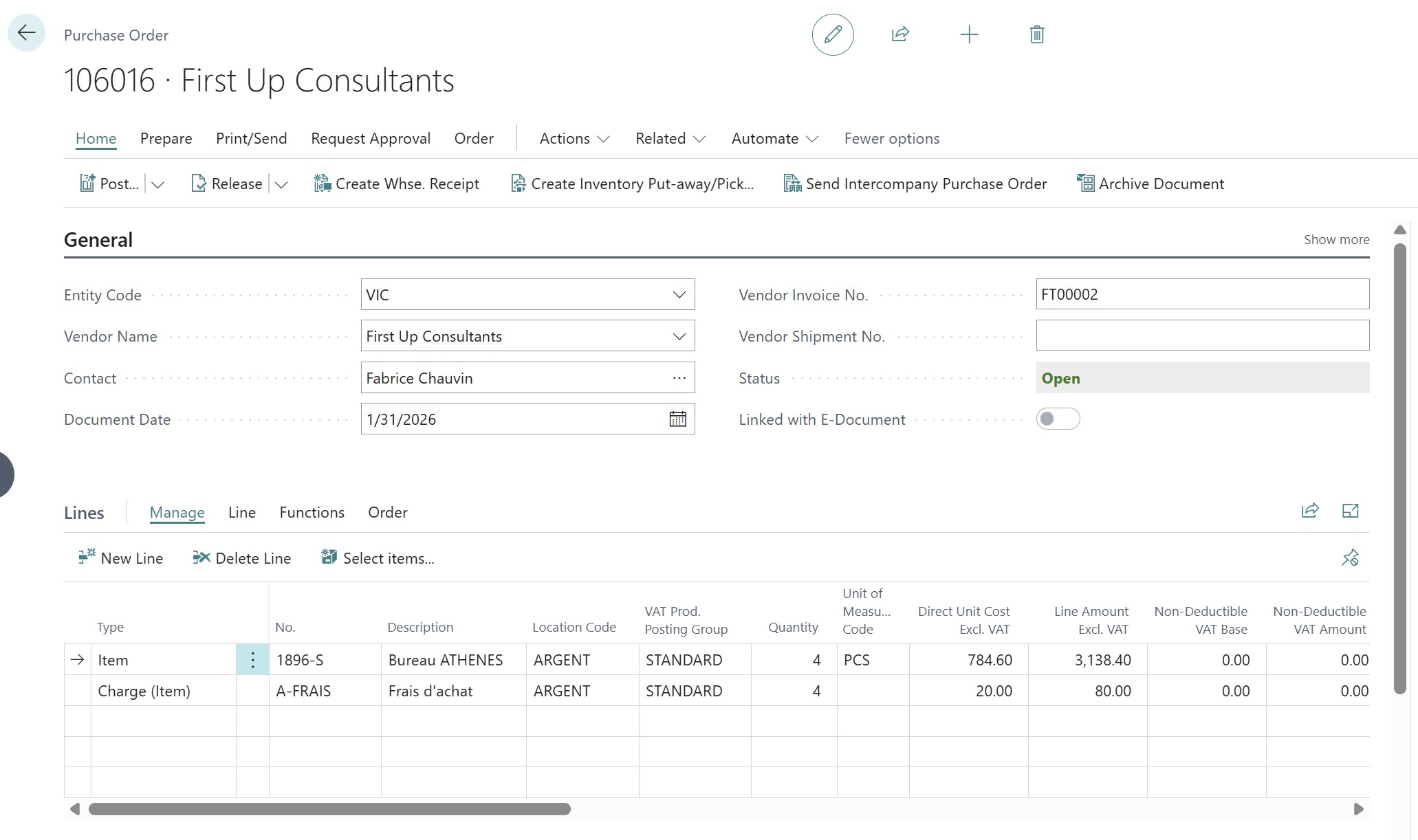
To distribute the item charge line, simply use the "Item Charge Assignment" function from the relevant line, then select the "Suggest Item Charge Assignment" option so that the system automatically ventilates the amount over the item lines of the order according to weight, volume, or value.
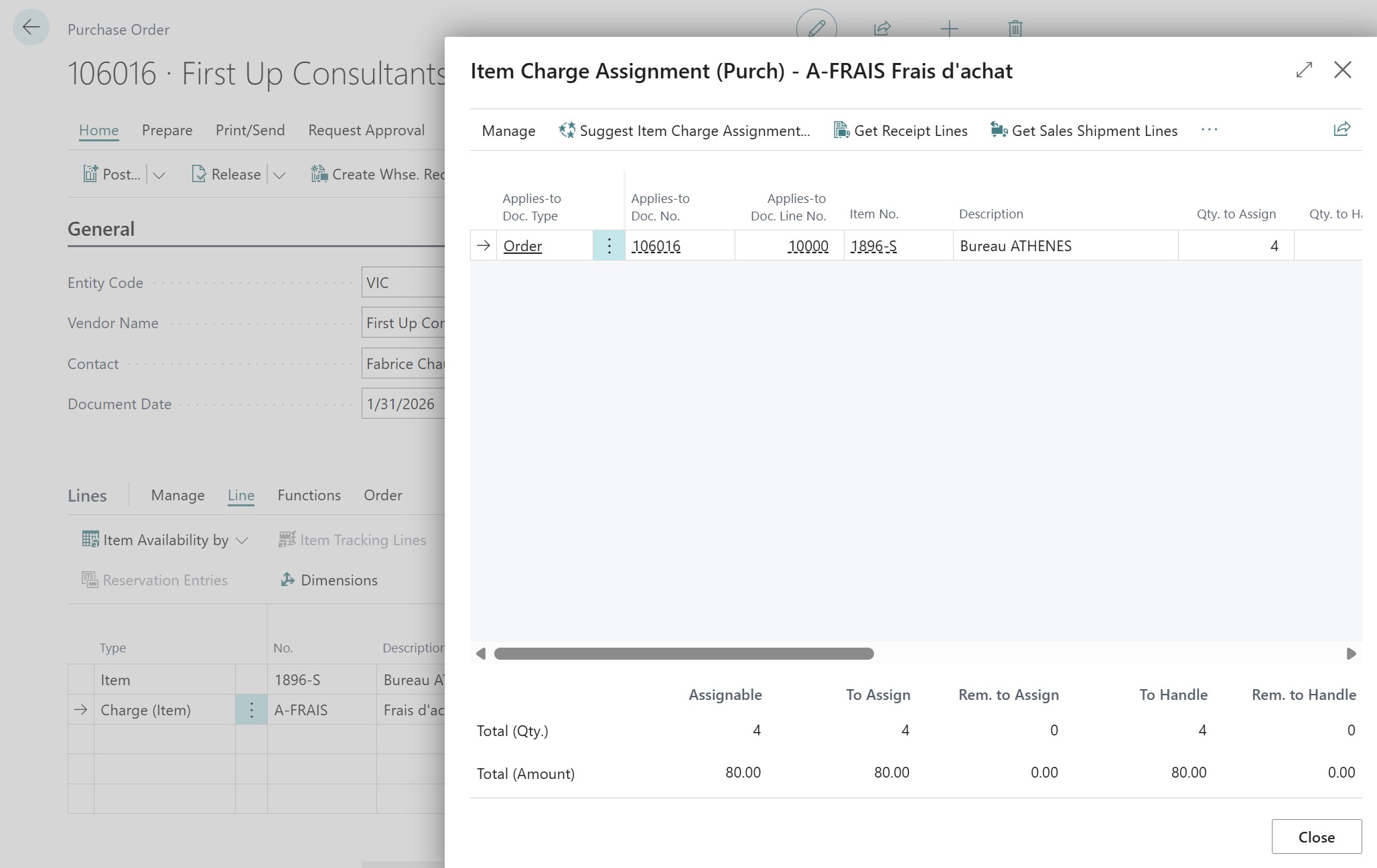
Once the receipt and invoice are posted, the evaluation of the inventory increase including item charges can be viewed in the value entries of the relevant item.
Assignment via a separate purchase invoice (Third-party provider)
This is the classic case for imports: you buy your products from a supplier, but a forwarder or a carrier (such as DHL) invoices you for shipping costs and customs later.
- The handling: Create a purchase invoice in the carrier's name. On the item charge line, use the Get Receipt Lines function. BC allows you to pick from your past receipt history to "attach" the value of the charge.
- Recursivity: If the items have already been sold, BC creates an adjustment Value Entry that retroactively corrects the cost of the sale.
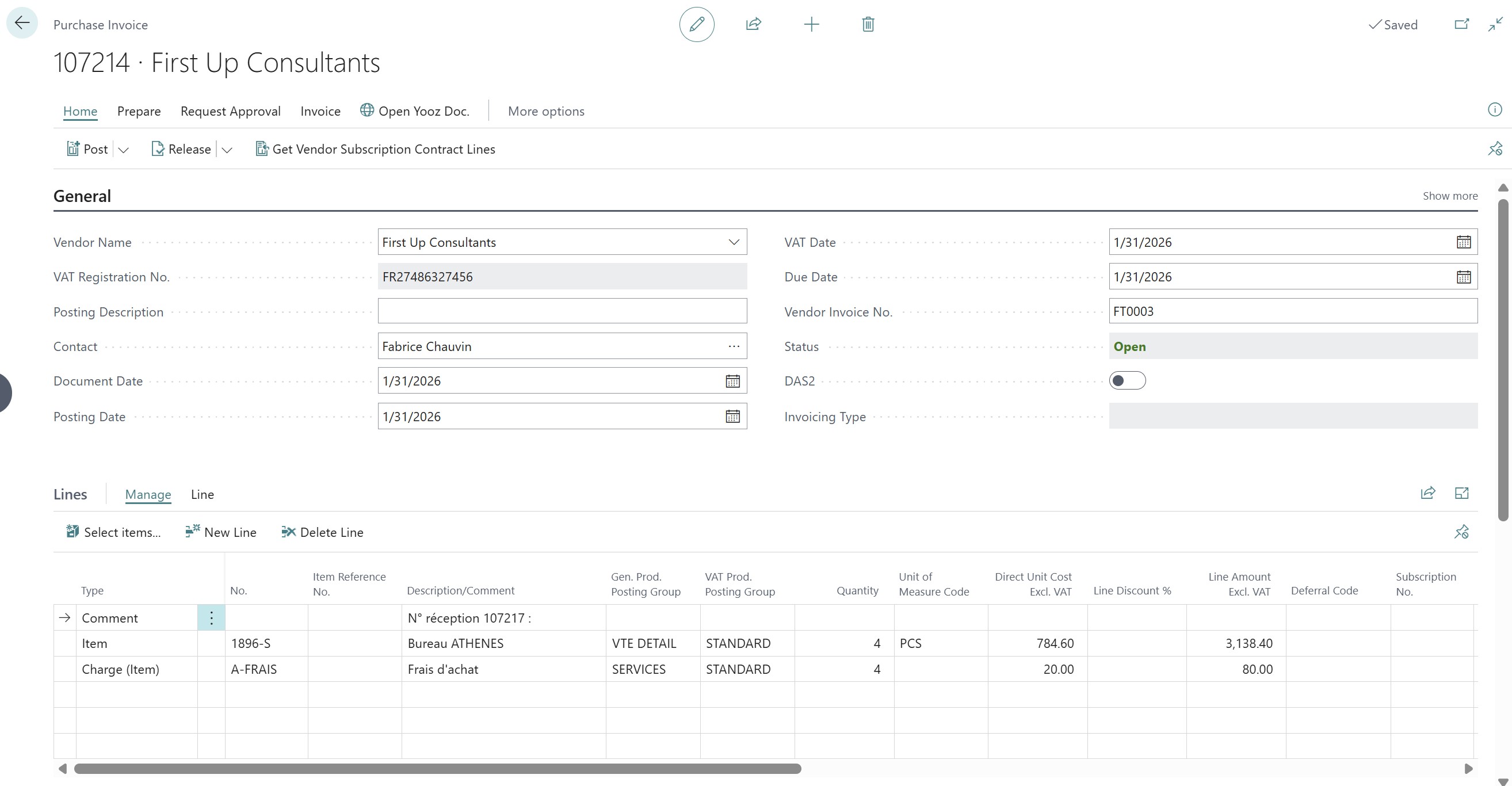
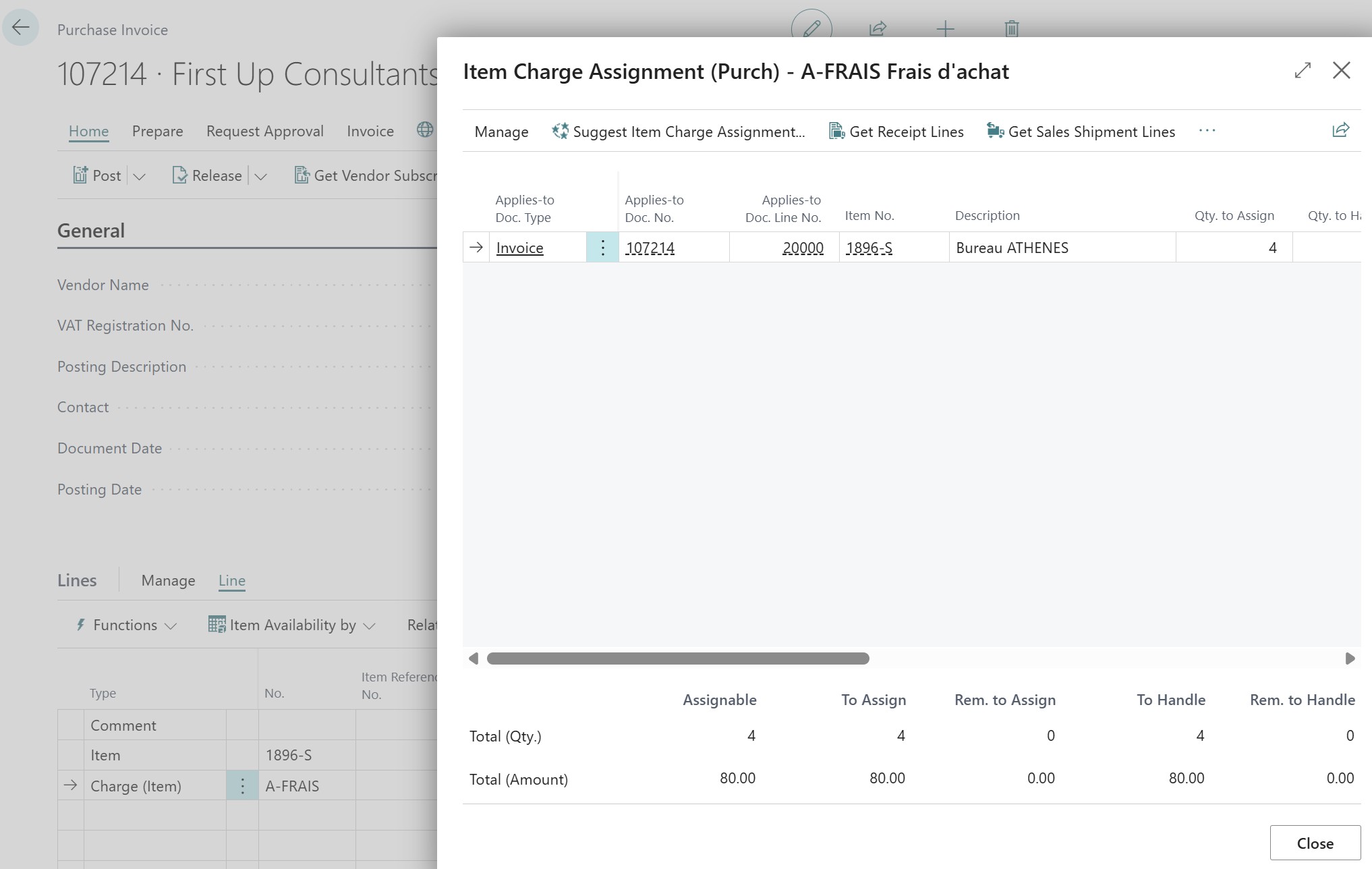
You must click on the item charge assignment action from the relevant line of the invoice to distribute the additional cost over the corresponding receipt lines.
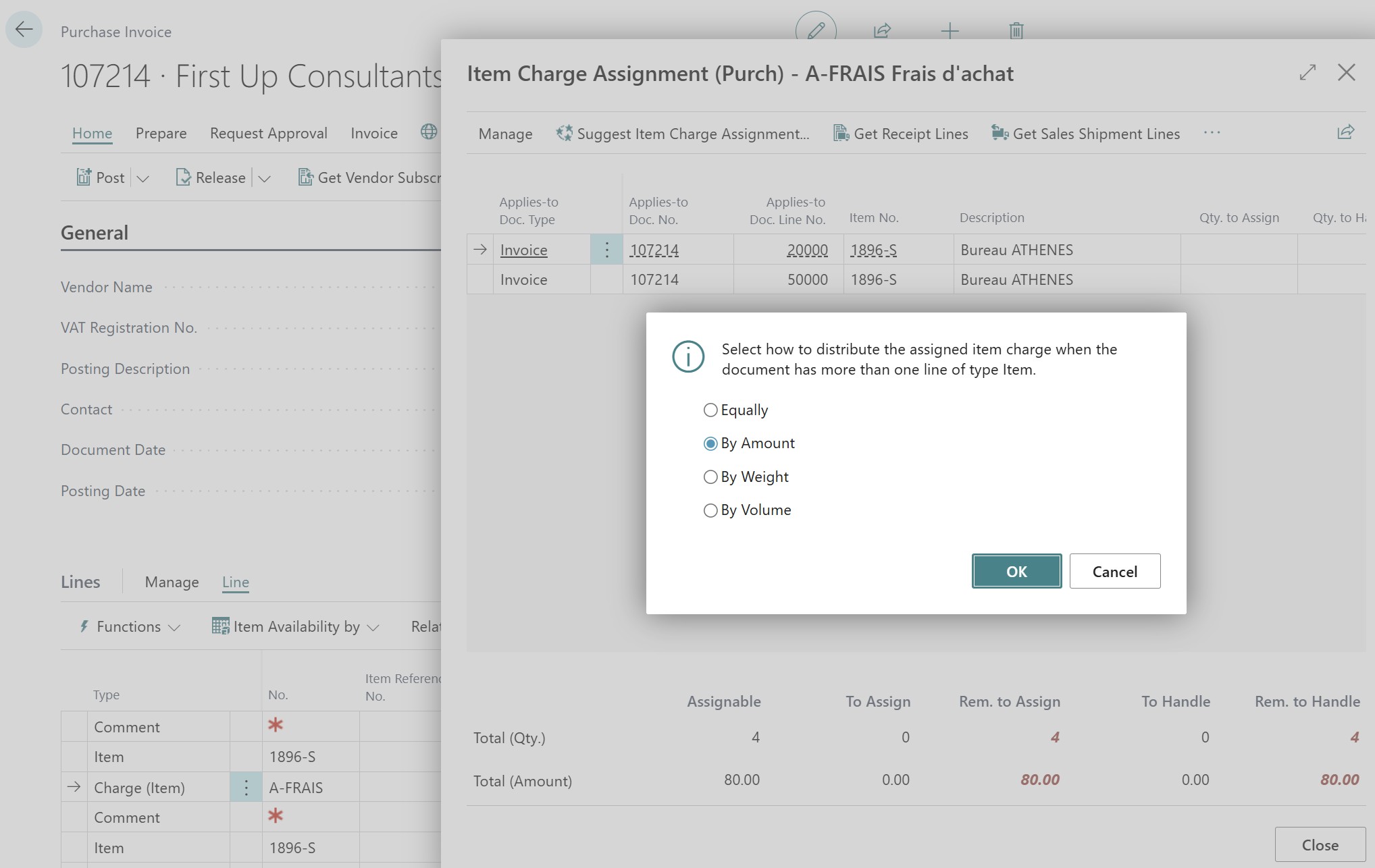
Distribution methods: Surgical precision
Once the target lines are chosen, by clicking on the Suggest Item Charge Assignment action located in the ribbon, a context menu appears allowing you to choose between four distribution modes: Equal, Quantity, Amount, or Weight/Volume:
- Equal: Each line receives the same share.
- Amount: Distribution proportional to the financial value. Ideal for insurance.
- Weight / Volume: The king of methods for transport. If a truck contains 1 ton of iron and 10 kg of feathers, the iron must bear the bulk of the cost.
Accounting schema and French Chart of Accounts (PCG)
For these charges to impact the balance sheet, Business Central relies on specific accounts that you must configure in the posting matrices:
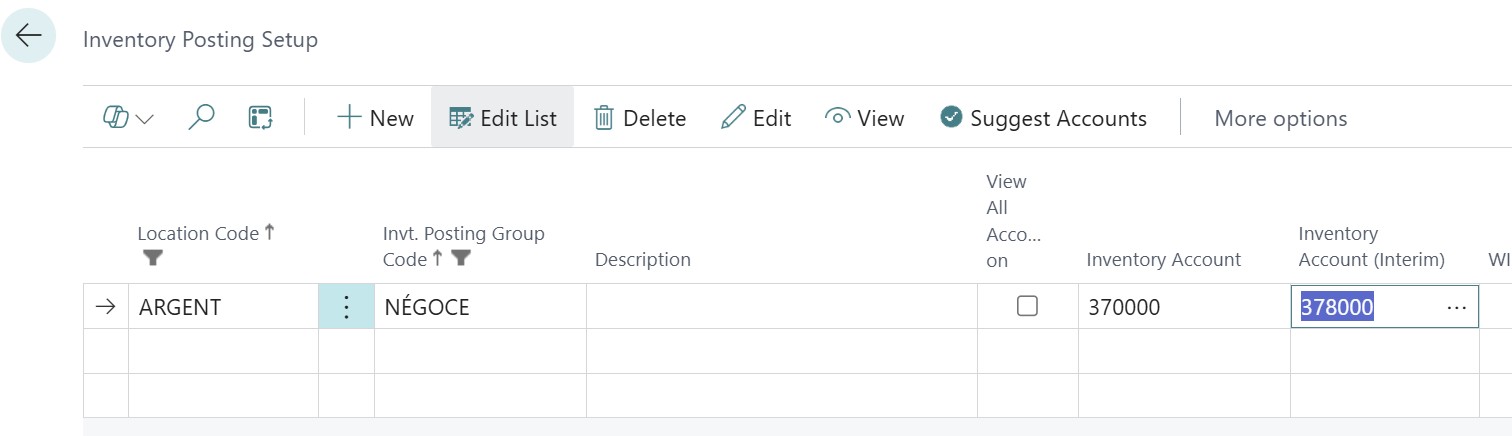
- Receipt - Account 378 Interim Stock at debit (🇫🇷378, 🇬🇧1250, 🇮🇹13.10.50)
- Receipt - Account 4081 Invoices not received at credit (🇫🇷408, 🇬🇧2150, 🇮🇹21.05.00)
- Invoicing - Account 370 Merchandise Stock at debit (🇫🇷370, 🇬🇧1200, 🇮🇹13.10.01)
- Invoicing - Account 401 Vendor at credit (🇫🇷401, 🇬🇧2100, 🇮🇹21.00.01)
The Inventory and Interim Inventory accounts are found in Inventory Posting Setup:
The Invoice not received account is found in General Posting Setup:
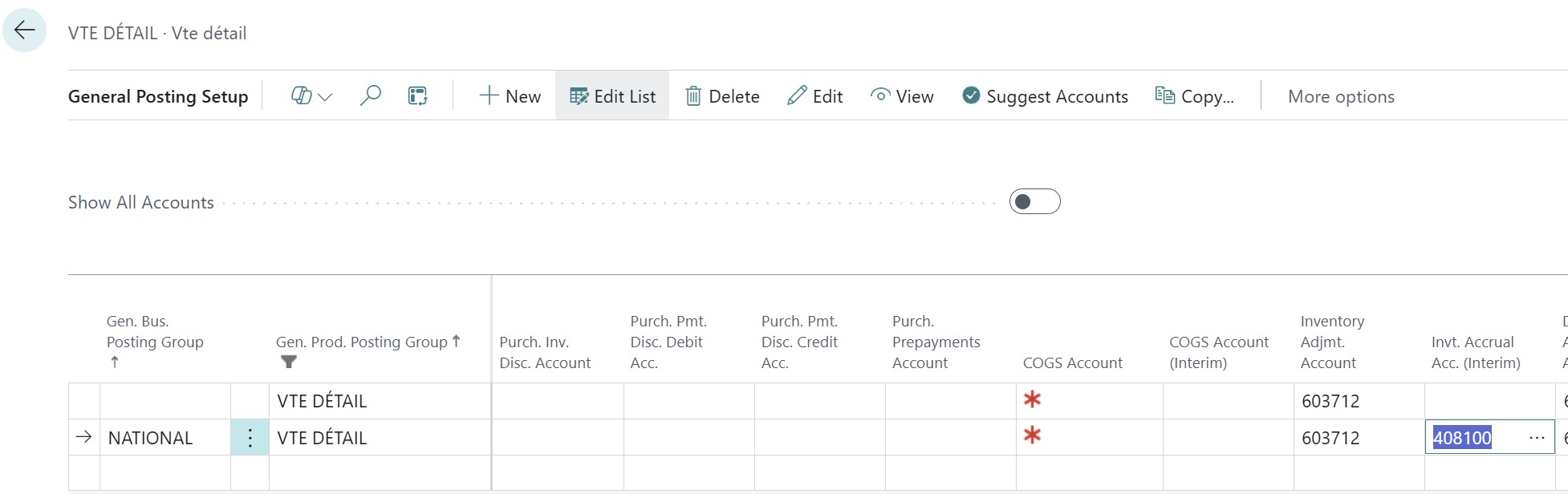
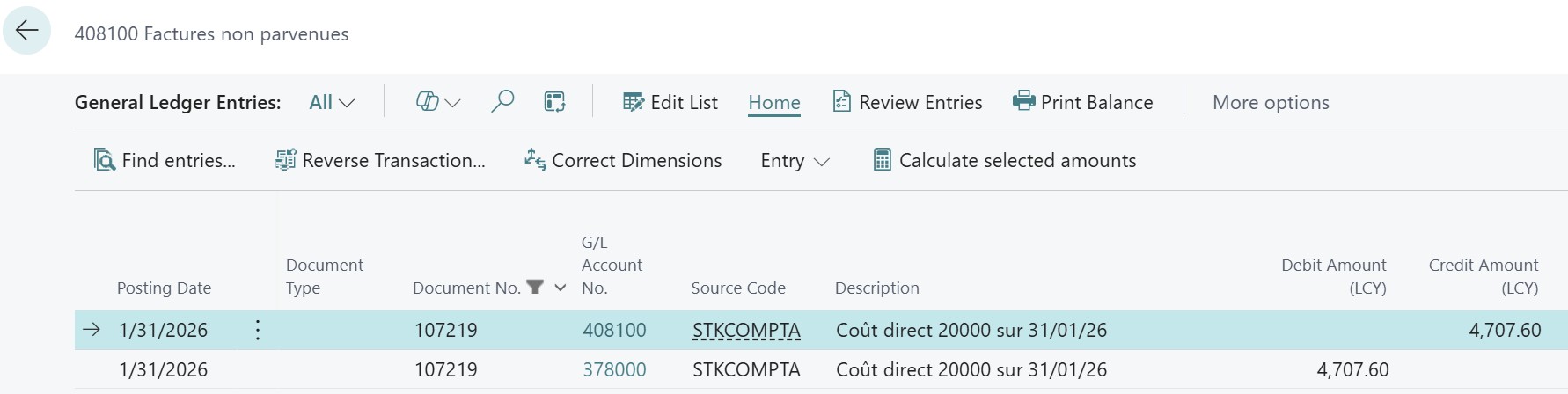
Once the item receipt is posted, if the automatic cost posting and expected cost options are activated in the inventory setup, the entries for invoices not received will be generated automatically.
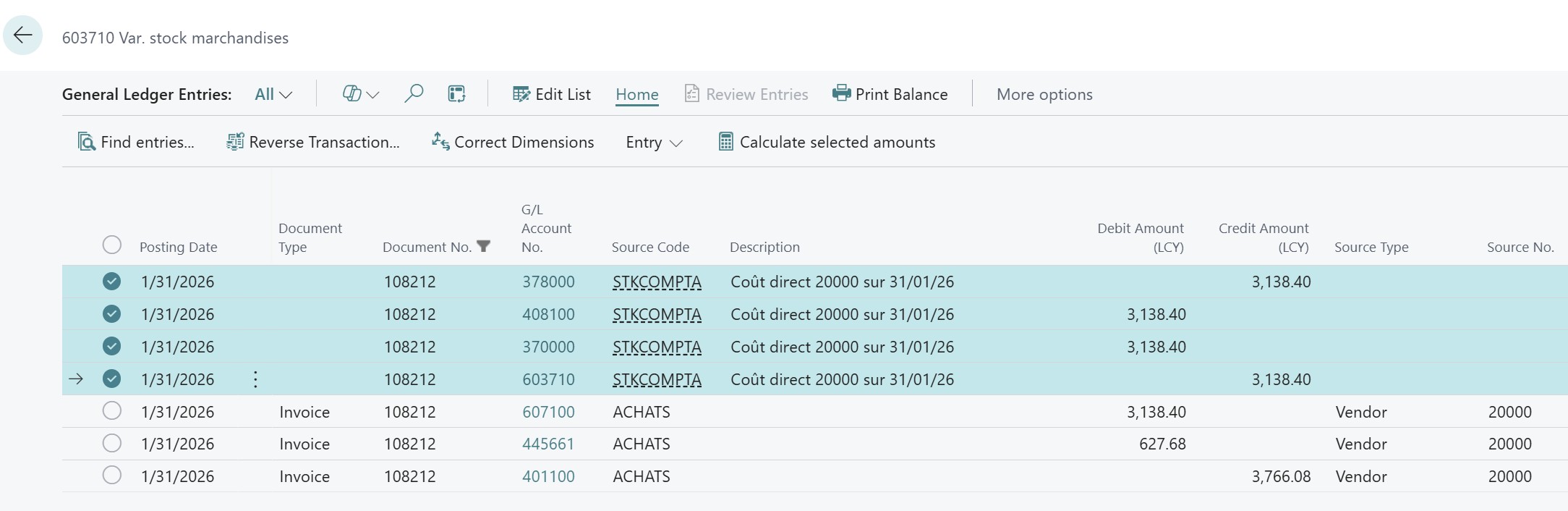
After posting the invoice, the system automatically generates the reversal of the invoice not received in favor of the vendor account, transfers the value from the interim inventory account to the final inventory account, and posts the purchase invoice entries.
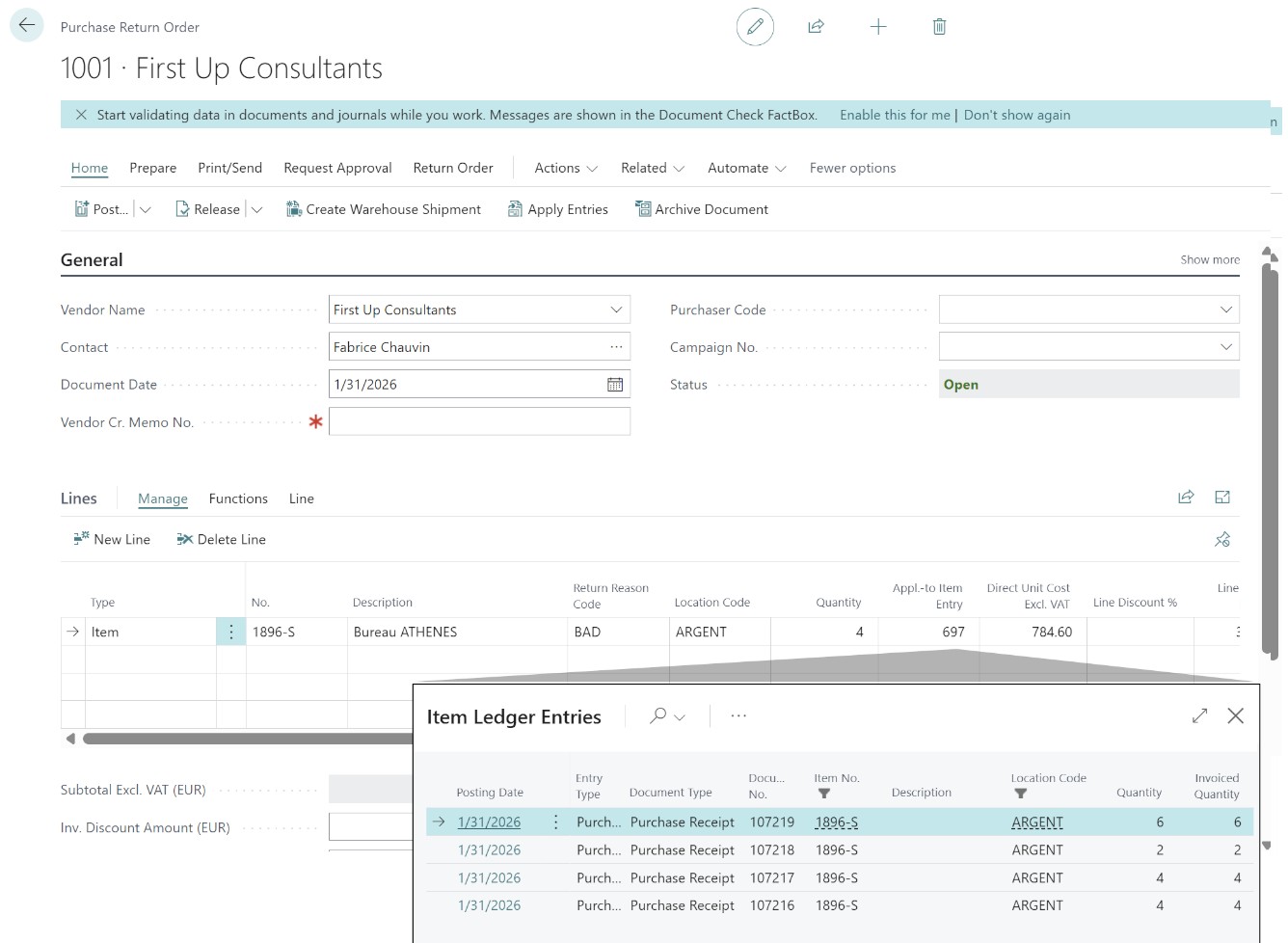
Complex Return Management: Protecting averages
A return is a reversed inventory movement that can destroy the relevance of your average cost or FIFO if poorly managed.
The reintegration trap
If a customer returns a product purchased a year ago (original cost: €80) while the current average cost is €120, an automatic reintegration at the current cost would skew your inventory by €40.
The ultimate weapon: Exact Cost Reversing
In the sales and purchase parameters, the "Exact Cost Reversing Mandatory" option must be activated.
- Operation: It forces the user to link the return to the original shipment via the "Get Posted Document Lines to Reverse" function.
- Result: The system will search for the precise Value Entry from that time. The return is thus neutral for inventory valuation.
This article is only intended to illustrate the accounting aspect of inventory management; I will write an article on the full return process.
PCG Accounts involved and Posting Schema
In French accounting, a return of goods must be treated with absolute rigor to reflect the cancellation of the initial exit charge.
For a sales return: The accounting entry consists of re-debiting the inventory account 370 (🇫🇷370, 🇬🇧1200, 🇮🇹13.10.01) and crediting the inventory variance account 607 (🇫🇷607, 🇬🇧5000, 🇮🇹40.00.01) (or 713 for finished goods (🇫🇷713, 🇬🇧5050, 🇮🇹48.05.01)). If the return is valued via exact cost reversing, the amount used will be strictly identical to that of the original sale.
Typical Schema:
Debit 370 (Real inventory) (🇫🇷370, 🇬🇧1200, 🇮🇹13.10.01): +€80
Credit 607 (Inventory variance) (🇫🇷607, 🇬🇧5000, 🇮🇹40.00.01): -€80
This mechanism allows for "cleaning" the income statement of the charge that had been recorded during the sale, while reintegrating the exact value into the balance sheet.
Setup in Business Central
For these entries to be automatic and error-free, the setup is performed:
- In General Posting Setup, for the COGS Account: This account (generally 607 (🇫🇷607, 🇬🇧5000, 🇮🇹40.00.01)) will receive the credit during a sales return.
- In Inventory Posting Group: The system uses the Inventory Account (370 (🇫🇷370, 🇬🇧1200, 🇮🇹13.10.01)) for physical reintegration.
- Point of vigilance: If you use discounts or charges during the return, ensure you fill in the Sales Credit Memo Account (709 (🇫🇷709, 🇬🇧4100, 🇮🇹51.05.01)) to isolate the commercial aspect (the refund of the sale price) from the logistical aspect (the reintegration of the inventory value).
Transfers between warehouses: Value travels too
Moving a product from Warehouse A to Warehouse B does not change its nature, but it can change its value if the journey incurs costs.
"In Transit" Inventory
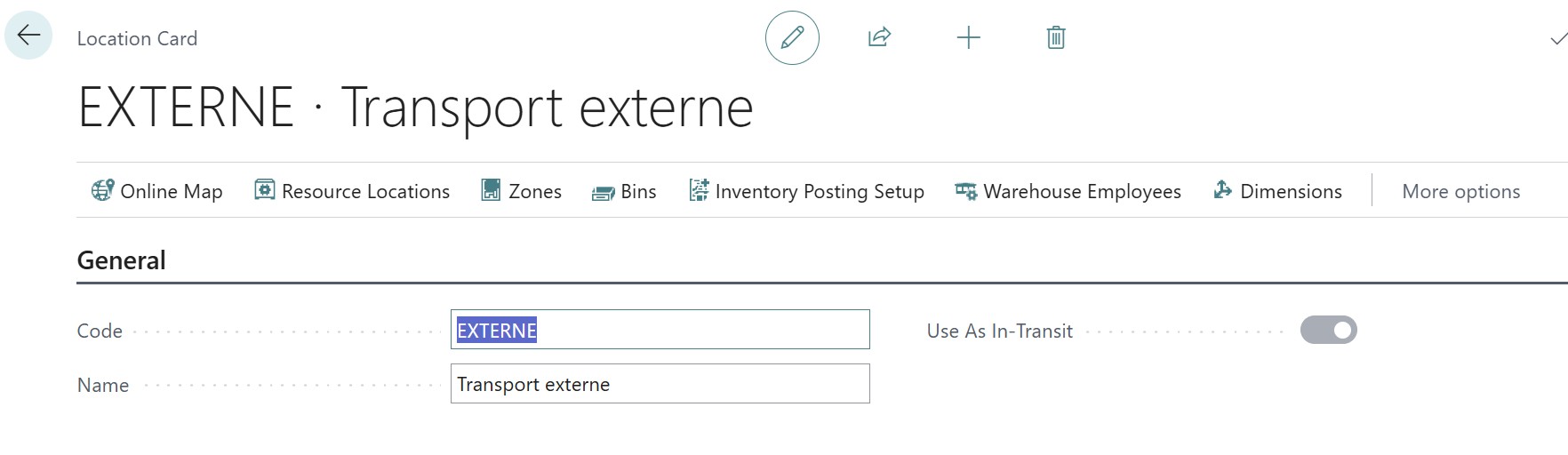
The use of a Transfer Code is mandatory. During the journey, the goods are located in a virtual warehouse. The value remains held by a dedicated Interim inventory account, thus avoiding a hole in your balance sheet during transport.
The PCG account for transit
In French accounting, the value of goods "in transit" must not be mixed with the inventory available for sale if an accurate inventory is desired. Account 378 - Stocks in transit (🇫🇷378 🇬🇧1250 🇮🇹13.15) is generally used. This account is a current asset account that ensures the goods still belong to the company, even if they are no longer physically on a shelf.
Setting up accounting accounts
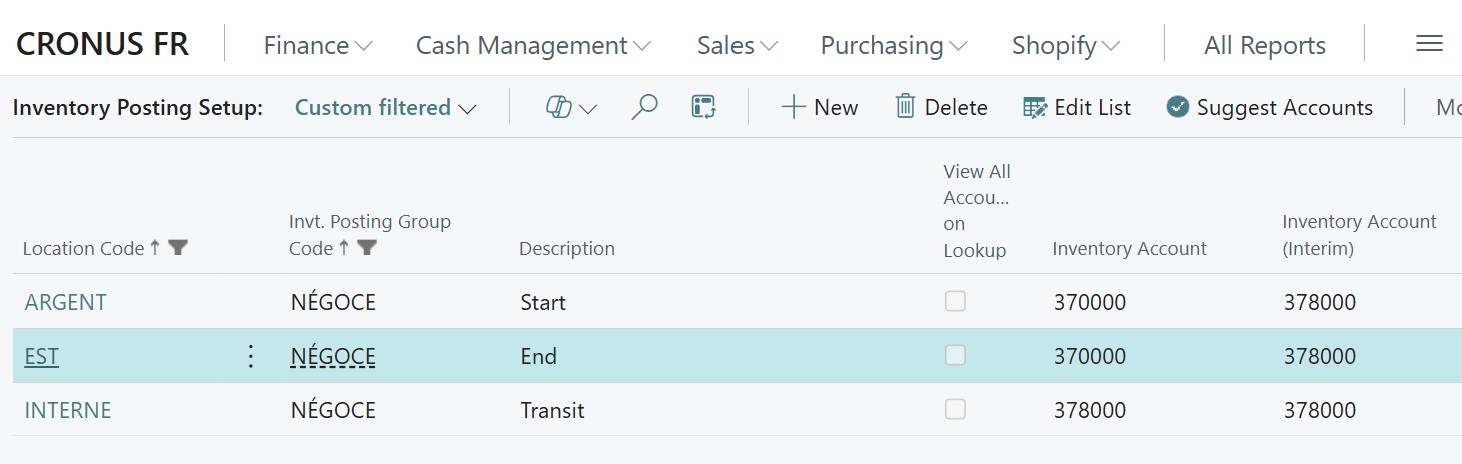
To orchestrate this flow without error, the setup must be rigorous in the Inventory Posting Groups page: for the departure and destination warehouses, fill in account 371 (🇫🇷371 🇬🇧1200 🇮🇹13.10) in the "Inventory Account" column and 378 (🇫🇷378 🇬🇧1250 🇮🇹13.15) in the "Inventory Account (Interim)" column. The subtlety lies in the line dedicated to the transit warehouse: to force the system to isolate the "in transit" value on the balance sheet, it is imperative to fill in account 378 (🇫🇷378 🇬🇧1250 🇮🇹13.15) directly in the "Inventory Account" column. This configuration ensures that, during shipment, the value leaves the departure 371 (🇫🇷371 🇬🇧1200 🇮🇹13.10) to reach the transit 378 (🇫🇷378 🇬🇧1250 🇮🇹13.15), before returning to the final 371 (🇫🇷371 🇬🇧1200 🇮🇹13.10) during receipt, thus providing a clear reading of the in-transit inventory on your trial balance.
Transit flow mechanics
The accounting architecture of transit is broken down into two perfectly synchronized steps:
Upon transfer shipment
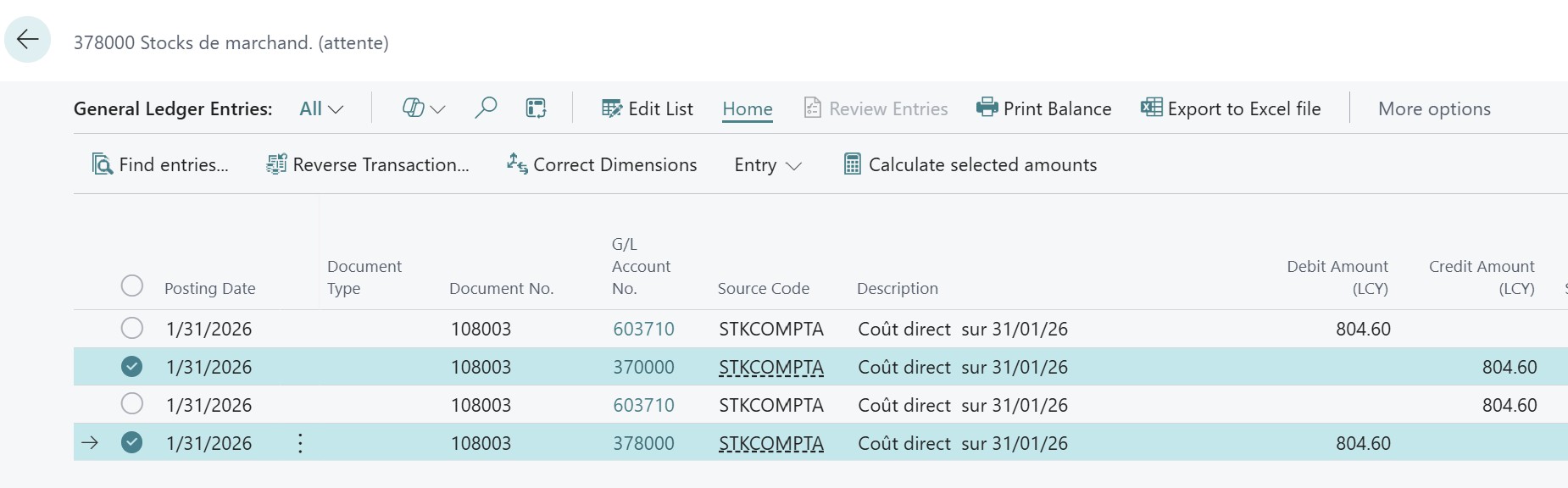
When shipping a transfer, Business Central executes an instantaneous accounting "switch" to ensure that the goods never disappear from the balance sheet, even when they physically leave their original shelf. The system then generates mirror entries:
- A first pair (Credit 371 (🇫🇷371 🇬🇧1200 🇮🇹13.10) / Debit 603 (🇫🇷603 🇬🇧5000 🇮🇹48.05)) settles the value in the departure warehouse,
- A second pair (Debit 371 (🇫🇷371 🇬🇧1200 🇮🇹13.10) / Credit 603 (🇫🇷603 🇬🇧5000 🇮🇹48.05)) immediately reintegrates it under the responsibility of the transit warehouse.
This double-entry mechanism neutralizes the impact on the income statement (account 603 (🇫🇷603 🇬🇧5000 🇮🇹48.05) is debited then credited with the same amount) while transferring the financial ownership of the asset from warehouse A to the transit warehouse. If you analyze the detail of the entries, you will find that while the general account remains the same, the warehouse code changes: the value has left available stock to join "in-transit stock", thus ensuring perfect traceability between the moment the truck is loaded and the moment it is received.
Upon transfer receipt
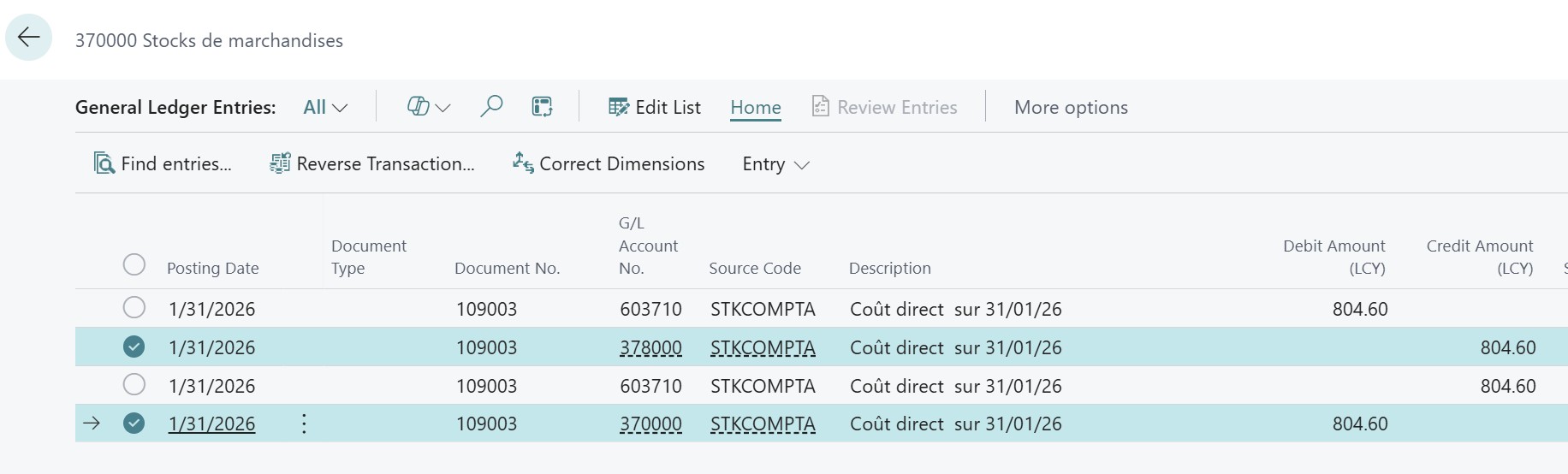
Upon transfer receipt, Business Central reproduces this reversed "switch" mechanism to record the end of the journey and the physical availability of the goods in the destination depot. The system generates a new set of mirror entries:
- A first pair (Credit 371 (🇫🇷371 🇬🇧1200 🇮🇹13.10) / Debit 603 (🇫🇷603 🇬🇧5000 🇮🇹48.05)) settles the residual value in the transit warehouse, thus ending the responsibility for "in-transit stock",
- A second pair (Debit 371 (🇫🇷371 🇬🇧1200 🇮🇹13.10) / Credit 603 (🇫🇷603 🇬🇧5000 🇮🇹48.05)) reintegrates this value into the balance sheet under the arrival warehouse code.
This final step mathematically closes the flow: the inventory variance account (603 (🇫🇷603 🇬🇧5000 🇮🇹48.05)) is again neutralized, and the inventory value returns to its standard inventory account (370/371 (🇫🇷371 🇬🇧1200 🇮🇹13.10)). The loop is closed, ensuring that every cent has transited uninterrupted from point A to point B, while maintaining a clear audit trail for the management controller.
Inventory Variances: The truth from the field
Inventory
To ensure rigorous traceability, the accountant must create two distinct Product Posting Groups in General Posting Setup.
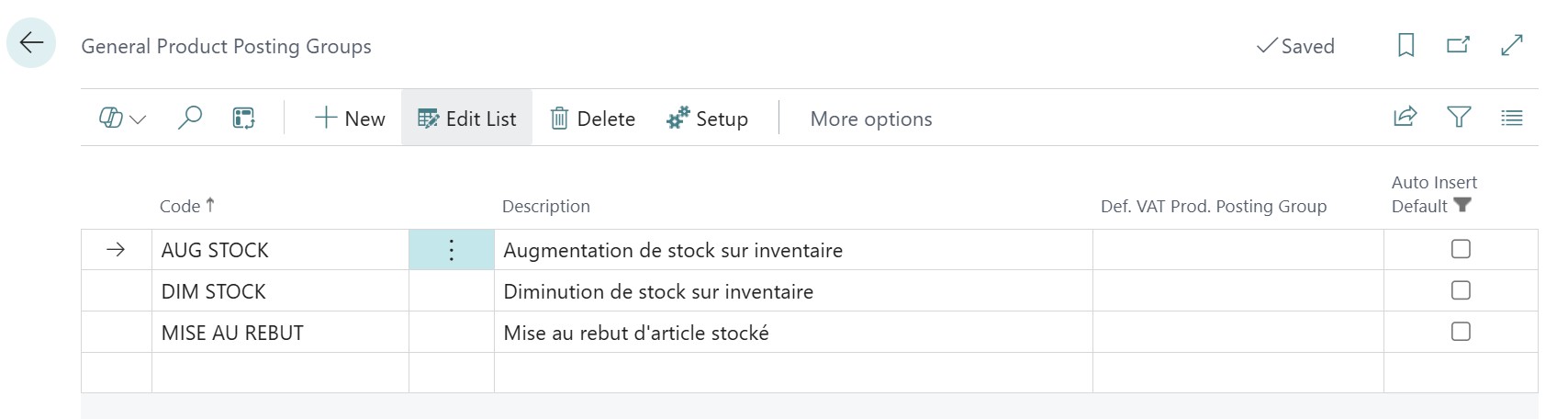
The first, dedicated to decreases, directs the Inventory Adjustment Account to 658 (Inventory Losses (🇫🇷658, 🇬🇧5100, 🇮🇹55.01.01)), while the second, dedicated to increases, points to 603 (🇫🇷603, 🇬🇧5050, 🇮🇹48.05.01) or 791 (🇫🇷791, 🇬🇧4900, 🇮🇹50.01.01).
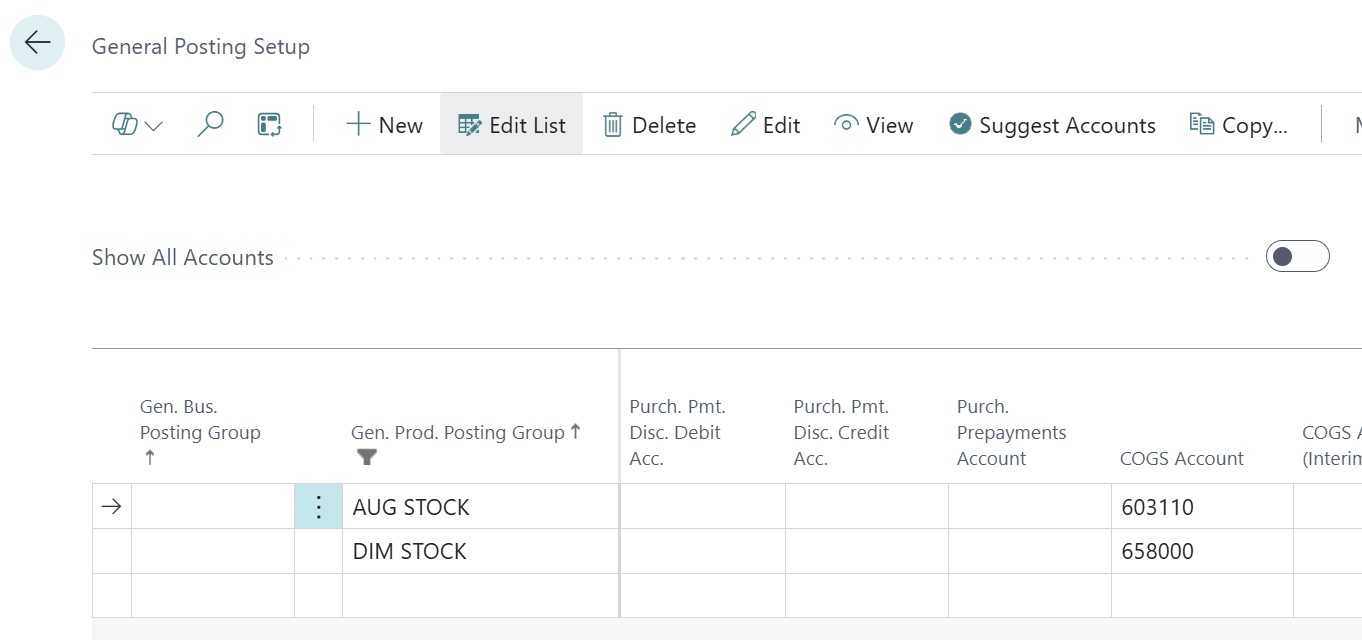
Account 603 (🇫🇷603, 🇬🇧5050, 🇮🇹48.05.01) is used for classic operating adjustments (reduction in charge consumed) and 791 (🇫🇷791, 🇬🇧4900, 🇮🇹50.01.01) to isolate the gain as an exceptional income or expense transfer.
The procedure requires the use of a Physical Inventory Journal where, after entering the physical count, special attention must be paid to the accounting routing: each line showing a positive variance must be manually associated with the increase product posting group, and vice versa for lines showing a decrease.
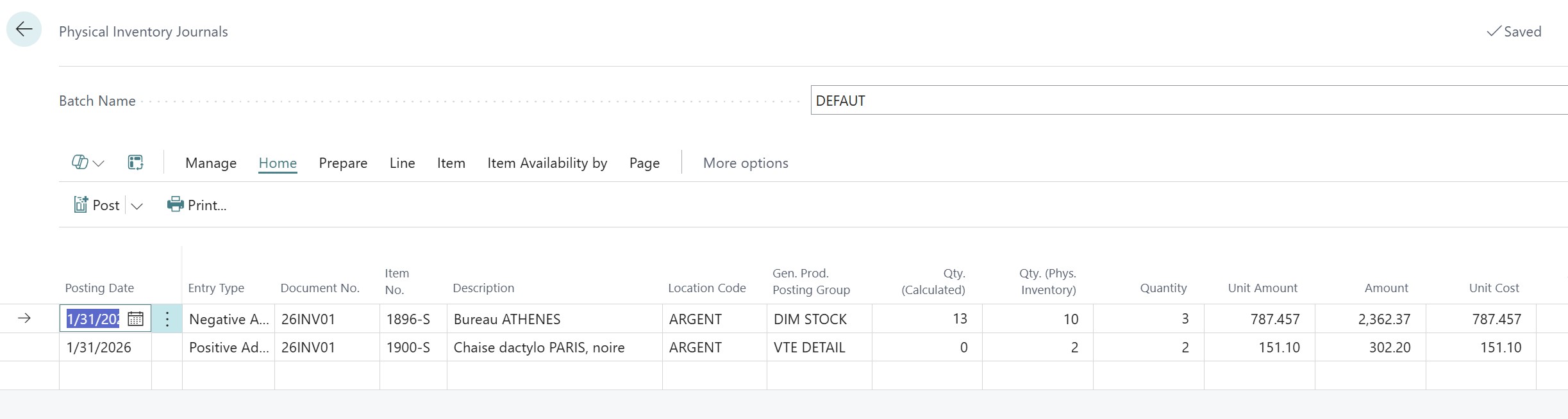
This entry discipline ensures that adjustment flows impact the correct items on the income statement, thus avoiding opaque compensation between inventory losses and gains.
Scrapping
For a financier, scrapping is an asset purging operation that must be isolated from usual sales flows. To orchestrate this routing, the setup relies on a double configuration:
- on the one hand, the inventory account (370 (🇫🇷370, 🇬🇧1200, 🇮🇹13.10.01)) is defined in the Inventory Posting Groups page at the intersection of the warehouse and the item's inventory posting group;
- on the other hand, the inventory adjustment account (671 (🇫🇷671, 🇬🇧900, 🇮🇹55.10.01) or 658 (🇫🇷658, 🇬🇧5100, 🇮🇹55.01.01)) is set up in General Posting Setup on a new line associating a blank market code with the SCRAP product group.
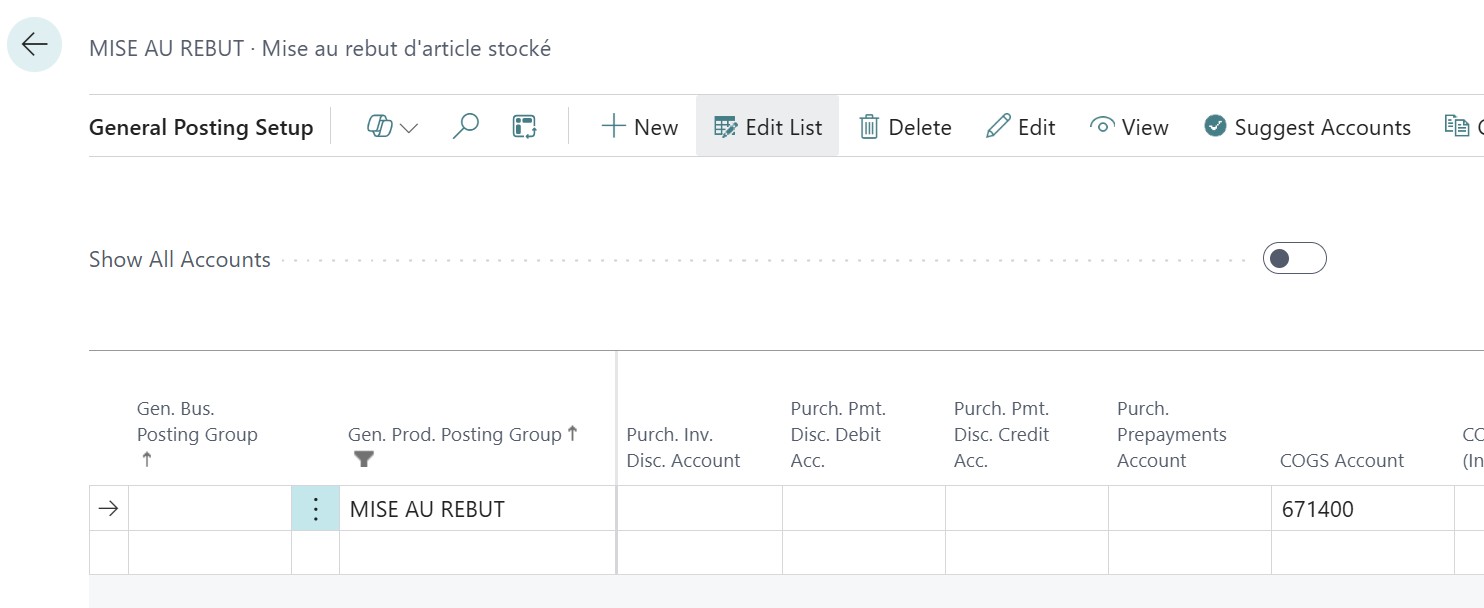
To guarantee the validity of the entry, it is imperative to use an item journal dedicated to scrap. During entry, make sure to select the relevant item, the SCRAP reason code, as well as a negative quantity (negative adjustment).
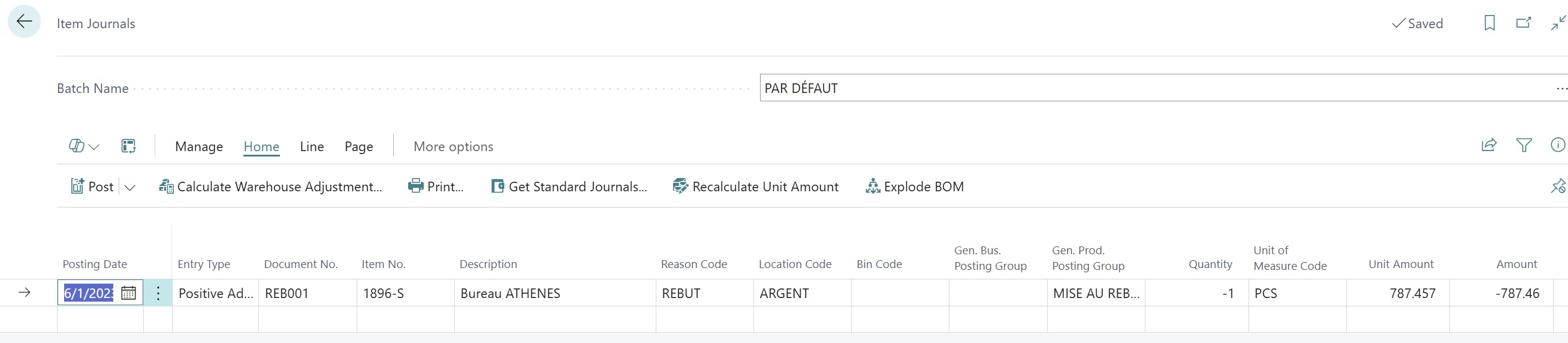
You must not forget to manually force the SCRAP product posting group on the journal line: it is this element that will serve as a routing to credit your account 370 (🇫🇷370, 🇬🇧1200, 🇮🇹13.10.01) and debit your exceptional expense account, thus preserving the clarity of your operating margin.
Conclusion: Mastering the unexpected
Managing advanced flows means accepting that the value of an item is a living data point. Item Charges are the ultimate reconciliation tool between logistics and finance. They transform an estimate into a real cost (Landed Cost), guaranteeing a margin analysis of surgical precision.
Now that we know how to manage flows and their hazards, how can we ensure that everything balances out at the end of the month? This is the subject of my next articles: financial control, audit, and closing.






No comments yet.