










Currency Management in Microsoft Dynamics 365 Business Central
Index 
Mastering multi-currency flows is a critical challenge for international financial steering. Business Central offers a rigorous framework to automate these processes, from rate retrieval to balance revaluation.
Currency Setup and Accounting Frameworks
The setup is based on the association of currency codes (ISO) with profit and loss accounts, adapted according to local charts of accounts (PCG, UK GAAP, IT).
Association with third parties and documents
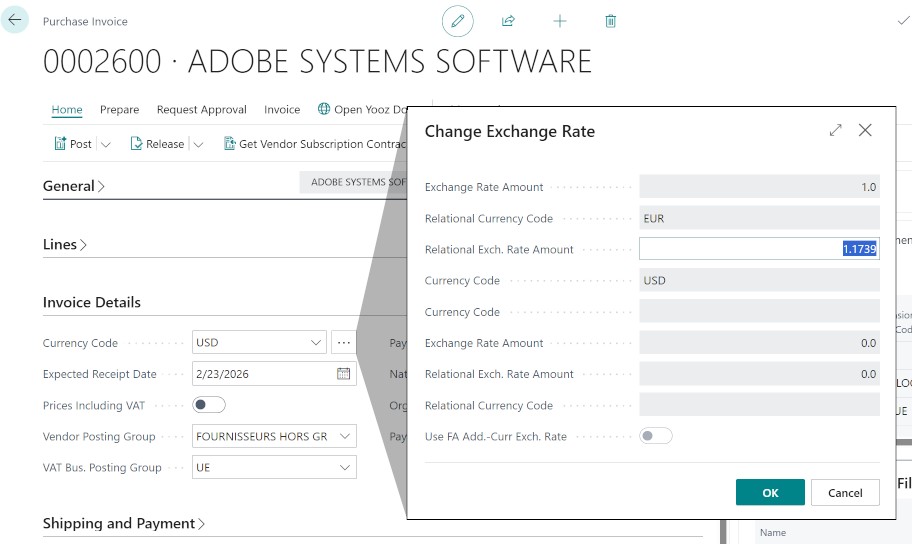
To automate entry, the Currency Code is filled in directly on the Customer, Vendor, and bank cards. When creating a general journal or a document (Sales/Purchase), this code is automatically inherited. However, the system offers total flexibility: it is possible to manually modify the specific exchange rate for an accounting entry via the Currency Factor field of the document, before its final posting. This "case-by-case" modification does not affect the global exchange rate table.
Accounts on the currency list
These accounts are used specifically during the posting of sales or purchase documents to estimate the exchange impact between the invoice posting date and the expected payment date or actual payment date.
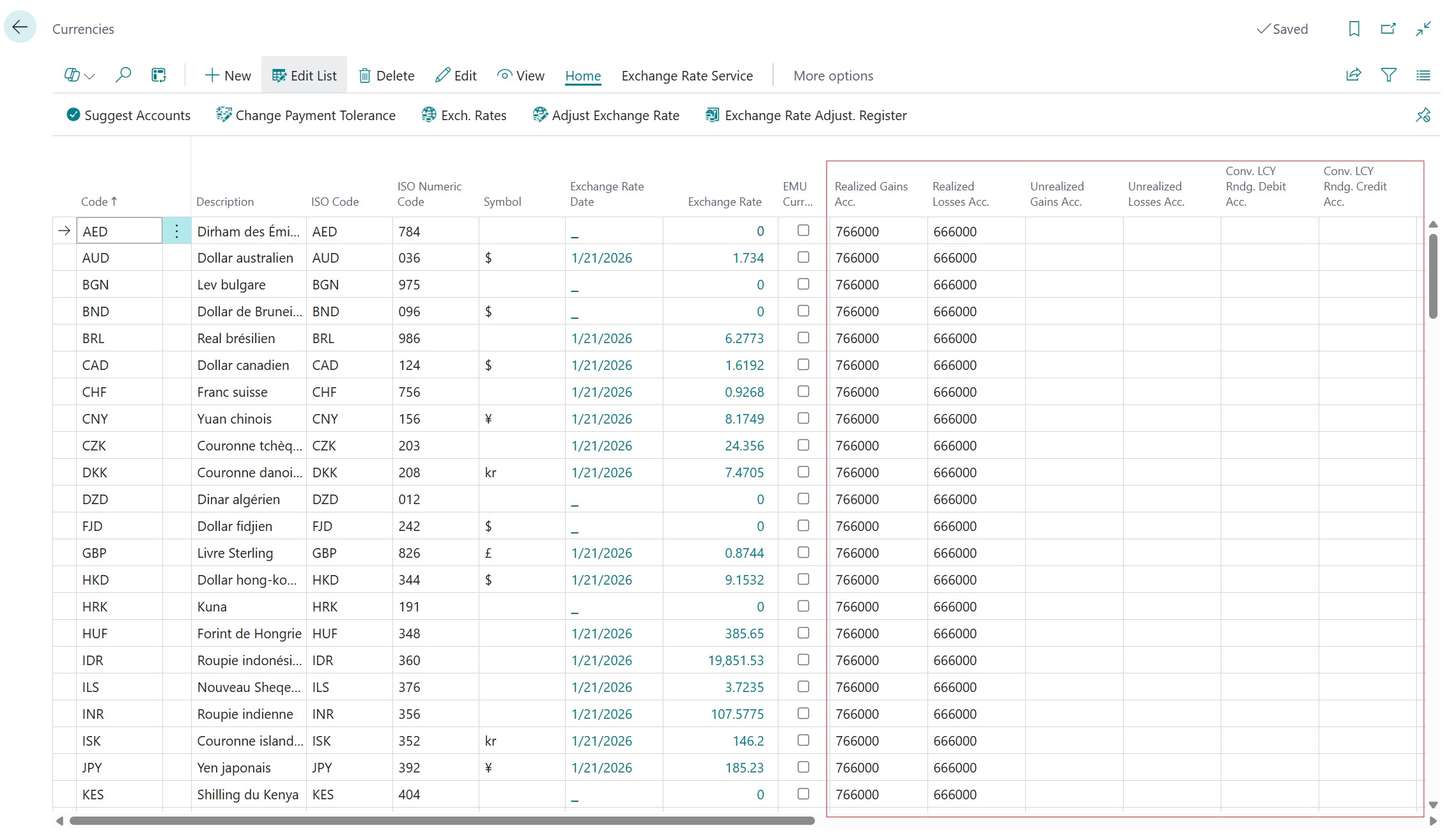
Realized (or recognized) gain/loss accounts
They record the final exchange variance recognized when a transaction is settled, i.e., at the time of an invoice payment. They clear the difference between the value recorded at the time of invoicing and the actual value at the time of settlement, thus impacting the final result of the fiscal year.
- Realized gains: 🇫🇷 766000, 🇬🇧 8000, 🇮🇹 80.01
- Realized losses: 🇫🇷 666000, 🇬🇧 9000, 🇮🇹 90.01
Unrealized gain/loss accounts
They serve to value receivables and payables in foreign currencies on the balance sheet during periodic closings (monthly or annual) according to the last known rate. They allow for the recognition of a latent value variation in accounting without it being final, as the variance will be regularized during the actual payment.
- Realized gains: 🇫🇷 477000, 🇬🇧 8005, 🇮🇹 80.05
- Realized losses: 🇫🇷 476000, 🇬🇧 9005, 🇮🇹 90.05
Management of LCY rounding
In addition to exchange variances, the Conv. LCY Rounding Debit Acc. and Conv. LCY Rounding Credit Acc. must be set up. They serve to balance entries when a minimal mathematical discrepancy (often 0.01) occurs during line-by-line conversion to the local currency.
- Realized gains: 🇫🇷 758000, 🇬🇧 8015, 🇮🇹 80.25
- Realized losses: 🇫🇷 658000, 🇬🇧 9015, 🇮🇹 90.25
Structure of the Exchange Rate Table
Before automating flows, it is essential to understand how Business Central stores values in the Currency Exchange Rates table.
To access this page, select a currency from the list and click Exchange Rates in the ribbon. Each line defines the value relationship between the foreign currency and the local currency (LCY).
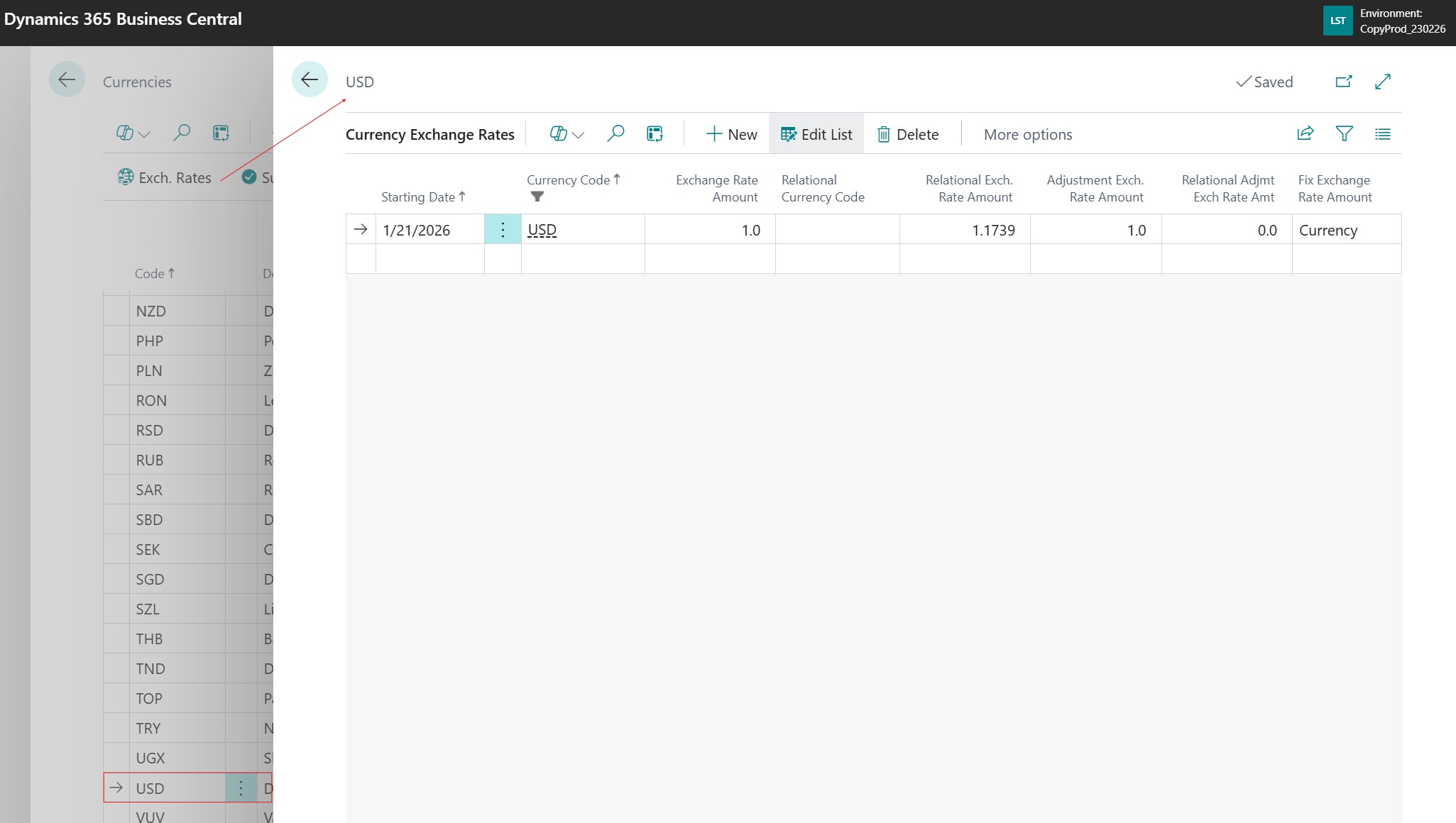
Key fields to fill in
- Starting Date: The date from which the rate applies.
- Currency Code: The code of the foreign currency concerned.
- Relational Currency Code: The currency code to be used to express the exchange rate. This is most often the local currency (therefore empty in this case).
- Relational Exch. Rate Amount: Generally represents the unit (1 or 100) expressed in the Relational Currency (therefore LCY).
- Exchange Rate Amount: The corresponding value in the selected currency.
- Relational Adjmt. Exch. Rate Amt: Generally represents the unit (1 or 100) expressed in the Relational Currency (therefore LCY), identical to the previous field and used by the “Adjust Exchange Rates” batch job.
- Adjustment Exch. Rate Amount: The corresponding value in the selected currency, identical to the previous field and used by the “Adjust Exchange Rates” batch job.
- Fix Exchange Rate Amount: Allows defining which part of the rate is fixed during entry (generally the currency should be chosen).
Automating Rates via Web Services
To guarantee data reliability, it is recommended to configure a Currency Exchange Rate Service, accessible from the currency list or from the feature search.
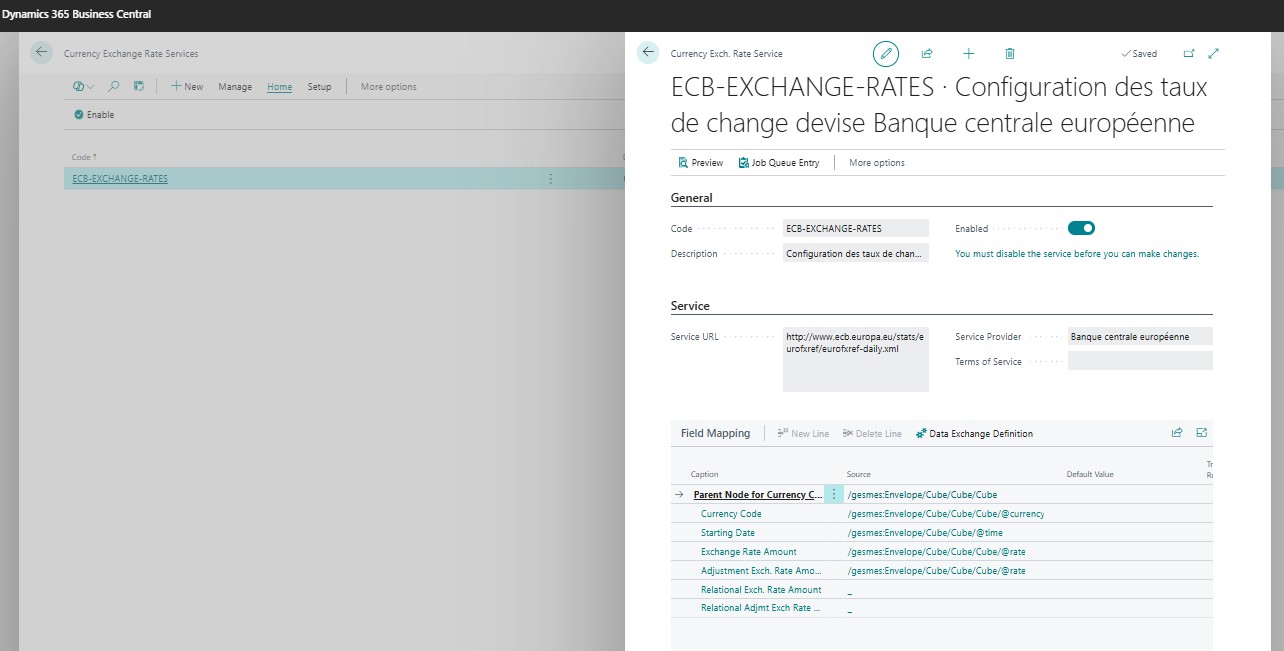
Technical configuration
Service Link
Use the URL of the European Central Bank (ECB):http://www.ecb.europa.eu/stats/eurofxref/eurofxref-daily.xml
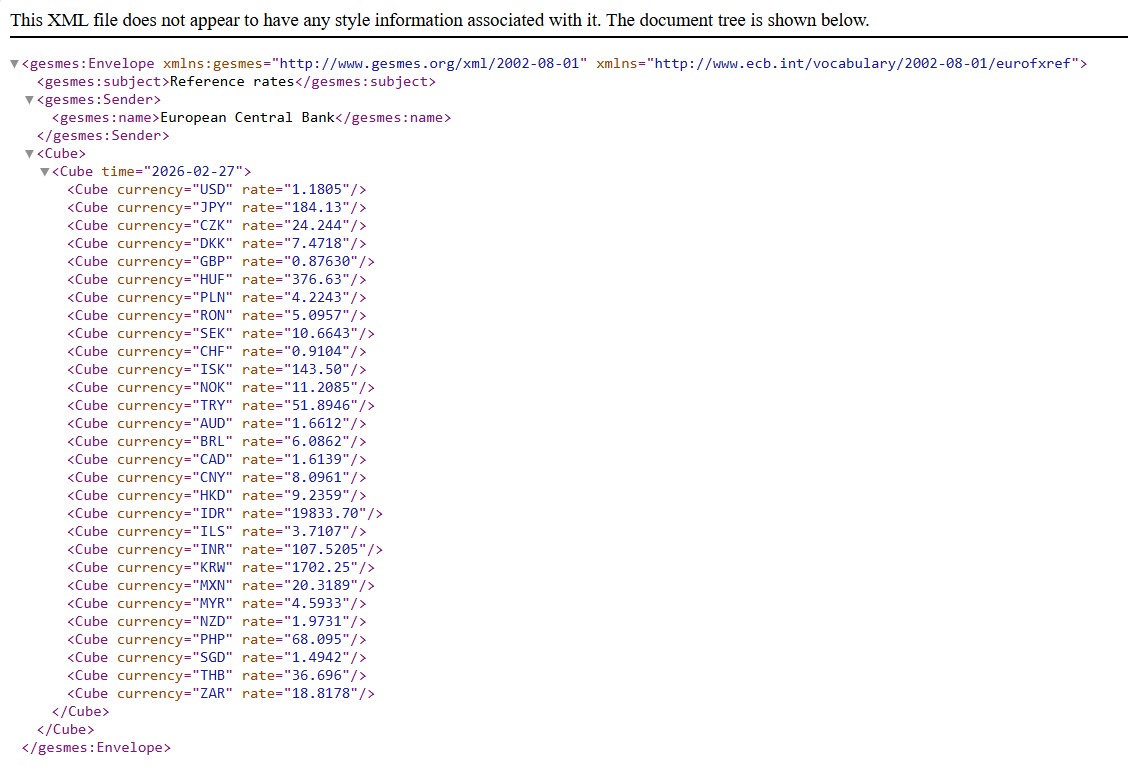
Data Exchange Definition
You must create a definition named "European Central Bank Currency Exchange". The File Type must be "XML", with a Column Definition Type set to "Generic Import". You will then need to establish a precise mapping between the XML file tags and the table fields.
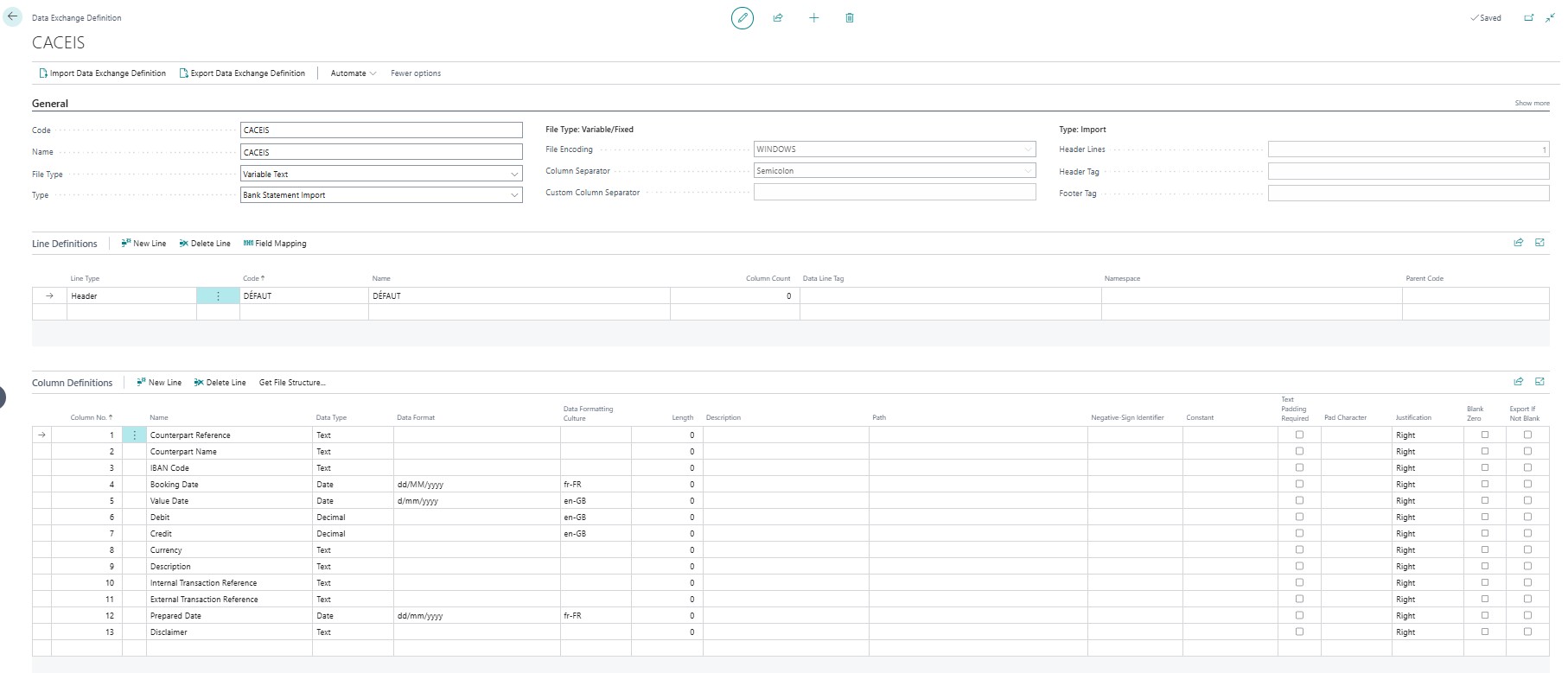
It is important to define the columns of the data exchange definition according to the data available in the xml file definition.
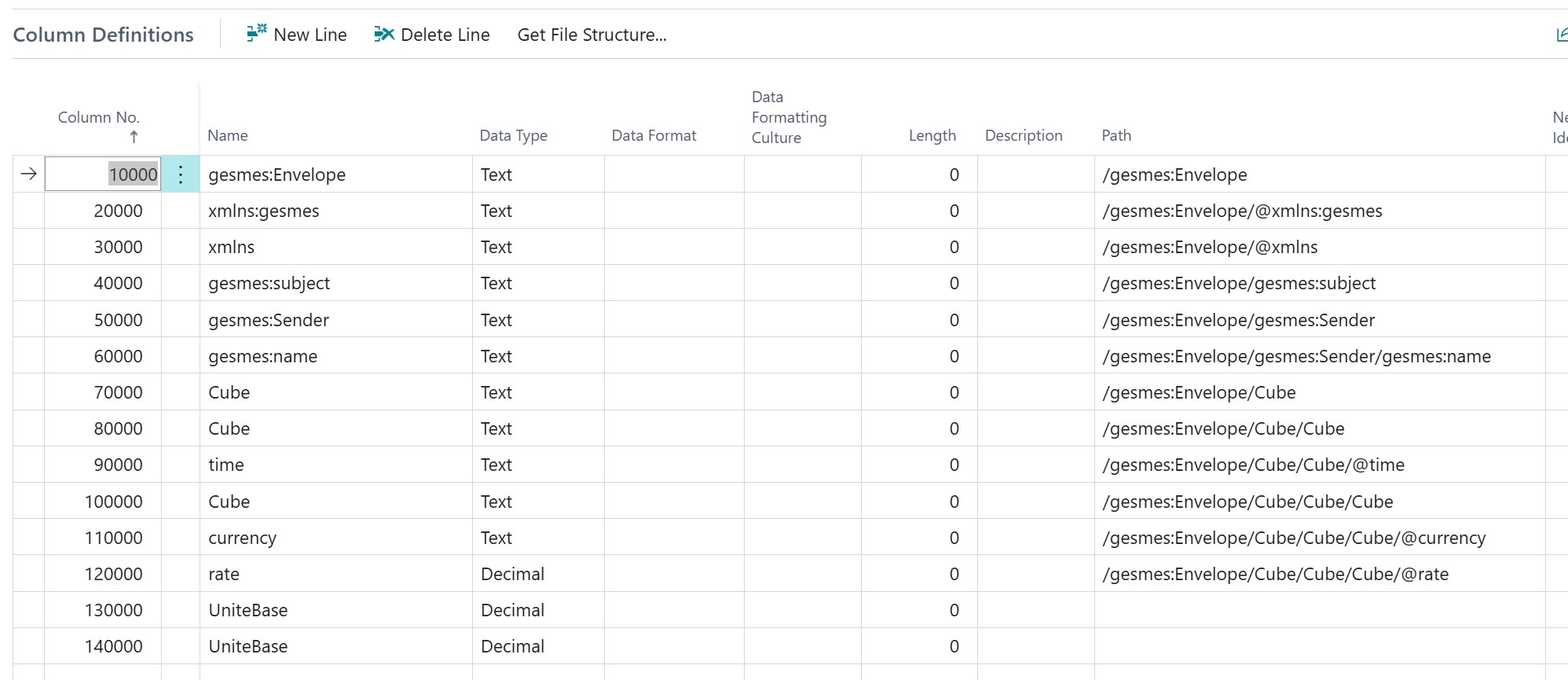
Field Mapping
Field mapping allows associating each column of the data definition with each type of data in the exchange rate table. The Table ID, 330, is necessary to be able to select the fields that compose it.
It is necessary to define the Parent node (the XML path to the data) in order to link the tags to the BC fields: Currency Code, Starting Date, Exchange Rate Amount, and Relational Exch. Rate Amount.
Activation
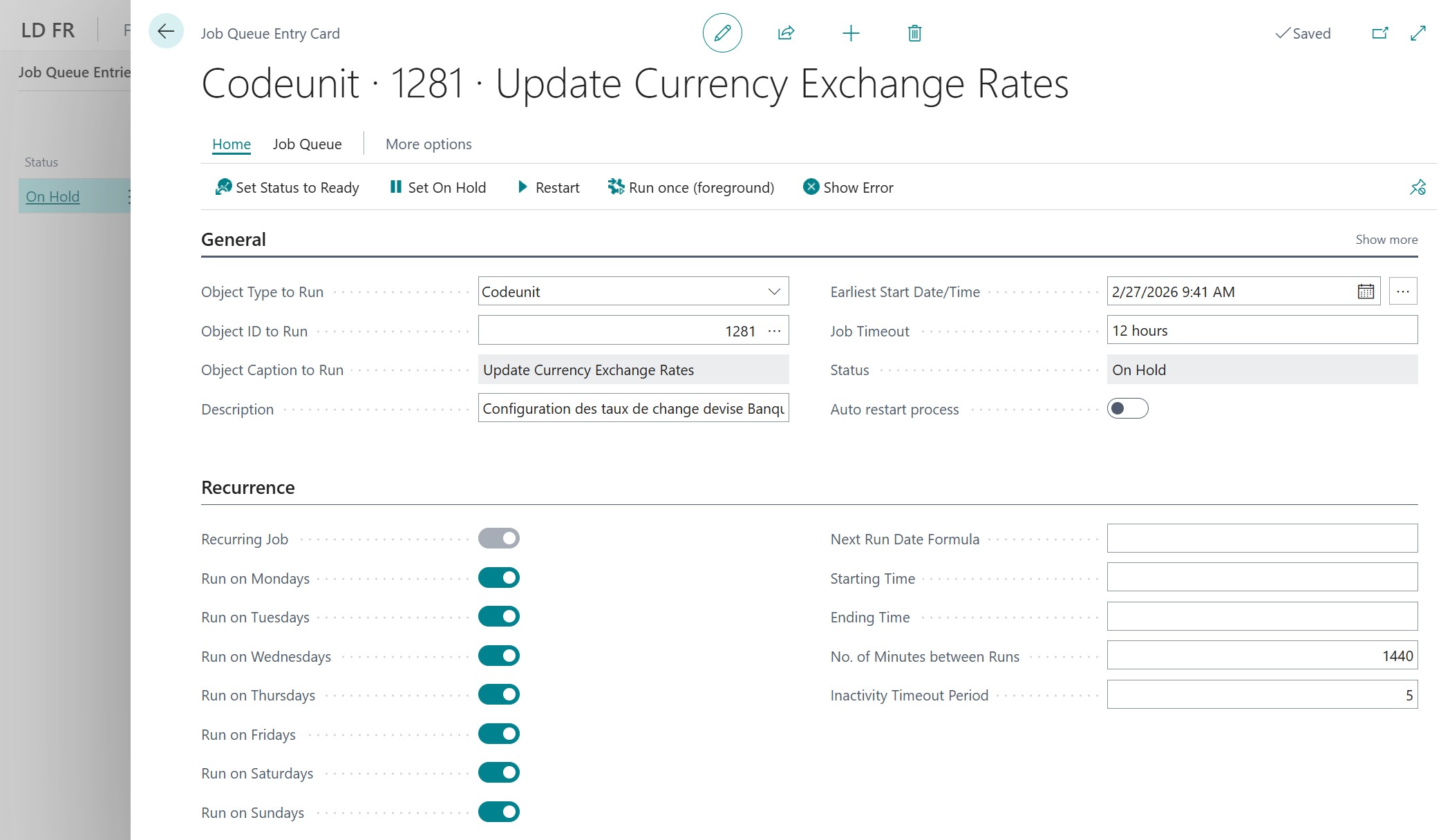
Once the mapping and definition are complete, activate the service from the Currency Exchange Rate Services page. You can then test the retrieval and schedule a daily update via the job queue.
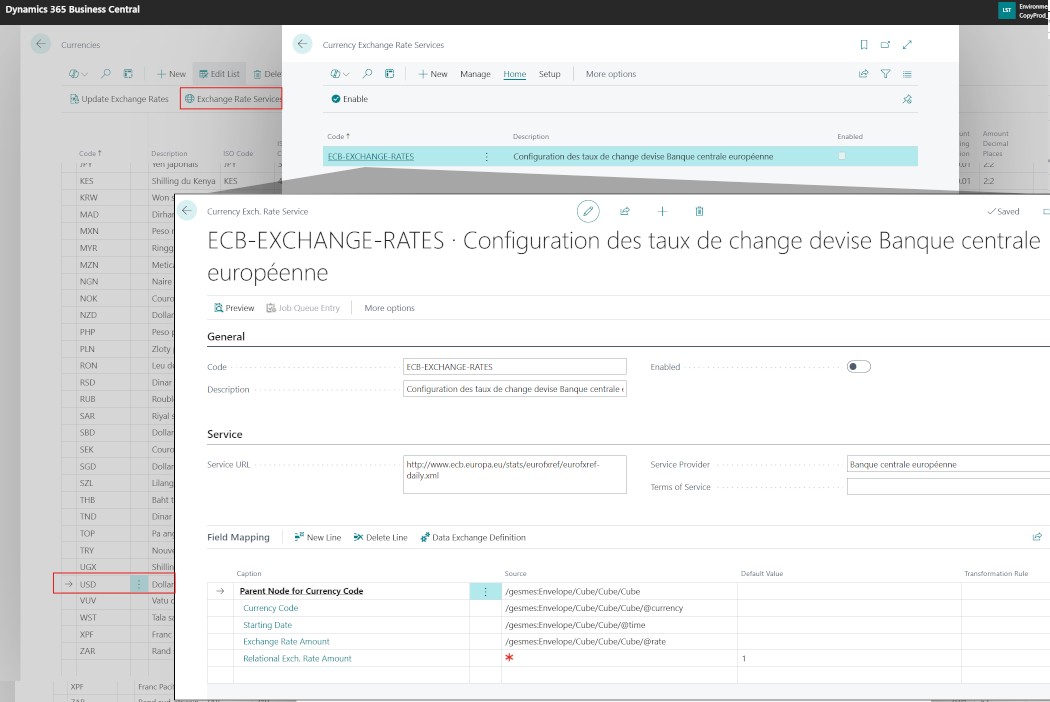
💡Activating the service will create a task in the job queue that must be scheduled on a daily basis. To do this, a user with a license whose name is in the Azure domain of the BC environment must be used.
Exchange Rate Revaluation: Procedure and Impacts
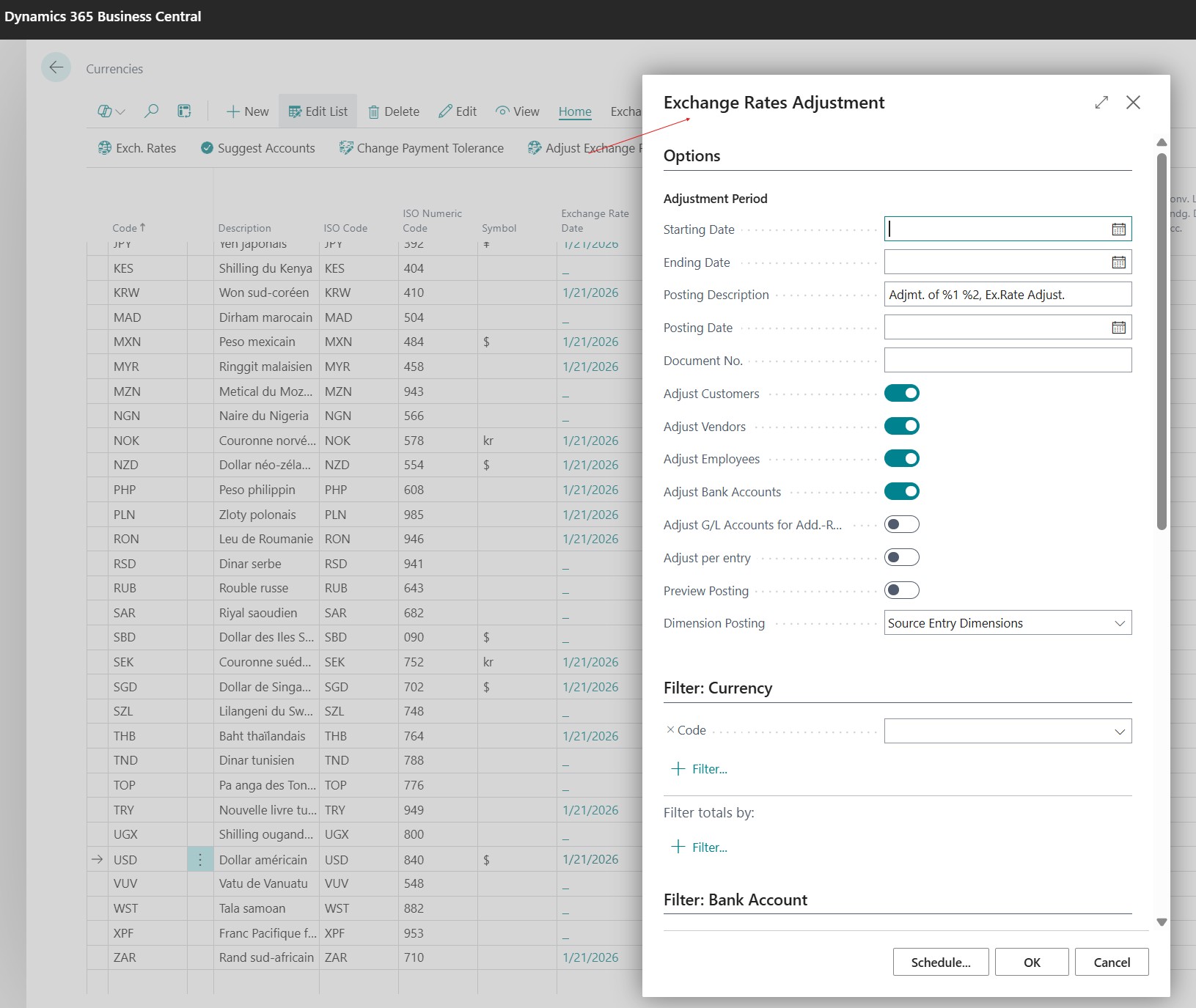
The Adjust Exchange Rates batch job allows for the recalculation of the local value of open entries. Here are the key options to launch the process:
Period and text parameters:
- Starting Date / Ending Date: Defines the range of entries to analyze. Generally, the last day of the month is used for the ending date.
- Posting Date: The date on which the adjustment entries will be posted in the accounting (often identical to the ending date).
- Posting Description: You can customize the text of the generated entries. The use of variables is possible: “%1” represents the currency code, “%2” the document no., and “%3” the exchange rate used.
- Document No.: The Document No. used in the exchange adjustment accounting entries. If there is no No., an error message will block the validation.
Adjustment targets:
- Adjust Customers/Vendors/Employees/Bank Accounts: These switches allow choosing the types of accounts to revalue.
- G/L Accounts (ACY): Used only if you manage an additional reporting currency to adjust general ledger accounts.
- Adjust per Entry: If enabled, the system creates an adjustment entry for each open invoice. If disabled, it accumulates the adjustment per account, which is more readable but less detailed.
Controls and Analytics:
- Preview Posting: Allows for visualizing the accounting entries before launching the final processing, an essential control to avoid errors.
- Dimension Validation: Determines how dimensions (profit centers, projects) are transmitted to the adjustment entries. You can choose to carry over the dimensions from the original entries.
- Currency Code Filter: Allows for launching the processing only for a specific currency (e.g., USD only) rather than for all active currencies.
Payment Tolerance and Acceptance Thresholds
To optimize application, Business Central allows defining a margin of error via the “Payment Tolerance %” and “Max. Pmt. Tolerance Amount” fields. The system validates the variance if the difference between the invoice and the payment respects the more restrictive of these two limits.
Account setup on the Currency card
Unlike exchange variances linked to rates, the accounts dedicated to payment tolerance are to be specified in the “Realized G/L Gains Account” and “Realized G/L Losses Account” fields of the currency card. These are the accounts that will receive the balancing entries for small application remainders.
Posting schemas and associated accounts
When the variance is validated within the tolerance threshold, the system automatically settles the invoice and the payment according to the localization:
- Realized G/L Gains Account on payment tolerance 🇫🇷 758000, 🇬🇧 8010, 🇮🇹 80.20
- Realized G/L Losses Account on payment tolerance 🇫🇷 658000, 🇬🇧 9010, 🇮🇹 90.20
Posting logic
In case of gain:
- Debit: Customer / Vendor account (to settle the variance)
- Credit: Gain account (Realized G/L Gains Account)
In case of loss:
- Debit: Loss account (Realized G/L Losses Account)
- Credit: Customer / Vendor account (to settle the variance)
Adjustment mechanics and generated entries
Once the Adjust Exchange Rates process is validated, the system does not just pass a global entry in the general ledger, it updates each sub-ledger to reflect the market reality.
The system does not change the currency amount of the invoice (which remains due), but it generates a detailed entry linked to the initial accounting entry. This adjustment entry increases or decreases the value of the receivable or debt in local currency (LCY) on the balance sheet, with the unrealized gain or loss account as the counterpart.
Scenario A: The currency rate has increased (Unrealized Gain)
- Debit: 🇫🇷 401000, 🇬🇧2100, 🇮🇹 45.05 - Customer Account (Increase in asset)
- Credit: 🇫🇷 666000, 🇬🇧 9000, 🇮🇹 90.01 - Unrealized Exchange Gain (Income)
Scenario B: The currency rate has decreased (Unrealized Loss)
- Debit: 🇫🇷 766000, 🇬🇧 8000, 🇮🇹 80.01 - Unrealized Exchange Loss (Expense)
- Credit: 🇫🇷 401000, 🇬🇧2100, 🇮🇹 45.05 - Customer Account (Decrease in asset)
Example of a purchase invoice in USD posted on February 26:

After revaluation, this invoice has an exchange loss:

By clicking on the LCY amount one can see the detail of the revaluation:

By searching for the posted entries one can see the loss entry:

Final Result
The set of these detailed entries justifies the new balance of the control account in the General Ledger. Upon later application of the invoice (at the time of payment), the system will automatically reverse these unrealized adjustments to make room for the "realized" exchange gain or loss.
Conclusion: Towards a Controlled Automation
Currency management in Microsoft Dynamics 365 Business Central is not limited to a simple technical setup, it secures your margins and guarantees the reliability of your financial reporting. By automating exchange rate flows and mastering adjustment processes, you transform a complex constraint into a smooth process.
And you, how do you manage your international flows?
Every Business Central implementation is unique and brings its share of technical or organizational challenges:
- Have you encountered specific difficulties during the implementation of the ECB exchange rate service?
- How do you manage the reconciliation of your payment variances on a daily basis?
- Do you use specific dimensions to track your exchange impacts by project or by region?






No comments yet.