










Generating the FEC in Business Central: usage, planning, and field mapping
Index 
The previous article detailed the architecture of the Audit File Export module and its configuration, first common to all, then specific to SAF-T and the FEC. Once this configuration is complete, three questions remain: how to manage an export on a daily basis, how the processing is scheduled in the background, and above all, how each of the eighteen regulatory fields of the FEC is built from the data already present in Business Central. These three points are the subject of this article.
Control an export from the Audit File Export Doc. Card page
Each export corresponds to a new document, created from the Audit File Export Documents list.
The format is inherited from the general settings, then modified. For the FEC, the card displays a dedicated group of fields: the inclusion of opening balances, the default journal code, and the optional filter on the chart of accounts.

The SAF-T-specific fields (monthly or daily breakdown, Zip archiving, header comment) remain hidden when the FEC format is selected. The map adapts to the format, not the other way around.

The Processing group displays the progress status: document status, start and end dates of execution, and for SAF-T only, the result of the last data check.

A subpage lists the processing lines, only one for FEC in most cases, more for SAF-T depending on the breakdown chosen.
Each line offers four actions: restart processing, display the error message of the last failed attempt, consult the activity log, download the product file.

Four actions structure the document lifecycle.
- Data control, reserved for SAF-T: checks upstream the completeness of customer, supplier, bank account and VAT settings.
- Startup: creates the processing lines and launches the generation. For the FEC, this startup checks that the period dates and the SIREN number are entered, and fails if no entry corresponds to the defined scope.
- File Re-creation: Rebuilds the final result from the data already collected, without restarting the entire collection process; useful for changing an archiving option without starting all over again.
- Download: opens the list of produced files.

Once all lines reach the "Completed" status, the generation of the final file begins automatically. Therefore, the recreation action is only used for a deliberate new generation.
Background treatment planning
The module does not rely on the classic Business Central task queue, but on the internal task scheduler, which runs sessions in the background without a visible queue.
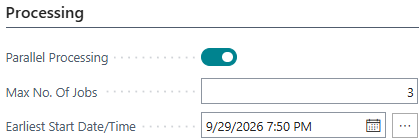
Three parameters govern this behavior on the map:
- Parallel processing, which can only be activated if the environment technically allows it.
- Maximum number of simultaneous tasks, set to three by default.
- Earliest start date/time, which determines the actual launch of planned tasks.
A delay of a few seconds separates each line planning, to limit locking conflicts between concurrent sessions.
The document status follows a simple logic: not started, in progress, then finished or failed depending on the outcome of the lines that compose it.
Each line has an attempt counter, initialized to three.
In case of failure, the module logs the error in the activity log, decrements the counter, and automatically restarts the lines that have not yet started.
An additional mechanism detects lost sessions (a server restarted during processing, for example) and restarts lines that remained blocked during execution without any manual intervention being necessary.
However, this feature lacks native recurrence. No integration with the standard task queue is provided by default.
Automating a periodic generation, monthly for SAF-T or annually for FEC, requires encapsulating the module call in a custom codeunit, itself triggered by a standard queue entry. Otherwise, the triggering remains manual, which is suitable for occasional use, less so for recurring production.
The mapping of the eighteen FEC fields
The FEC generation engine scans the general ledger entries for the period, within the limits of any account filter defined, and constructs one line per entry. The mapping with Business Central data follows a straightforward logic, with a few exceptions that warrant attention.
Identification of the journal and the handwriting
- JournalCode / JournalLib: These come from the source code of the entry, or from the default source code specified in the document when the entry does not have one. The associated label is the one declared in the source code record.
- EcritureNum: takes the internal Business Central transaction number, in a unique and continuous sequence across the entire file, never repeated by journal.
- EntryDate: corresponds to the date the entry was recorded.
Account and third-party identification
Account identification is direct.
- CompteNum / CompteLib: take the number and name of the general account as recorded in the chart of accounts.
- CompAuxNum / CompAuxLib: These fields are only populated when the exported general ledger account corresponds to the customer or supplier counterparty account, or a bank reconciliation account. For other accounts, these fields remain empty, in accordance with the rule of the conditional field, which is always present but sometimes empty. When a transaction involves multiple parties, the module enters a conventional value, an asterisk in CompAuxNum, and an explicit note in CompAuxLib, which must be documented in the accompanying description.
Supporting document, description and amounts
- PieceRef / PieceDate: directly reproduce the document number and date of the entry.
- EcritureLib: corresponds to the description entered on the writing.
- Debit / Credit: includes the debit and credit amounts as recorded, formatted without thousands separator and with a decimal comma.
Lettering, validation and currency
- EcritureLet / DateLet: These fields display the document references for the accounting entries applied to the settlement and the date of the last application found. These fields remain empty if no reconciliation has been performed.
- ValidDate: Since Business Central does not have a separate draft mode for the general ledger, this field uses the creation date of the journal entry batch (the G/L Register) rather than a business validation date. In most cases, this date coincides with the posting date. A discrepancy may occur if the entry is delayed relative to the accounting event.
- Amount/Foreign currency: only provide information on entries involving a foreign currency, and remain empty on accounting currency transactions.
Special case: opening sales
One case deserves separate mention. When the corresponding option is activated on the document, the module generates balance lines with a fixed journal code, 00000, a fixed journal label, OPENING BALANCE, and a fixed entry number, zero, for all these lines. This convention, perfectly legible in the file, must nevertheless be explicitly stated in the accompanying description; otherwise, it appears as a break in the numbering system to an auditor unfamiliar with its origin.
This level of technical detail directly determines the conformity of the product file.
The next article concludes this series with the remaining operational aspects: necessary permissions, troubleshooting steps in case of failure, purging of obsolete documents, and above all the points of vigilance to know before considering an FEC export as definitively reliable.






No comments yet.