



Acquisition, historical data import, and depreciation processing under Dynamics 365 Business Central
Index 
Following the configuration of depreciation rules and the setting up of accounting rules, the operational deployment of the Fixed Assets module begins with the recording of incoming flows. The entry of an asset into the company's balance sheet marks the starting point of the fixed asset lifecycle in Microsoft Dynamics 365 Business Central. This process encompasses the initial financial allocation, the import of historical data during the go-live phases, and the automatic execution of recurring depreciation processes.
1. Methods of Accounting for Acquisition Cost
Recording the acquisition cost of a fixed asset is done via two separate channels depending on the nature of the transaction and the company's purchasing workflow.
A. Direct accounting via purchase document (Purchase Orders & Invoices)
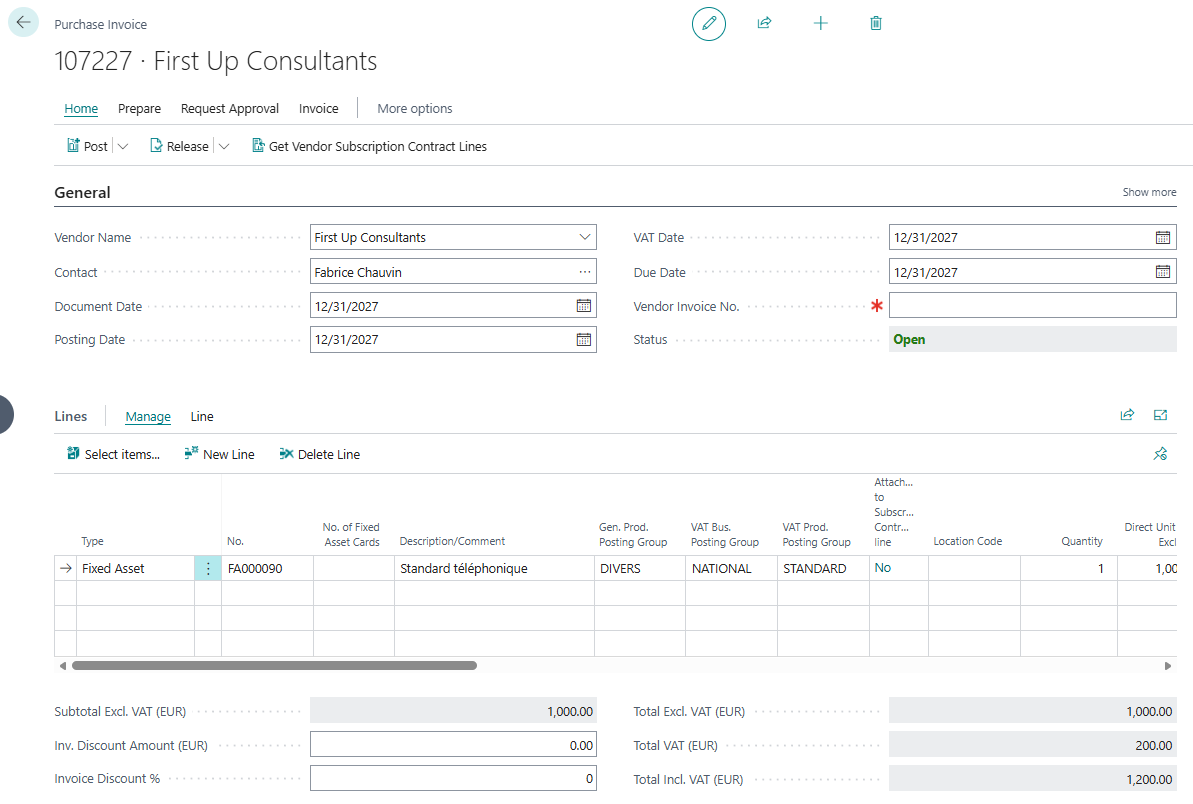
When an asset is acquired from a third party, the transaction is recorded directly on a line item in the purchase document:
- The “Type” field is set to “Fixed Asset”.
- The number of the asset in question is entered in the “No.” field.
- On the line, the allocation of the amount feeds the debit of the balance sheet account (Class 2) associated with the accounting group of the asset as soon as the document is validated.
- In the event of multiple acquisitions of identical equipment, the “Fixed asset record number” field allows for the automatic generation of duplicate asset records during validation.
B. Entry via Fixed Asset Accounting Sheet (FA G/L Journal)
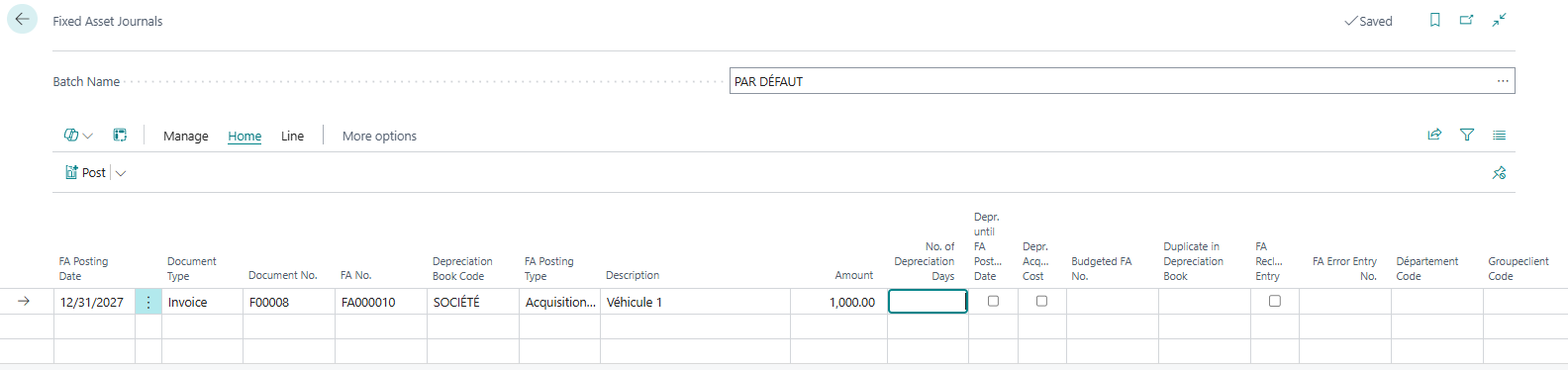
When the acquisition results from an internal contribution, capitalization of work, or a direct adjustment without a supplier document, the transaction is validated via the "Fixed Asset Accounting Sheet". The "Fixed Asset Accounting Type" field is then set to "Acquisition Cost".
The choice of the offsetting account is adapted to the economic nature of the transaction. The allocation is made directly on the entry line using the “Opposing Account Type” field:
- Cash Purchase: Selection of a bank or treasury account (Class 5).
- History resumption or start-up: Use of a suspense account or contribution resumption account to settle opening entries.
- Capitalized production: Allocation to an asset production revenue account (Class 72) when the asset is produced internally by the company.
2. Resumption of historical data and opening transactions
When the module is put into service on an existing environment, the transfer of net book value (NBV), initial acquisition costs and accumulated depreciation is orchestrated using import configuration packages.
Preparation of the import matrix
A configuration package targeting the fixed asset sheet lines table (Table 5621) is exported to Excel.
Integration of opening values
For each asset in the portfolio, two lines are entered in the file:
- A line of type “Acquisition cost”bringing the historical gross amount.
- A line of type “Depreciation”bearing the cumulative total of previous allocations (expressed as a negative amount).
Application of the package and validation
Once the file has been re-imported and the data applied to the auxiliary sheets, validation is performed to generate the opening entries.
3. Execution of the batch process "Calculate Depreciation"
The calculation of periodic (monthly or annual) depreciation allowances is fully automated by the application engine via the “Calculate depreciation” batch processing.
Batch processing settings
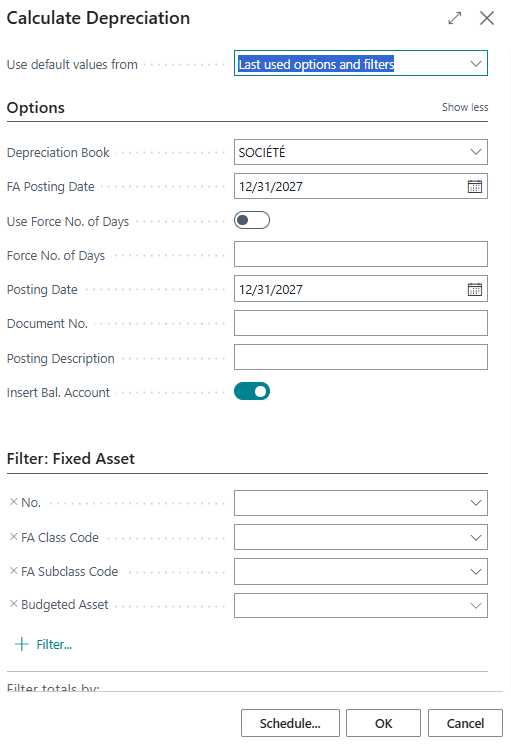
When the process is launched, the following options are configured:
- Depreciation Law: Selection of the accounting book relevant to the calculation.
- Depreciation end date: Stop date up to which depreciation is calculated.
- Fixed asset accounting date & Accounting date: Dates assigned to the generated sheet lines (must be identical if equality control is enabled on the law).
- Document No. & Entry Description: References assigned to future entries in the General Ledger.
Generating and validating the sheets
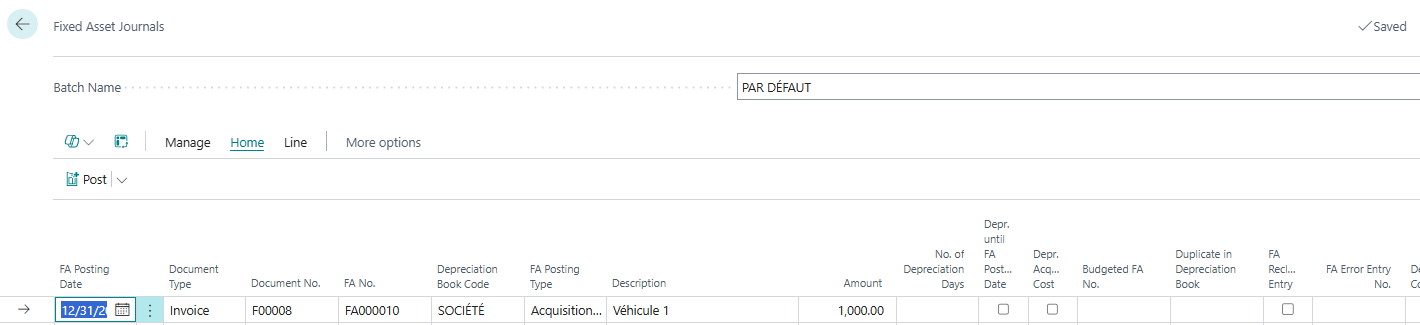
Following the calculation, proposal lines are automatically created in the “Fixed Asset Accounting Sheet” (for integrated accounting systems) or in the “Fixed Asset Sheet” (for non-integrated accounting systems). The amounts calculated “pro rata temporis” according to the method defined on each sheet are presented there for review before final validation in the accounting system.
Impacts of validation on journals and the general ledger
Once the proposal lines have been verified and the sheet validated, the system automatically generates the corresponding accounting entries:
- Fixed asset accounting entries (FA Ledger Entries): Regardless of the depreciation law settings, auxiliary entries are systematically created to update the net book value, accumulated depreciation, and financial history of each asset record.
- General Ledger Entries (G/L Entries): If the depreciation method is configured in integrated mode for the relevant entry type, the validation simultaneously generates entries in the General Ledger. The depreciation expense (Class 6) and accumulated depreciation (Class 28) accounts are then debited and credited directly in the income statement and balance sheet.

4. Conversion of a Budgeted Fixed Asset into an Actual Acquisition
When a previously planned investment project materializes, the budgeted fixed asset is transformed into a real asset.
- When entering the purchase invoice or the actual acquisition sheet for the new fixed asset, the number of the planned asset is indicated in the “Budgeted fixed asset no.” field.
- Once the actual acquisition cost has been validated on the final asset, the original budgeted fixed asset record (on which the “Budgeted Fixed Asset” switch was activated) is manually deleted or closed to avoid any duplication in the financial projection statements (Fixed Asset - Projected Value).
Conclusion
Mastering asset acquisition, historical data migration, and automated depreciation calculations ensures a smooth transition to Microsoft Dynamics 365 Business Central and guarantees the continued reliability of financial statements. Automated batch processing minimizes manual intervention and ensures accurate pro rata calculations across the entire asset portfolio.
In the next article in this series on fixed asset management in Business Central, adjustment and end-of-cycle operations will be discussed in detail: the treatment of exceptional impairments, asset revaluation, disposal management, and the accounting for scrapping.






No comments yet.
Feel like commenting on this article? sign up, it's free!