



Depreciation laws and accounting integration in Business Central
Index 
After addressing the module's general configuration and the structuring of fixed asset records, the financial processing of assets requires defining the rules for calculating impairment losses and their impact on financial statements. Within the Fixed Assets module of Microsoft Dynamics 365 Business Central, the regulation of depreciation methods and the management of cash flows rely on the configuration of Depreciation Books. This tool allows for simultaneous compliance with statutory accounting requirements, tax law, and internal management reporting.
1. Role and structure of depreciation laws
Depreciation laws define the financial treatment rules applied to assets. One or more laws may be assigned to the same fixed asset (e.g., one law for statutory accounting, one law for tax tracking, and one law for IFRS standards).
Constraints and rounding rules
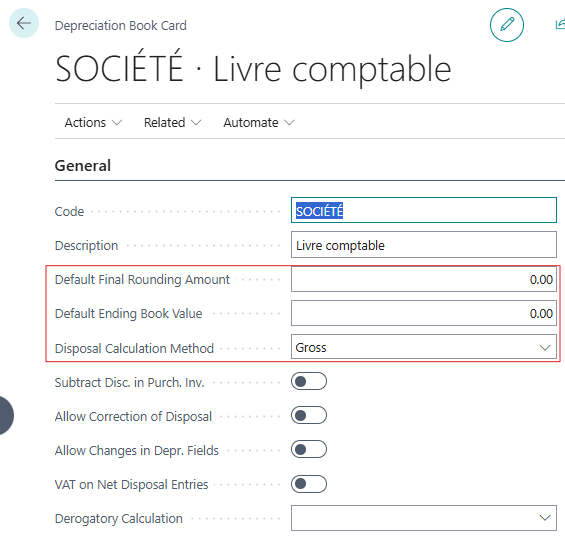
- Final amount rounded by default: This parameter absorbs the residual balance during the last calculated depreciation to ensure that the final book value reaches exactly zero at the end of the useful life.
- Definition Final Book Value: The minimum value below which the Net Book Value (NBV) cannot fall is set via this field (e.g., mandatory residual value). It prevents the asset from reaching zero by deducting this residual amount from the final depreciation expense.
- Disposal Calculation Method: This choice determines whether the disposal is recorded as “Net” (The system automatically calculates the loss or profit and records the single net balance on the disposal profit and loss account) or as “Gross” (The sale proceeds and the book value disposed of are recorded separately on their respective debit/credit accounts).
The fields “Final amount rounded by default,” “Final accounting value by default,” and “Disposal calculation method” are also present at the level of the depreciation laws of each fixed asset record, where they prevail, the values defined on the general depreciation law only intervening as default parameters if these fields are left empty.
Validation safeguards
On the General shortcut, several rules regulate the consistency of the calculations:
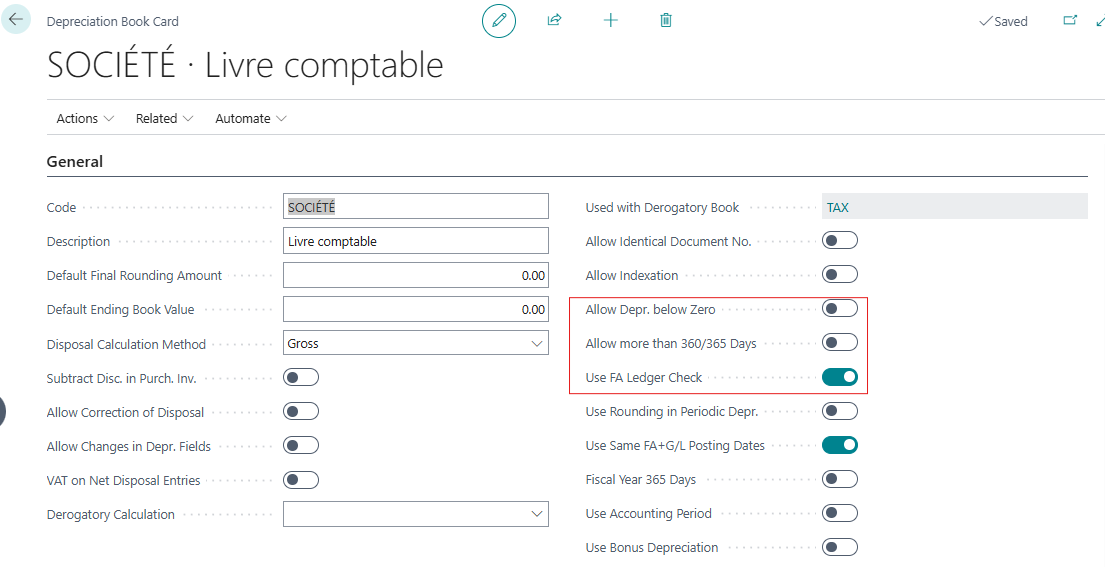
- Allow negative depreciation: Depreciation calculations may continue even if the net book value becomes zero or negative.
- Use fixed asset entry verification: A strict sequential control is activated, ordering the acquisition cost to be recorded first (as a debit) and the disposal last, while checking the sign of the balances (accumulated depreciation credits).
- 365-day accounting period: The pro rata temporis calculation is forced on a 365-day calendar year instead of the standard 360-day business year (12 months of 30 days).
2. Integration Strategy in General Accounting
The sealing or bridge to the General Ledger is configured in the “Integration” shortcut of the depreciation law.
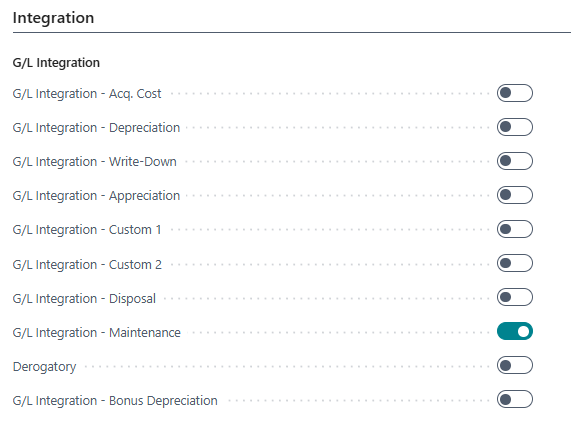
For each type of operation (acquisition cost, depreciation, impairment, revaluation, disposal, maintenance), the switch is activated to allow the direct impact in general accounting:
- Integrated Law (Main): Entries are entered via the “Fixed Asset Accounting Sheet” (FA G/L Journal), simultaneously generating entries in the fixed asset subsidiary ledger and the General Ledger.
- Non-integrated law (Tax or Management Law): Transactions are entered via the “Fixed Asset Sheet” (FA Journal), impacting only the auxiliary fixed asset accounting without altering the profit and loss account or the general balance sheet.
An essential management rule is applied: accounting integration for a given type of transaction should only be activated on a single depreciation law, in order to avoid any risk of double accounting in the General Ledger.
3. Data entry duplication and batch processing
When managing multiple depreciation laws, redundant re-entry of acquisition or revaluation entries is avoided thanks to duplication mechanisms.
Duplication Option & Duplication Sheet
The option “Include in duplicate list” (Part of Duplication List)is enabled on secondary laws. When an entry is validated on the primary law, the operation is automatically duplicated to the sheet name configured for the secondary law.
To handle cases where the duplicated law is expressed in a different currency or requires a conversion value adjustment during transfer, two additional parameters are configured in this shortcut:
- Use current rate in duplicate. (Use FA Exch. Rate in Duplic.): This switch forces the application of a currency conversion rate during the automatic duplication process of the sheet line to the target law.
- Default Exchange Rate: This field sets the default exchange rate or coefficient used to convert the amount of duplicated entries to the target currency (e.g., currency multiplier or adjustment factor). If the value is left at zero or 1.0000, the duplication is performed at the same face value.

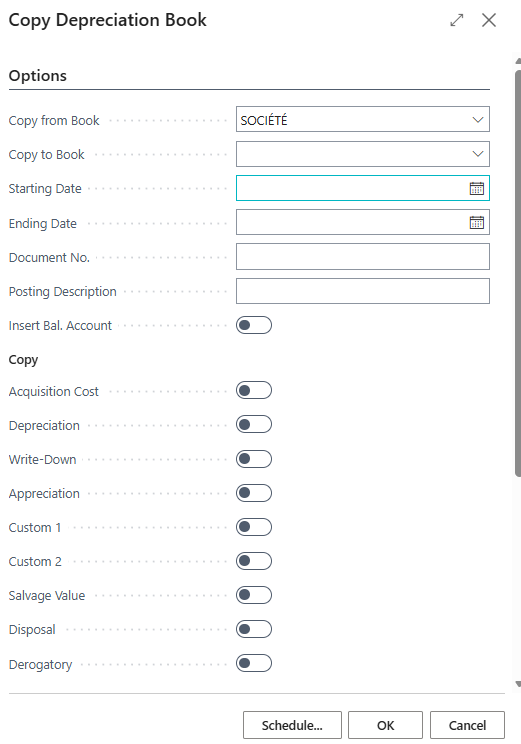
Batch processing "Copy Depreciation Book"
When setting up a parallel amortization schedule, the "Copy Amortization Schedule" batch process is executed to duplicate the transaction history from a source schedule to a target schedule. Filters allow targeting asset classes (by number or subclass) and transaction types to be copied over a defined date range.
4. Advanced options of the Depreciation Law Sheet
Beyond the basic configurations, the "Depreciation Book Card" page contains several specific and often overlooked parameters that govern the behavior of application logic within Business Central. These options are organized into four functional areas.
A. Management of purchases, discounts and transfers
- Deduct discount in purchase invoice: When validating purchase invoices, line or footer discounts are automatically deducted from the acquisition cost (Class 2) and posted to the discount account configured in the accounting group.
- Allow correction of the transfer: This option allows the cancellation or reversal of entries of type “Transfer”. Without this activation, the application engine blocks any adjustment of an asset disposal that has already been validated.
- Tax/VAT on net disposal entries: Optional when the “Disposal Calculation Method” is set to “Net”, this parameter forces the recording of VAT directly within the fixed asset subsidiary entries to ensure consistency with the General Ledger.
B. Flexibility of administration and validation controls
- Allow modification of the amortization field: By default, validating the first entry locks the attributes of the depreciation schedule (method, start date, duration). Enabling this field removes this lock, allowing you to readjust the depreciation schedule on the "Fixed Asset Depreciation Schedules" subpage during the asset's lifetime.
- Allow identical document number: Validation of multiple lines or transactions sharing the same document number is allowed within the same law, facilitating the resumption of histories or grouped entries.
- Allow Revaluation: This switch acts as prior authorization. If the box is unchecked, the "Revaluation Fixed Assets" batch process ignores the law during global revaluations for price increases. The principle of the "Revaluation Fixed Assets" batch process (Index Fixed Assets) is based on the global and automated adjustment of fixed asset amounts to compensate for inflation, market price variations, or index revaluations. (This feature will be covered in a future article.)
- Same accounting/fixed asset dates: This control requires strict equality between the "Accounting Date" (General Ledger) and the "Fixed Asset Accounting Date" (depreciation calculation). Disabling this control allows for a discrepancy in dates, useful for retroactive adjustments.
C. Depreciation calculations, periods and exceptions
- Use premium amortization (Derogatory calculation): Taken into account by the calculation engine (Codeunits 5611 / 5612), this parameter includes entries of type “Parameter 1” (Custom 1) in the amortization calculation base for the management of specific tax regimes (exceptional amortization or equipment premiums).
- Use rounding in amort.: When launching the batch process “Calculate amortization”, each calculated periodic allocation is rounded to the nearest integer to eliminate decimals.
- 365-day accounting period: The days counting routine (CalcDeprDays) replaces the standard 360-day business year (12 months of 30 days) with the actual 365-day calendar.
- Use accounting period: The time breakdown of depreciation charges is aligned with the actual dates of the “Accounting Periods” table in the General Ledger, instead of a uniform monthly calendar breakdown.
5. Multi-law association of a fixed asset and typologies of calculation methods
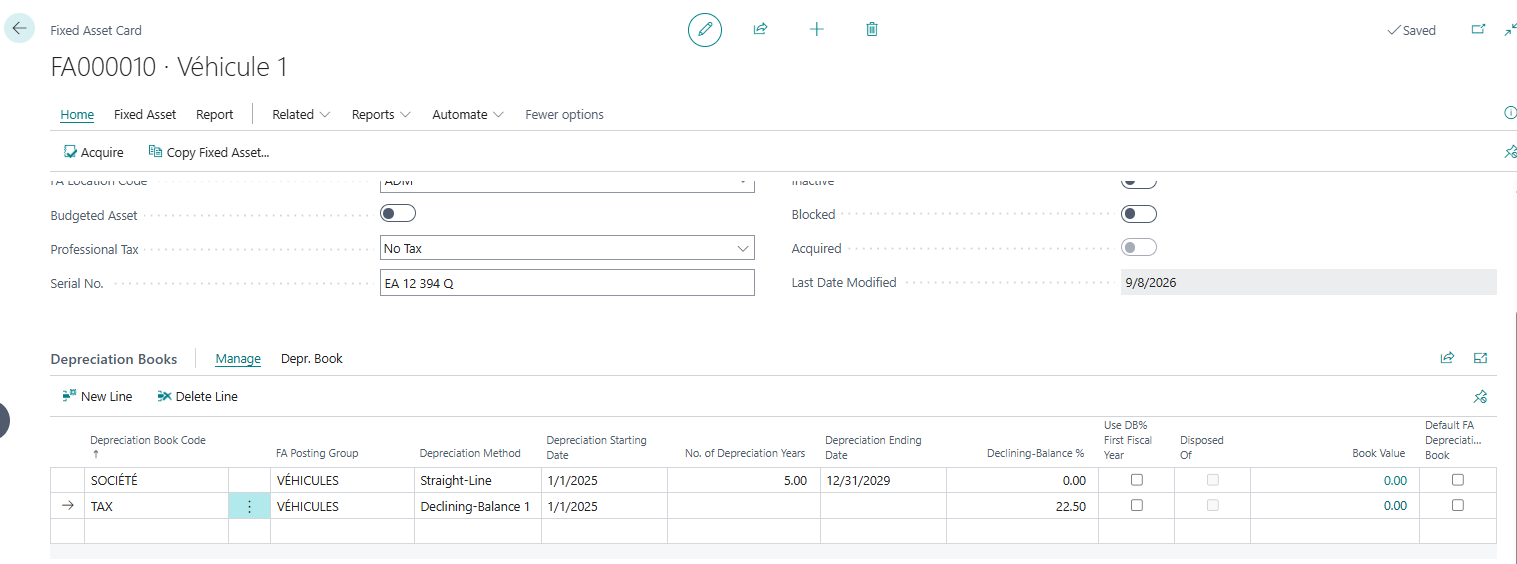
Beyond the default depreciation method assigned when an asset record is created, each asset can be linked to multiple depreciation methods simultaneously. This capability addresses situations where distinct calculation rules must coexist for the same asset (e.g., straight-line depreciation for financial statements and accelerated depreciation for tax returns).
The allocation of supplementary laws is carried out on the fixed asset record via the actionAdd other depreciation lawsA dedicated grid is displayed, allowing secondary laws (e.g., TAX) to be associated and specific calculation rules to be defined.
Overview of depreciation calculation methods
In the asset depreciation laws subpage, the “Depreciation Method” field offers eight application logics:
- Linear (Straight-Line): The asset loses a constant value over each reporting period.
- Declining Balance 1: An accelerated method that allocates a higher expense in the early years. The calculation applies a fixed rate to the depreciable base at the beginning of each year.
- Declining-Balance 2: Identical to the “Declining-Balance 1” method over the entire financial year, but the charge is distributed in a decreasing manner over the intra-annual calculation periods (unlike the equal tranches generated by “Declining-Balance 1”).
- Declining Balance 1/Straight Line (DB1/SL): Dynamic combination where batch processing simultaneously calculates the amounts in "Declining Balance 1" and "Straight Line" methods, then retains the higher amount. Depreciation thus begins in declining balance and automatically ends in straight line.
- Degrad. 2/Lin. (DB2/SL): Functioning identical to the “Degrad. 1/Lin.” method, the initial decreasing calculation is based on the rules of the “Degrading 2” method.
- Half-Year Convention: This option can be combined with straight-line or declining-balance methods. It mandates a fixed six-month depreciation period in the first accounting period, regardless of the exact date of commissioning.
- Customizable (User-Defined): Definition of custom grids through personalized amortization tables, applying a percentage specific to each period of use.
- Manual: Disable automatic calculation when running the "Calculate Depreciation" batch process. Depreciation charges must be entered manually on the worksheet (used for non-depreciable assets such as land).
Mapping of associated parameter fields
Depending on the depreciation method chosen, the following fields on the “Fixed Asset Depreciation Laws” subpage must be entered or customized:
- Depreciation start date: Mandatory field setting the starting point for the calculation of depreciation days.
- Number of years of amortization / End date of amortization: Used for the Straight-Line method and combined methods (Degraded/Linear) to determine the useful life and deduce the target date.
- % linear (Straight-Line %): Optional field allowing you to impose a fixed annual percentage instead of a duration in years.
- Fixed Depreciation Amount: Optional field to define a fixed annual monetary amount deducted each year.
- % declining-balance %): Required field as soon as a declining method (Declining 1, Declining 2, Degrad/Linear) is selected.
- Depreciation table code: Field filled in exclusively when the method is set to Configurable, in order to point to the custom depreciation schedule.
- Use the half-year rule: Switch activated to apply the half-year depreciation convention in the year of acquisition.
- Ending Book Value: Residual amount below which the Net Book Value (NBV) cannot be amortized.
6. Accounting rules configuration (FA Posting Type Setup)
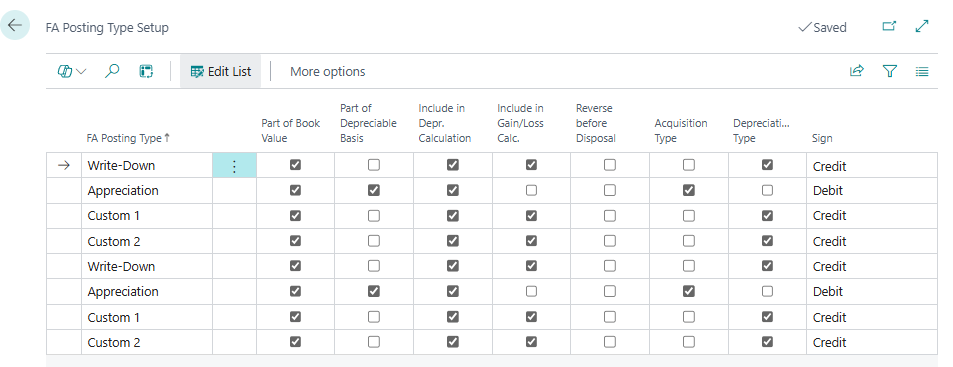
Accessible via l'action “Accounting parameter type. Fixed assets.This screen frames the accounting behavior of specific types of transactions (depreciation, revaluation, parameter 1, parameter 2).
For each type of entry, the financial impact indicators are configured as follows:
- Part of Book Value (PBV): The entry directly modifies the PBV of the asset.
- Include in Depreciation Calculation: The adjusted amount is taken into account in the basis for calculating future depreciation.
- Sign: The natural direction of writing (debit or credit) is imposed for validation.
Conclusion
Mastering depreciation laws is the driving force behind the calculations in the Fixed Assets module of Microsoft Dynamics 365 Business Central. By separating or linking statutory accounting, tax rules, and internal management constraints, the system ensures complete data integrity while automating the duplication of data flows.
In the next articles on operational flows under Business Central, the execution processes will be detailed: the accounting for acquisitions, the initiation of batch depreciation processing, the processing of exceptional impairments, as well as the management of disposals and revaluations.







No comments yet.
Feel like commenting on this article? sign up, it's free!