









Disposing of an asset, planning retirements and justifying the asset base in Business Central
Index 
A company car is sold to an employee. The sales invoice is posted in seconds, and yet the gain shown differs from the one the accounting firm calculated. The previous articles followed the asset from setup to maintenance. This last one deals with its exit from the asset base, with planning disposals in the budget and with the tools used to justify the figures at year end.
One rule shapes everything that follows: in Business Central, the disposal entry must be the last entry posted on the asset. Any depreciation forgotten before the sale ends up in the disposal result.
1. Posting a disposal
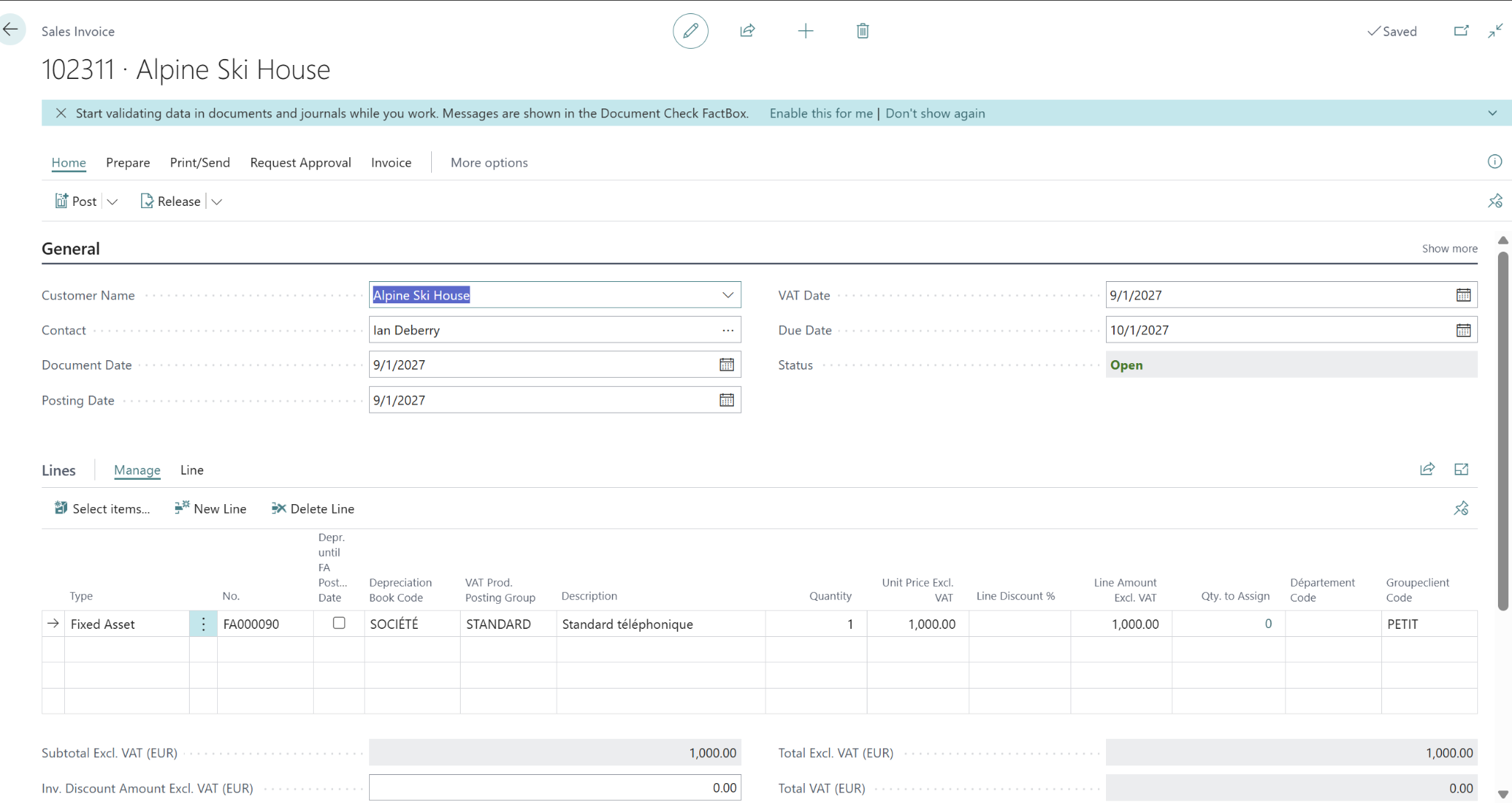
The most common route is the sales invoice. On a line of type "Fixed Asset", the asset number is entered with the sale price, and posting records the proceeds, clears the acquisition cost and depreciation, then calculates the gain or loss. The "Depr. until FA Posting Date" checkbox on the line triggers the depreciation calculation between the last depreciation run and the disposal date. It explains most differences with the accounting firm's figures.
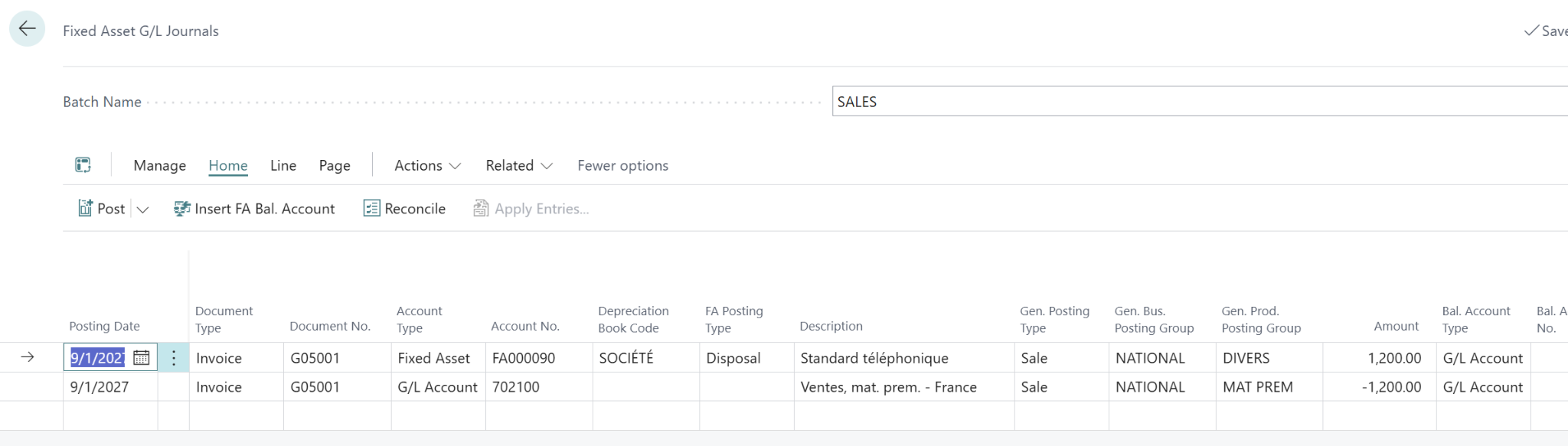
For scrapping without a buyer, or a disposal without a sales document, the FA G/L journal takes over. "FA Posting Type" is set to "Disposal", and the "Insert FA Bal. Account" action creates the balancing line from the "Sales Bal. Acc." of the posting group.
After posting, the "FA Ledger Entries" page shows several lines whose "FA Posting Category" is "Disposal". The "Find Entries" action then retrieves the general ledger entries produced by the operation, which serves as an audit trail during the year-end review.
2. Net or gross method
The "Disposal Calculation Method" field of the depreciation book decides how the result appears in the income statement. With the net method, Business Central posts a single balance to the gains or losses account of the posting group ("Gains Acc. on Disposal", "Losses Acc. on Disposal"). With the gross method, the book value disposed of and the sale proceeds are posted separately, to accounts that the code distinguishes depending on whether the disposal results in a gain or a loss ("Book Val. Acc. on Disp. (Gain)", "Book Val. Acc. on Disp. (Loss)", "Sales Acc. on Disp. (Gain)", "Sales Acc. on Disp. (Loss)").
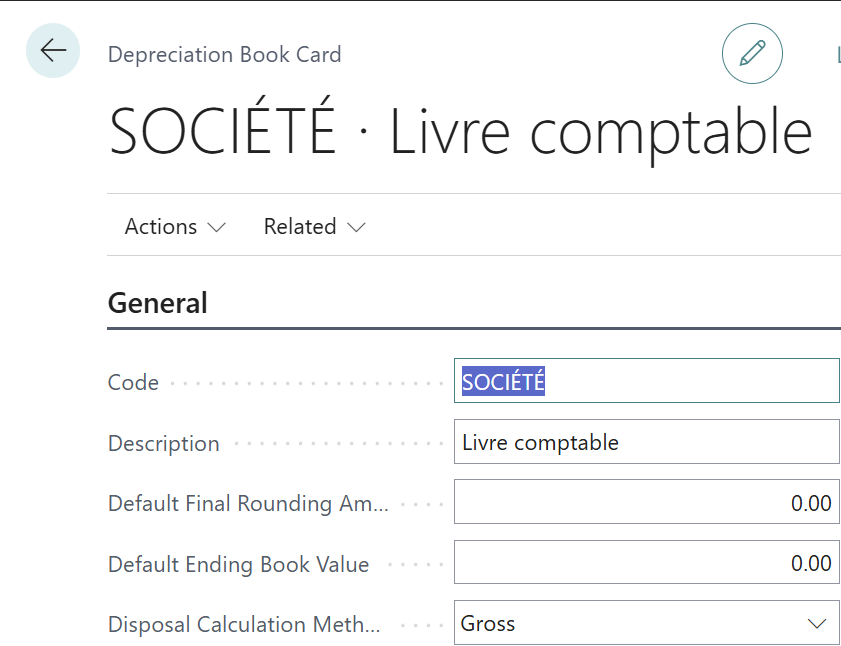
For a French company, the gross method matches the presentation of the French chart of accounts: the net book value of assets sold debited to an account 675, the sale proceeds credited to an account 775. The net method remains defensible for group reporting, but it forces the two amounts to be rebuilt for the tax return. The choice is made before the first sale, because it applies to all disposals in the book.
When the net method is chosen, the "VAT on Net Disposal Entries" option aligns the VAT on fixed asset entries with the general ledger. In the French version, the disposal also releases the derogatory balance of the asset through the accounts provided for this in the posting group ("Derogatory Acc. (Decrease)", "Derog. Bal. Acc. (Decrease)"), bringing the provision back to zero without a manual entry.
3. Partial disposals and corrections
Selling half of a set of office furniture recorded under a single card cannot be done directly. Microsoft documentation is explicit: the asset must first be split with the reclassification journal, then the card for the part sold is disposed of in full. This approach keeps a readable history and correct depreciation on the part retained.
A second disposal entry on the same asset is only accepted if the "Allow Correction of Disposal" checkbox is selected on the depreciation book. The total of disposal amounts must also remain a credit. This option is mainly meant to correct a sale price, not to organise staggered disposals.
Disposal also ends insurance coverage, provided the book designated for insurance in the FA setup is the one where the sale is posted. A disposal posted by mistake is cancelled by targeting the "Proceeds on Disposal" entry, following the procedure described in the article on corrections.
4. Budgeting asset disposals
Next year's budget often includes renewing part of the fleet. On the "FA Depreciation Books" page of each asset concerned, the "Projected Disposal Date" and "Projected Proceeds on Disposal" fields describe the expected exit.
The "Fixed Asset - Projected Value" report uses this information. It calculates future depreciation, book value at the start and end of the period, and the gains and losses of projected disposals when the "Projected Disposal" option is selected. The "Budgeted Asset" filter includes or excludes the planned acquisitions presented in the second article, and the "Copy to G/L Budget Name" field transfers the calculated amounts to a G/L budget. This report (report 5607) is now captioned Obsolete in the source code: Microsoft lists it among legacy reports and points to its Excel version (report 4413), which includes projected disposals and filtering by class, subclass or location.
5. Analysing and reconciling
For a one-off question, analysis mode saves looking for a report. Opened in analysis mode, the "FA Ledger Entries" page lets users combine depreciation book, asset number, posting type and posting year with a few drag-and-drop moves, with pivot mode to follow depreciation month by month. The Fixed Assets Ad-hoc Analysis query (query 123) enriches the entries with class, subclass and location.
Year-end reports remain the reference for the auditor:
- "Fixed Asset - Book Value 01" and "Fixed Asset - Book Value 02": acquisition cost, depreciation, additions and disposals for the period, with a reclassification column in the second.
- "Fixed Asset - G/L Analysis": the tool Microsoft points to for validating disposal entries against the general ledger.
- "FA Posting Group - Net Change": the net change by posting group, which must equal that of the linked G/L accounts when the book is integrated.
- "Maintenance - Details": upkeep costs by asset, useful to document a replacement decision.
When reconciliation fails, the cause usually lies in an entry posted directly to a class 2 account from a general journal, with no reference to a fixed asset. Such cases show up by filtering the account's G/L entries on the source type.
Conclusion
Disposal concentrates in a single entry the choices made throughout the project: calculation method, posting groups, the book used for insurance, derogatory treatment. A mistake at this stage only becomes visible in the disposal result, often after closing.
Before the first real sale, the company benefits from simulating a complete disposal in the sandbox, comparing the result with the accounting firm's calculation and recording the chosen method in a procedure. This last article closes the series on fixed assets in Business Central, from initial setup to the asset's exit.







No comments yet.
Feel like commenting on this article? sign up, it's free!