









Transfer, revalue, correct: the life of a fixed asset after acquisition
Index 
Six months after go-live, the question almost always comes from management control. A press has moved to another workshop, a server is now shared between two departments, and depreciation keeps landing on the old cost center. The previous articles covered setup, the fixed asset card, depreciation books and acquisition. This one deals with what happens next, when the asset moves, changes value or was entered incorrectly.
Business Central provides a tool for each of these cases. The risk comes rather from habits inherited from another system, which lead people to edit a card where an entry was needed.
1. The reclassification journal: transfer, split, combine
The first surprise for accounting teams is that the reclassification journal holds neither a location code nor a dimension. It moves amounts from one card to another. To transfer a machine to another department, a new fixed asset card is created with the new dimension, a depreciation book is assigned to it, and the acquisition cost and depreciation of the original card are then transferred to it.
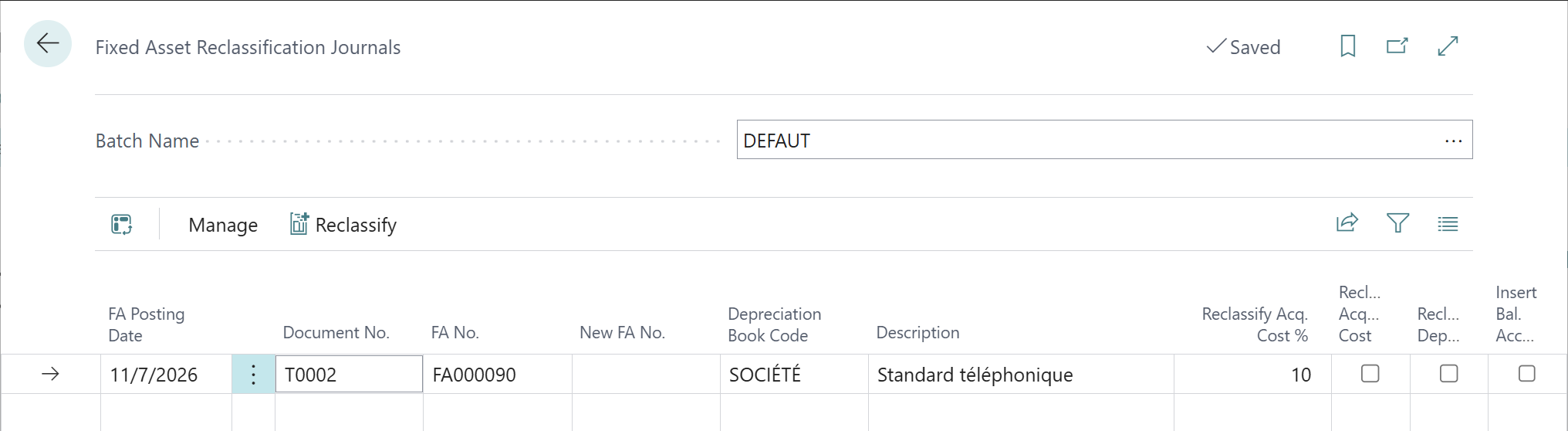
The fields of a reclassification line read as follows:
- "FA No.": the original fixed asset.
- "New FA No.": the destination card, which must already exist and differ from the original.
- "Reclassify Acq. Cost %" or "Reclassify Acq. Cost Amount": the share transferred. Left empty, the percentage covers the whole amount.
- "Reclassify Acquisition Cost" and "Reclassify Depreciation": the checkboxes that define which posting types move. The code also covers write-down, appreciation, custom 1 and 2, salvage value and, in the French version, derogatory ("Reclassify Derogatory").
- "Insert Bal. Account": automatic creation of the balancing line.
The "Reclassify" action posts nothing. It creates two lines per posting type in the FA G/L journal defined on the "FA Journal Setup" page of the depreciation book. During user acceptance testing, a key user regularly notices that the reclassification journal has emptied and concludes the job is done, while the lines are waiting in another batch.
Splitting follows the same logic with several lines. To spread an asset across three departments, two cards are created, the first line receives 25 in "Reclassify Acq. Cost %", the second 40, and the original card keeps the remaining 35%. Combining works the other way round: the percentage stays empty and the full amounts move to the target card.
The source code sets two safeguards worth knowing before testing. A disposed fixed asset can no longer be reclassified, either as source or as destination. The amount to reclassify cannot exceed the available acquisition cost either. The "Fixed Asset Book Value 02" report then shows reclassifications in a separate column.
2. Write-down and appreciation of an asset
A partial loss in a warehouse, a production line made obsolete by a regulatory change: the value in use drops away from the depreciation plan. A write-down is entered in the FA G/L journal with "FA Posting Type" set to "Write-Down". The "Insert FA Bal. Account" action creates the balancing line from the posting group: the "Write-Down Account" is credited on the balance sheet, class 29 in the French chart of accounts, and the "Write-Down Expense Acc." is debited, class 68.
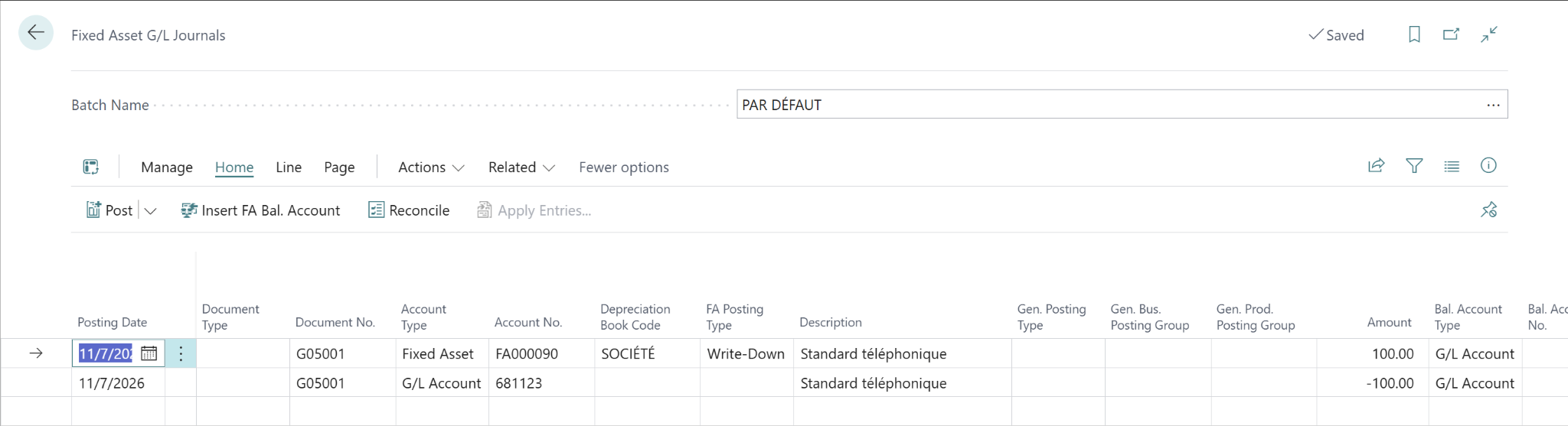
Appreciation follows the symmetrical path with the "Appreciation" type. The "Appreciation Account" carries the increase on the asset side and the "Appreciation Bal. Account" receives the offset. In a French chart of accounts, this offset is the revaluation reserve in equity (account 105), with no impact on the income statement.
Whether these amounts enter the base of future depreciation does not depend on the journal. It is set on the "FA Posting Type Setup" page, presented in the article on depreciation books.
3. Global indexation
To adjust several assets by the same coefficient, the "Index Fixed Assets" batch job applies a figure to a selection of fixed assets. It is only available if the "Allow Indexation" checkbox is selected on the card of the depreciation book concerned.
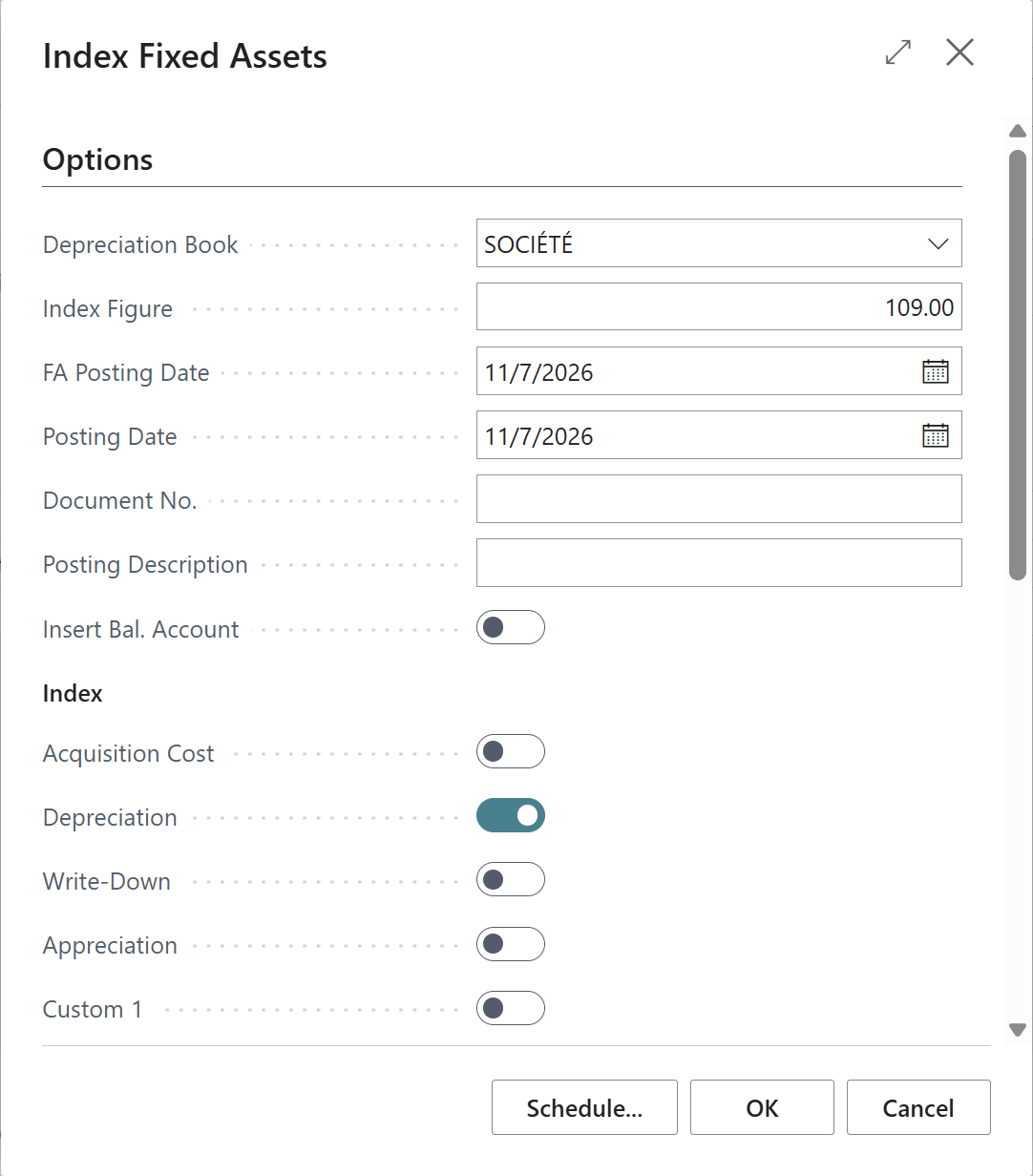
The options on the request page are as follows:
- "Depreciation Book": the target book.
- "Index Figure": 103 for a 3% increase, 98 for a 2% decrease.
- "FA Posting Date" and "Posting Date": the first cannot be a closing date, and both must be identical if the book requires equal dates.
- "Document No.", "Posting Description" and "Insert Bal. Account".
- The posting types to index: acquisition cost, depreciation, write-down, appreciation, custom 1 and 2, salvage value, maintenance and, in the French version, derogatory.
The batch job creates lines in the FA G/L journal or in the FA journal, depending on the book setup. Nothing is posted before review. For a simulation, Microsoft documentation recommends a dedicated depreciation book, which isolates the amounts without touching the accounting and tax books.
The French version adds a constraint that the functional documentation does not mention. The batch job refuses to index a derogatory book and directs the user to the book integrated with the general ledger.
4. Correcting an entry: cancel rather than reverse
An acquisition posted on the 1st of the month instead of the 15th, and the whole pro rata temporis of the year shifts. The reflex of an accountant used to the general ledger is to run "Reverse Transaction" from the ledger entries. Business Central refuses it for fixed asset entries, and Microsoft documentation states this explicitly.

The right tool is the "Cancel Entries" action, run from the "FA Ledger Entries" page. It creates journal lines, in the FA G/L journal if the book is integrated, in the FA journal otherwise. After posting, the incorrect entries leave the FA ledger entries and move to the "FA Error Ledger Entries". Subsequent depreciation is thus recalculated on a clean basis.
For a series of entries, for example a depreciation run on the wrong period, the "Cancel FA Ledger Entries" batch job runs from the depreciation book card. It accepts a date range, the posting types to cancel, filters on fixed assets and the "Use New Posting Date" option, essential when the original period is already closed. An entry can only be cancelled once.
Two details from the code complete the picture. In the French version, entries of the derogatory book cannot be cancelled directly: the cancellation is done on the book integrated with the general ledger. Also, a disposal is cancelled by targeting only the "Proceeds on Disposal" entry. Any other entry of the disposal category is refused with a message pointing to that type. The generated line is posted with a customer or G/L balancing account, adding the VAT manually if the sale included it.
Conclusion
Reclassification, value adjustments and cancellation are often handled at the end of the project, as secondary functions. Yet they are the ones called upon at the first closing, under time pressure, by people who have never used them.
The company benefits from writing a short procedure for each case, testing it in the sandbox on a copy of real data, and restricting entry cancellation to an identified key user. The next article in the series covers maintenance tracking and insurance management.







No comments yet.
Feel like commenting on this article? sign up, it's free!