









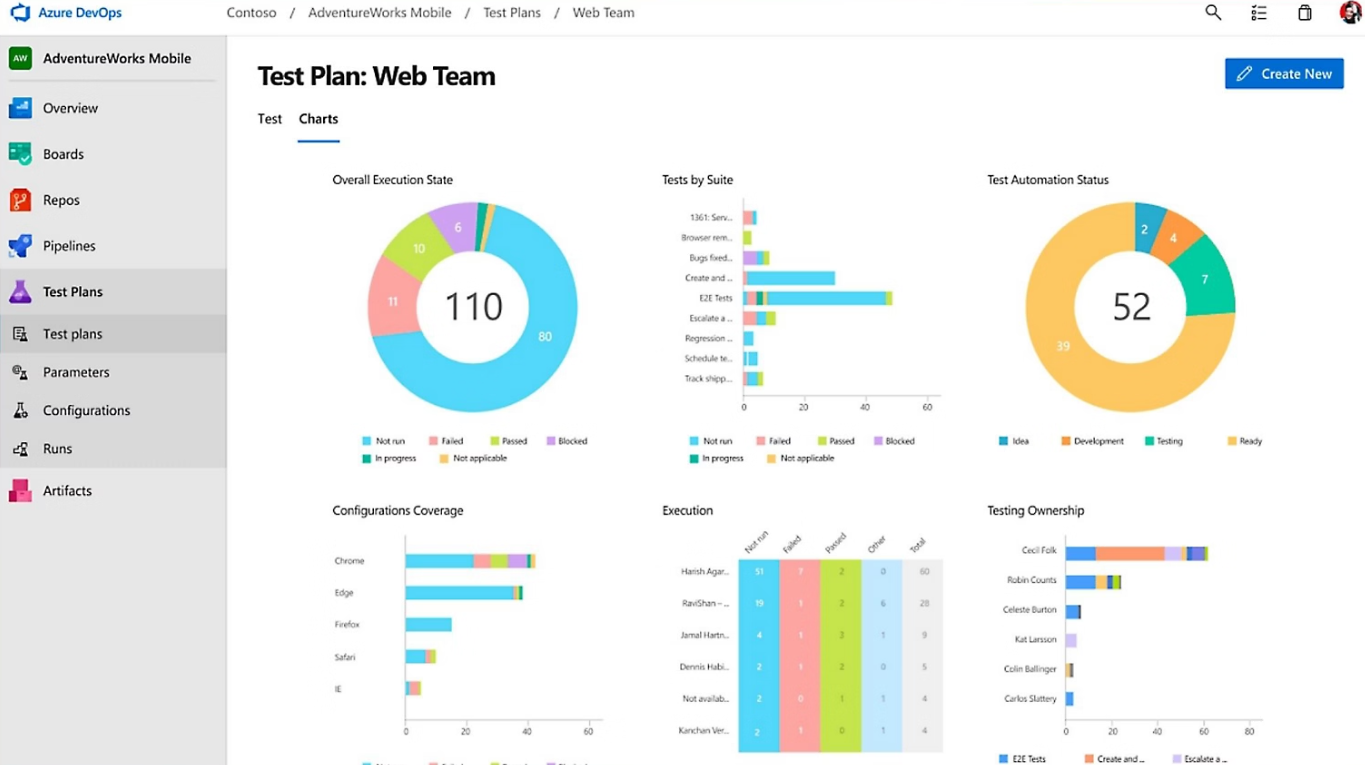
From rigorous documentation to integrated agility: the evolution of testing paradigms
Index 
Software quality management is a discipline that has undergone profound changes with the evolution of IT project lifecycles. While the objective remains constant—ensuring a tool's conformity to a business need—the methods for achieving this have shifted from a rigorous manual control model to a continuous integration model where data is dynamic.
The era of rigorous documentation, test management using static repositories
Before the advent of modern application lifecycle management (ALM) platforms, system validation relied on a massive documentation infrastructure. This approach, while perceived as rigid today, provided absolute traceability and an essential evidence base for critical projects.
Centralization via the test list document
The technical and functional testing process was managed by a master document: the test plan. This document did more than simply list actions; it structured the software design by modules. Each module (accounting, purchasing, inventory management, etc.) was broken down into functional units.
This organization provided a high-level overview of the project's health. The list served as the central hub, ensuring that no regressions were overlooked during a version upgrade. Extreme rigor was demanded of the test manager; each line of this document represented a commitment to compliance. Failure to update this repository immediately rendered the entire acceptance testing phase invalid.
The anatomy of the test sheet, a standard of execution
Each entry in the list corresponded to an individual test sheet. This level of detail aimed to eliminate any subjectivity during execution. The sheet was composed of immutable sections:
- The definition of minimum requirements:Before any action could be taken, the test eligibility requirements had to be met. This included the availability of a dedicated environment, the presence of specific datasets in the database, and access to particular user profiles. Failure to meet even one prerequisite invalidated the entire procedure.
- The operational scenario:The tester was guided by a precise set of instructions. The neutrality of the scenario ensured that the test would produce the same result, regardless of who performed it. This reproducibility is the foundation of the scientific method applied to computer science.
- The expected result:This section defined the ground truth. The system's behavior had to correspond point by point to this description. Any deviation had to be recorded.
The human factor and team organization
The traditional method relied on a strict separation of roles. A dedicated testing team, often separate from the development team, was responsible for execution. This independence guaranteed the impartiality of the tests.
The tracking process was manual and time-consuming: Each execution required recording the date, the name of the person performing the test, and the status (Passed, Failed, or Blocked). In case of an error, a detailed technical description was written. This description had to allow the developer to reproduce the anomaly unambiguously. Communication between the testing team and the developers took place via these tracking sheets, creating a correction cycle that was often lengthy but extremely well-documented.
The Azure DevOps revolution, the industrialization of the test plan
The move to Azure DevOps transforms these static documents into interconnected digital objects. Test management is no longer a disconnected final step, but a continuous flow integrated into development.
Prerequisites and license management
Access to advanced testing features in Azure DevOps is not available to all users by default. Unlike basic tasks (Backlog, Boards), managing test plans requires a specific license: The licenseandAzure Test Plans.
It is generally included for Visual Studio Enterprise subscribers. For others, a paid extension must be activated at the organization level. Without this access right, the user can only view results or run very basic tests, but creating and structuring plans remains inaccessible.
Structuring the Test Plan
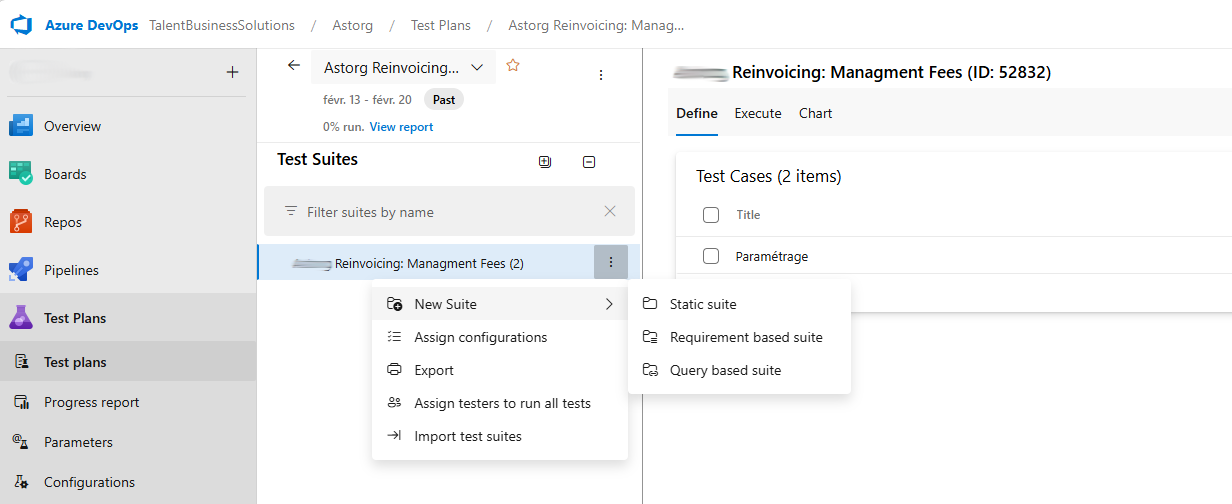
In DevOps, the test plan replaces the old test list document. It is created for a specific cycle (a Sprint or a Release). Within this plan, ofs Test Suites (Test suites) are organized. There are three types:
- Static Suite:A classic folder for manually organizing tests.
- Query-based Suite:A dynamic suite that automatically groups all tests meeting a criterion.
- Requirement-based Suite:The most powerful, which directly links tests to a User Story or a functional need.
Creating and configuring a Test Case
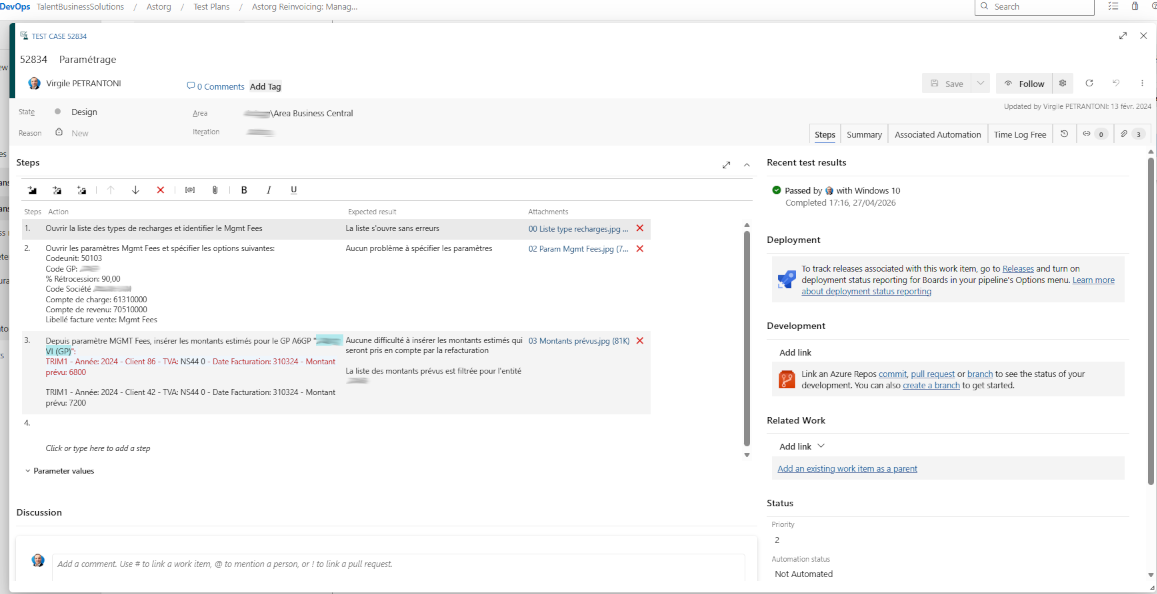
Within these suites, the test sheets becomes Test CasesCreating a Test Case retains the fundamentals of the old test form but adds interactivity:
- Steps:Each step of the scenario is captured with its action and expected result.
- Parameters:It is possible to inject variables to test the same scenario with several datasets without multiplying the records.
- Shared Steps:If a process is common to several tests, it is created only once and shared, facilitating maintenance.
Execution via the Web Runner, a dynamic control interface
Test execution under Azure DevOps is done via aA dedicated interface guides the user in real time. The process begins from the nail.t Executeof the plan of tests. After selecting the relevant test or test suite, the user launches the procedure via the option “Run for web application”.
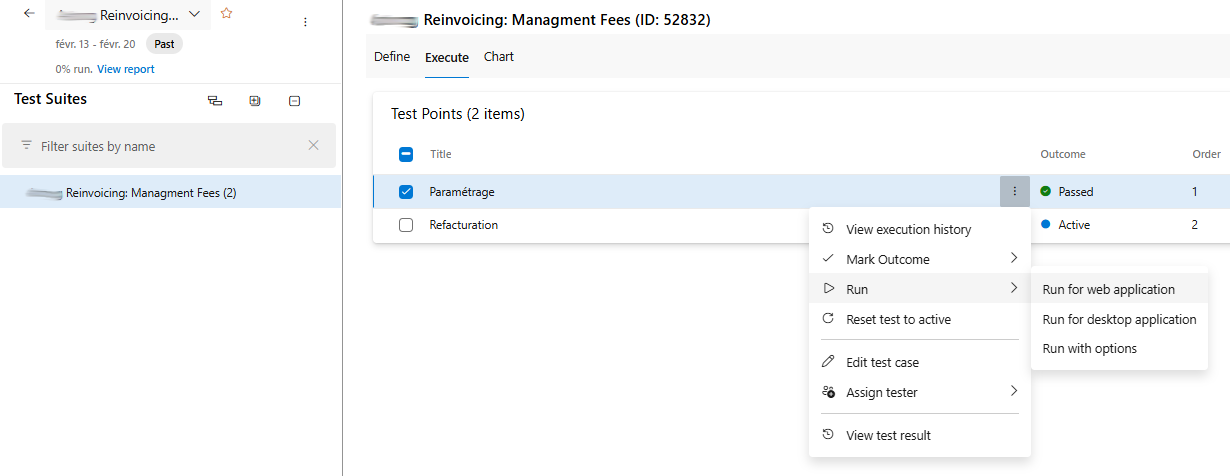
This action opens the Web Runner, an interactive window that overlays the application being tested. This interface sequentially presents the steps defined during the Test Case design:
- Interactive validation of steps:For each step of the scenario, the tester has a binary validation system. A positive "check" is applied if the observed behavior is correct. A negative marker is used in case of discrepancy.
- Instant documentation of the anomaly:If a step fails, the interface allows you to immediately generate a bug report. Using the bug creation button integrated into the runner, the system pre-fills the ticket with the steps already completed, the expected results, and the discrepancies observed.
- Multimedia evidence capture:The Web Runner offers native tools for visually documenting malfunctions:[BL]
- Screenshot:A dedicated button allows you to take instant snapshots of display errors or system messages.
- Video recording:A screen recording feature allows you to film a sequence of actions; this is a major asset for reproducing intermittent bugs.
- Comments and attachments:At each step, the user can add contextual notes or attach log files.[IMG:img_1777305992696_4.png; Running a test manually]
Visibility and exploitation of results
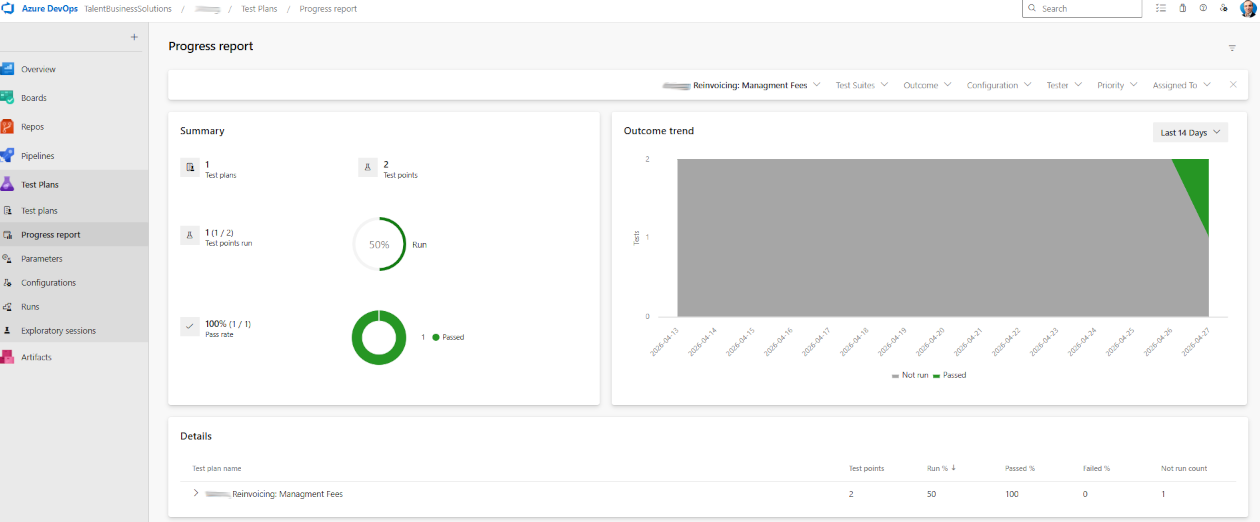
Once the execution session is closed, the data is immediately aggregated at the test plan level. Visibility is complete and instantaneous.
- Progress dashboards:The overall status of the plan is updated in real time.
- End-to-end traceability:It is possible to trace a bug back to the exact test that generated it.
- Execution history:Each execution is archived with its complete context. Results from the same test can be compared across multiple versions of the software.
Conclusion
The shift from rigorous document management to integrated management under DevOps doesn't eliminate the need for rigor; it simply shifts it. The precision once devoted to writing paper forms is now invested in configuring dynamic test plans. This transition drastically reduces the time between discovering an error and resolving it, while preserving the methodological legacy of module-based testing.





No comments yet.