










Mastering the ERP Budget: From Analytical Codification to Sprint Steering
Index 
Managing an ERP project is often compared to building a ship in the middle of the sea: you must maintain the strategic course while adjusting the sails to the changing winds of business needs. In this context, budget mastery can no longer be limited to simple retrospective accounting supervision. It must become a predictive navigation tool.
Traditionally, ERP projects followed a linear approach, known as "waterfall." A global budget was defined, a long analysis phase was conducted, followed by setup, and finally, the finished product was delivered. This model has shown its limits: budget drifts were only noticed at the end of the journey, often too late to be corrected. Today, agility is essential, transforming budget tracking into a three-dimensional structure where functional domains, production cycles, and now, sprint temporality intersect.
Here is the methodology I use to structure, enter, and steer the budget of my projects, relying on a rigorous data architecture and simple visual steering tools.
I. The strategic foundation: Segmentation by functional domains
Everything begins with an analytical deconstruction of the scope. An ERP project is not a monolithic entity, but a collection of interdependent modules. The first step, therefore, consists of performing a "top-down" cut based on functional domains.
This segmentation allows for the allocation of a "broad-brush" budget as soon as the contract or initial order is signed. Indeed, the global quantity of days to be dispatched is a contractual datum. The role of the project manager is to break down this global envelope to give the contract an operational reality.
Domain codes are thus defined:
- A00 – General Ledger: The financial core.
- B00 – Accounts Receivable (O2C): Revenue streams.
- C00 – Accounts Payable (P2P): Expense streams.
- D00 – Bank Accounting and Treasury: Cash flow management.
- E00 – Inventory Management and Logistics: The operational chain.
- Etc …
Each domain is allocated a portion of the total budget. This initial distribution, while useful for establishing a workload estimate, is also crucial for holding expert consultants accountable for their own scope.
If the General Ledger has 40 days, the consultant knows they must orchestrate their interventions within this limit, otherwise they will have to request a budget arbitration from the project committee.
II. The temporal dimension: Integrating sprints
Unlike the old sequential method, the contemporary ERP project adopts the rhythm of Sprints. A sprint is a short iteration, generally two to four weeks, aimed at delivering a functional portion of the ERP ready to be tested.
The introduction of the sprint into the budget radically changes the way day consumption is viewed. Budget is no longer just allocated to a functional domain (e.g., to "General Ledger") in an abstract way over the entire duration of the project; budget is allocated to Sprint 1 of the General Ledger domain.
This approach allows the risk to be broken down. If a domain proves more complex than expected, the drift will be identified at the end of the first sprint, and not six months later. The budget thus becomes dynamic: it is consumed in successive waves, allowing for reallocation between sprints if certain functionalities prove simpler or more complex than initially planned. It is this notion of the sprint that now defines the very structure of the budget codification, as it imposes a temporal vision of the work-in-progress.
However, the budgeting (in terms of work days) of a functional domain should not be confused with the project schedule, nor even with the sprint planning of the functional domain. A sprint can involve a variable number of resources who will consume a variable number of work days.
III. The production cycle: From analysis to go-live
Within each functional domain and for each sprint, the methodology requires adherence to a standardized production cycle. This cycle is the guarantor of technical and functional quality. Depending on the complexity, this cycle can be short (implementation with standard setup) or long (implementation of specific functionalities to be developed).
For each domain, the work is broken down into codified phases, thus creating the third level of our budget structure.
Sprint with a long production cycle:
- 100 – Analysis: Understanding needs and drafting target processes.
- 200 – Mockup Presentation: Intermediate validation with key users.
- 300 – Setup: Configuration of standard ERP functionalities.
- 400 – Development: Creation of specific functionalities or interfaces ("specifics").
- 500 – Tests and Acceptance: Verification of solution compliance.
- 600 – Training: Knowledge transfer to end users.
- 700 – Go-live Assistance: Critical support during the production launch.
Sprint with a short production cycle:
- 100 – Analysis: Understanding needs and drafting target processes.
- 200 – Mockup Presentation: Intermediate validation with key users.
- 300 – Setup: Configuration of standard ERP functionalities.
- 500 – Tests and Acceptance: Verification of solution compliance.
- 600 – Training: Knowledge transfer to end users.
- 700 – Go-live Assistance: Critical support during the production launch.
💡Data migration is not a phase of a sprint for a functional domain; it should be considered a project within the project. A secondary budget with its own functional domains, its own sprints, and its own phases must be defined.
Example of phases for the data migration sub-project:
- Source data analysis
- Data extraction mockup
- Data migration
- Tests and controls
By allocating a budget in days to each phase of each domain and to each sprint, surgical precision is achieved. One can thus say: "Domain A00 has 3 sprints of 5 days each."
Numbering each phase with 3 characters allows for more detail to be defined for the cycles, if necessary. For example, the analysis phase could be divided into:
- 110, Requirement gathering workshops,
- 120, Drafting of analysis documents,
- 130, Review and feedback to the client
This level of detail complicates the allocation and budget reallocation, as well as the time entry by the project team.
IV. Analytical codification: The common language of the project
For this system to work, a unique identifier is needed, capable of linking the budget and the time spent to calculate the work-in-progress. This is the role of the "Concatenated Budget Code."
The code is formed by the union of the domain code, the sprint code, and the phase code. For example: A00-S1-100.
- A00: General Ledger.
- S1: Sprint number 1.
- 100: Analysis phase.
This unique key is the pivot of the entire system. It allows each hour of work to be charged to a specific budget cell. The more complex the project, the more precise the codes can be, particularly for specific developments where sub-codes can be created to isolate each software modification request.
V. Budget entry methodology: The "Budget Accounting Entries" reference
It is important to note that, despite the absence of specialized project management software or a budget tracking tool, it is possible to do your tracking in Excel.
Excel: "the pros":
The flexibility of Excel allows for building a custom system, often more agile and better adapted to the realities of an ERP deployment. This substitute infrastructure relies on three fundamental documentary pillars:
- A sheet dedicated to the initial budget entry that values the budget codes,
- A sheet for collecting time spent to capture the reality in the field,
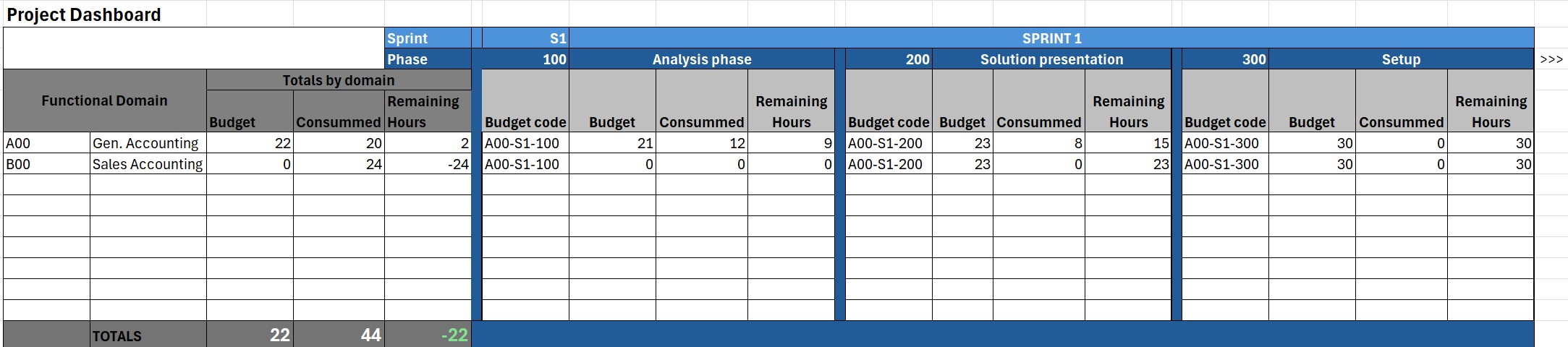
- A work-in-progress tracking dashboard sheet that ensures automatic and visual reconciliation of data.
This architecture transforms a simple spreadsheet into a true decision-making steering center.
Excel: "the cons":
For large projects involving many implementation days, resources, sprints, and functional domains, a simple spreadsheet can quickly become heavy to handle, and data loss can be irreparable.
My personal experience allows me to say that projects with 1000 days of implementation, spread over the work of 10 people, divided into 10 functional domains and 3 sprints each, are the limit not to be crossed with a simple Excel file.
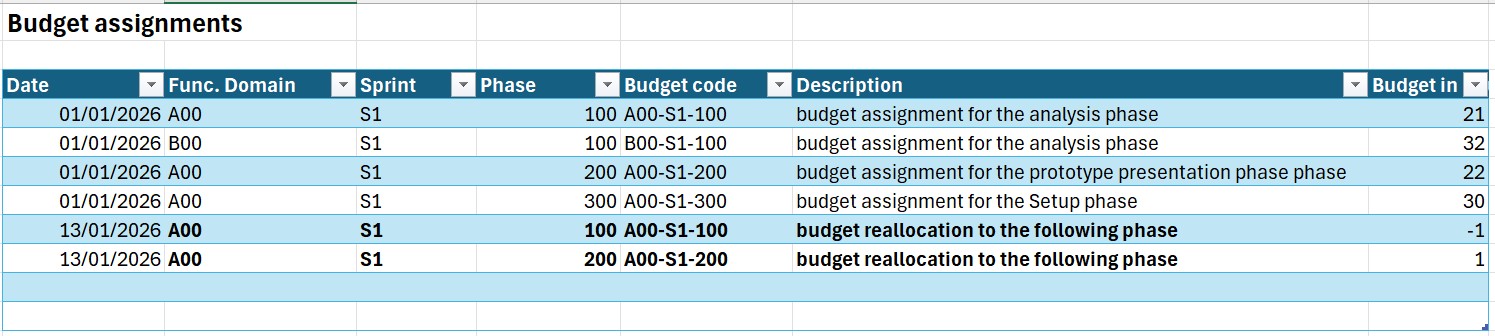
The initial budget entry phase is the moment when the rules of the game are defined. This operation is performed in an Excel sheet named "Budget Accounting Entries."
Technical functioning of SUMIFS
The challenge here is not to simply type numbers into boxes, but to build a budget database. Each budget allocation is an entry with a date, a domain, a sprint, a phase, and a quantity of days.
To consolidate this data into a dashboard, the power of the Excel SUMIFS function is used. This function allows for adding up the days constituting the budget based on several simultaneous criteria.
- Sample formula: =SUMIFS(Days_Column; Domain_Column; "A00"; Sprint_Column; "S1"; Phase_Column; "100").
This method offers a major advantage: traceability. If a domain's budget increases following an amendment, or if a reallocation of a portion of the budget to another budget code is necessary, the existing figure is not modified. A new budget entry line is added with the current date and the quantity of days (increasing or decreasing). SUMIFS will automatically accumulate the old and new budget, thus allowing for a complete history of the project's financial decisions to be kept. It is thus possible to know on what date a budget was increased or reduced.
VI. The reality in the field: Time entry and allocations
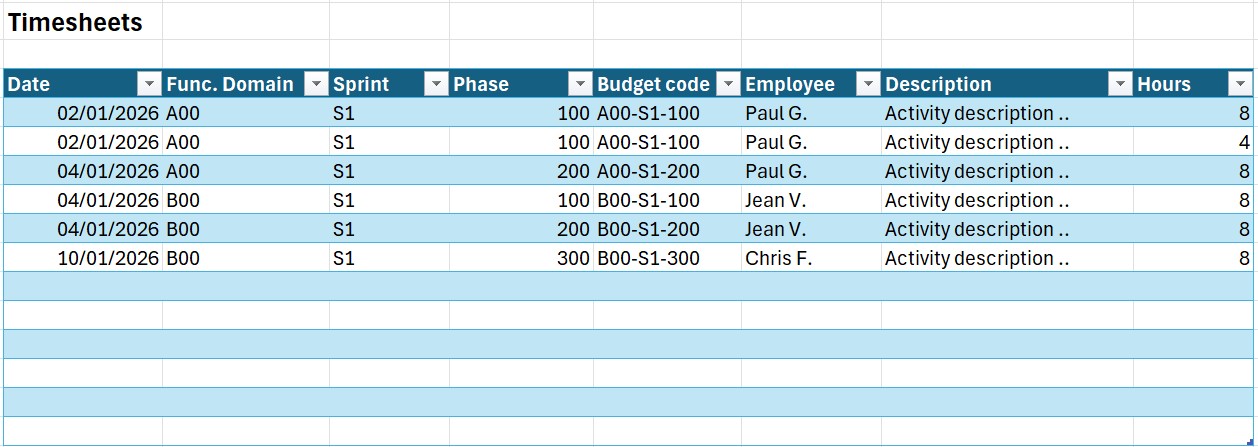
Once the budget is defined and entered, the project enters its execution phase. The reliability of the tracking then rests on the quality of time entry by the team members (consultants, developers, project managers). This data is collected in the "Actual Time" sheet.
Allocation to Budget Code
The team member does not write "I worked on accounting." They select, ideally via a dropdown list, the "Concatenated Budget Code" (e.g., B00-S2-200 for the accounts receivable setup in Sprint 2).
The entry is generally made in hours, which are then converted into days in the system (e.g., 7h = 1 day). The precision of this step is fundamental. If a consultant spends 4 hours on an analysis and 3 hours on setup, they must split their time over the two corresponding codes. Experience dictates that the most experienced resources are also those who move from one project to another during the same work day; it is therefore crucial to be able to track the hours spent on the project.
It is this rigor of allocation that allows the "consumed" to be compared to the "budgeted." Without a strict budget code, tracking gets lost in semantic approximations that make variance analysis impossible. This real-time sheet becomes the daily logbook of the project's health.
VII. The visual dashboard: Steering the work-in-progress through images
The final phase of the methodology is the reporting of information. The "Work-in-progress by Domain and Phase" sheet centralizes the calculations, but it is the Visual Dashboard that allows for decision-making. The goal is to transform columns of numbers into immediately understandable performance indicators (KPIs).
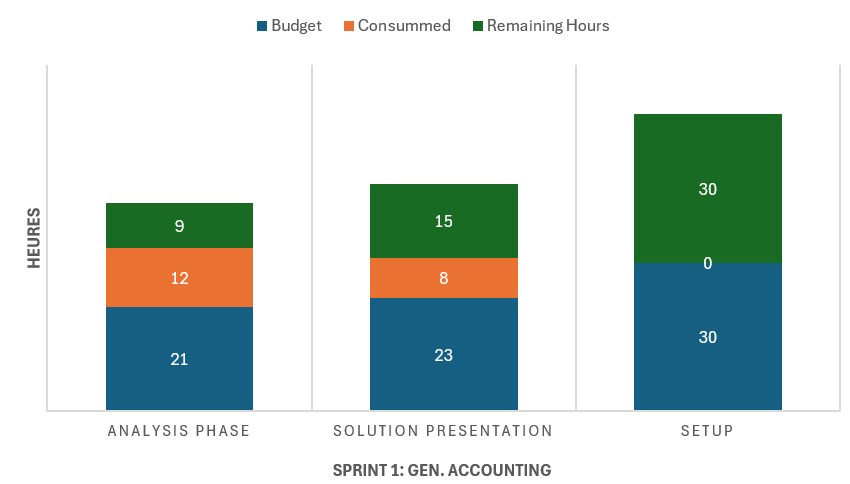
1. The consumption thermometer by domain
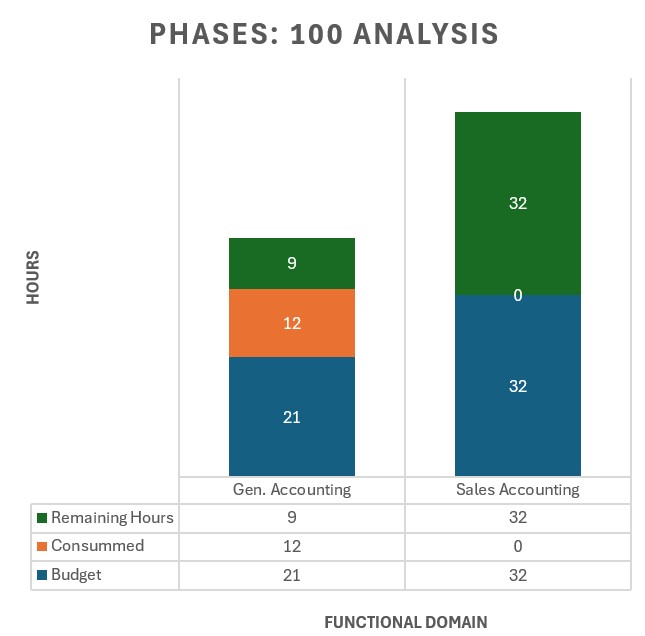
I use vertical progress bars to illustrate the remaining budget to be consumed through the visual difference between the total height of a block (allocated budget) and its colored part (actual consumed), allowing for the immediate identification of remaining margins. By observing the depth of the Z-axis, one can spot if a domain's budget is being exhausted too early in the sprint sequence compared to the phases yet to be completed.
2. The "Phase vs Sprint" matrix (Heatmap)
This table allows for seeing where the effort is concentrated. It displays the Consumed / Budget ratio per phase. If we see that the "Analysis" phase (100) is already at 95% consumption in the middle of Sprint 1, the dashboard visually alerts to a risk of overrun for the following setup phases.
3. The Estimate to Complete (ETC) analysis
This is the most valuable indicator. The dashboard calculates the difference between the allocated budget and the actual consumed. But it also integrates a manual entry from the consultant: the "Estimated to Complete."
- If Budget - Consumed > ETC: The project is profitable; we are generating margin.
- If Budget - Consumed < ETC: We are in a latent loss situation.
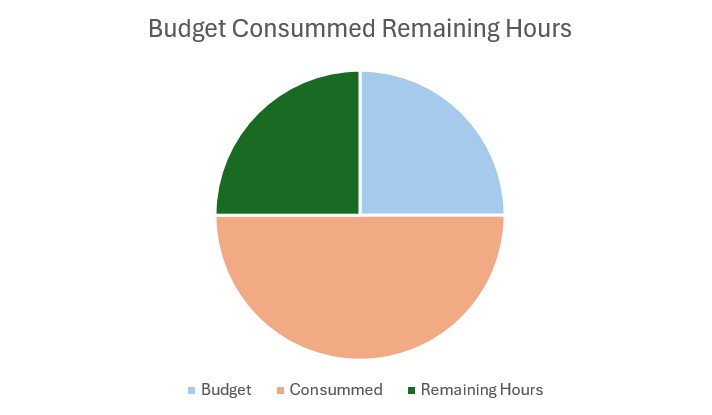
Visually, this translates into an arrival graph (Forecast) that shows the probable budget trajectory at the end of the project. If the arrival curve exceeds the budget ceiling, the project manager has factual proof to initiate discussions on scope or resources.
To conclude this article, I would like to specify that this methodology, although robust as I have been using it for several years, is not an end in itself. It constitutes the fundamental base allowing for the reliable measurement of work-in-progress, but it remains largely improvable and evolvable.
This model can be refined to adapt to the profiles of the participants. For example, certain specialized resources are contractually or technically associated with one single phase (such as pure developers or trainers). For these profiles, one can imagine a simplification of time entry: an interface where the budget code is pre-filled, thus limiting the risk of error and increasing the team's buy-in to the tracking tool.
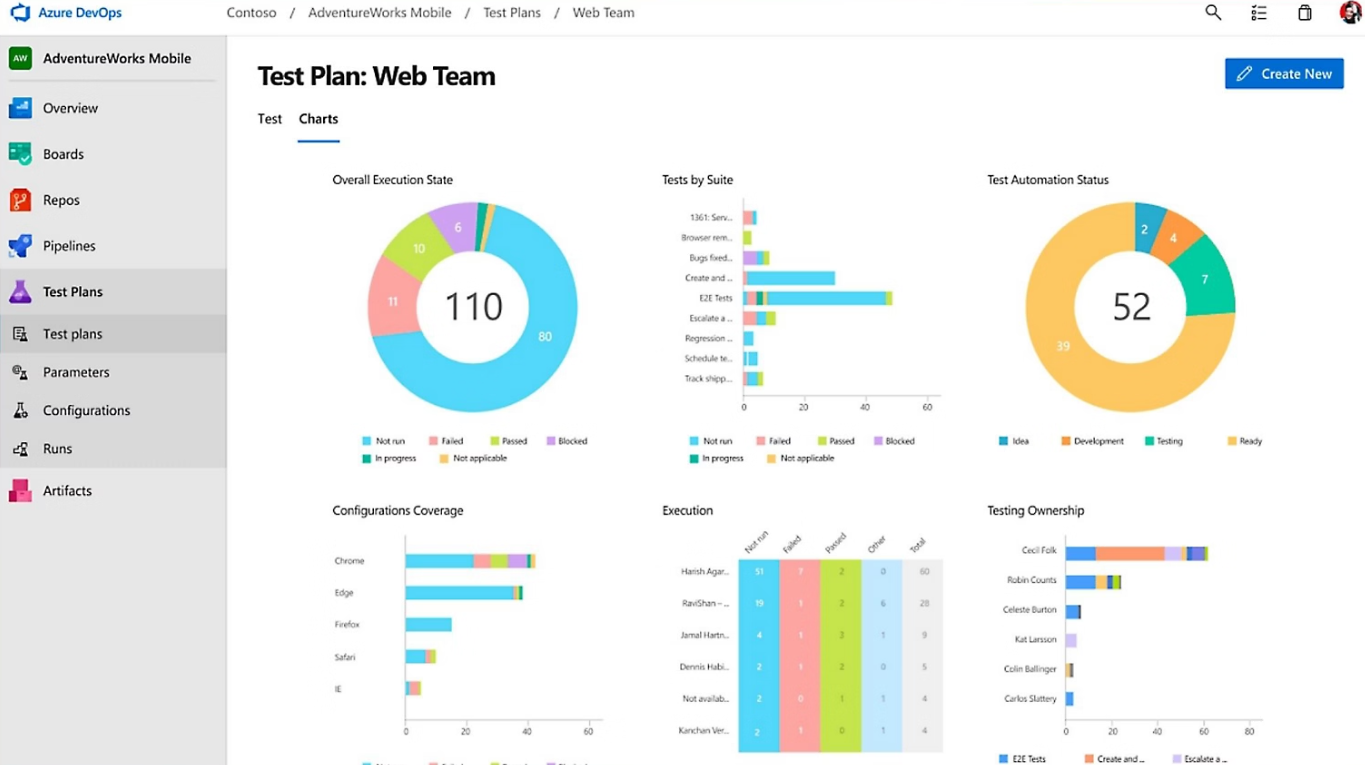
For the sake of clarity, I have only described the basic structure. In industrial project management, the breakdown of specific developments benefits from being directly linked to User Stories (US) and Tasks present in the project's ticket management tool (such as Azure DevOps or Jira). The next step would be to create a bridge between your Excel file and the technical backlog to ensure perfect consistency between functional progress and budget consumption.
Finally, a major theme was only touched upon: billing. It is, however, the ultimate judge of profitability. Comparing actual work-in-progress (what has been produced) with billing (what has been recognized by the client) is the ultimate exercise for the project manager. This comparison allows for anticipating critical situations, such as "work in progress not yet billed" (WIP) being too high or, conversely, billing advances that mask a production delay.
I will cover these advanced topics (DevOps integration, entry automation, and billing/work-in-progress reconciliation) in my upcoming articles.
In short, in a world where ERP projects are known for their complexity and drifts, it is necessary to find a reliable steering approach. This steering ensures that every hour spent by consultants is a stone added in an orderly fashion to the building, while respecting the company's profitability and the final client's satisfaction. Budget mastery is then no longer a constraint, but the very engine of the deployment's success.
Excel file sample



No comments yet.